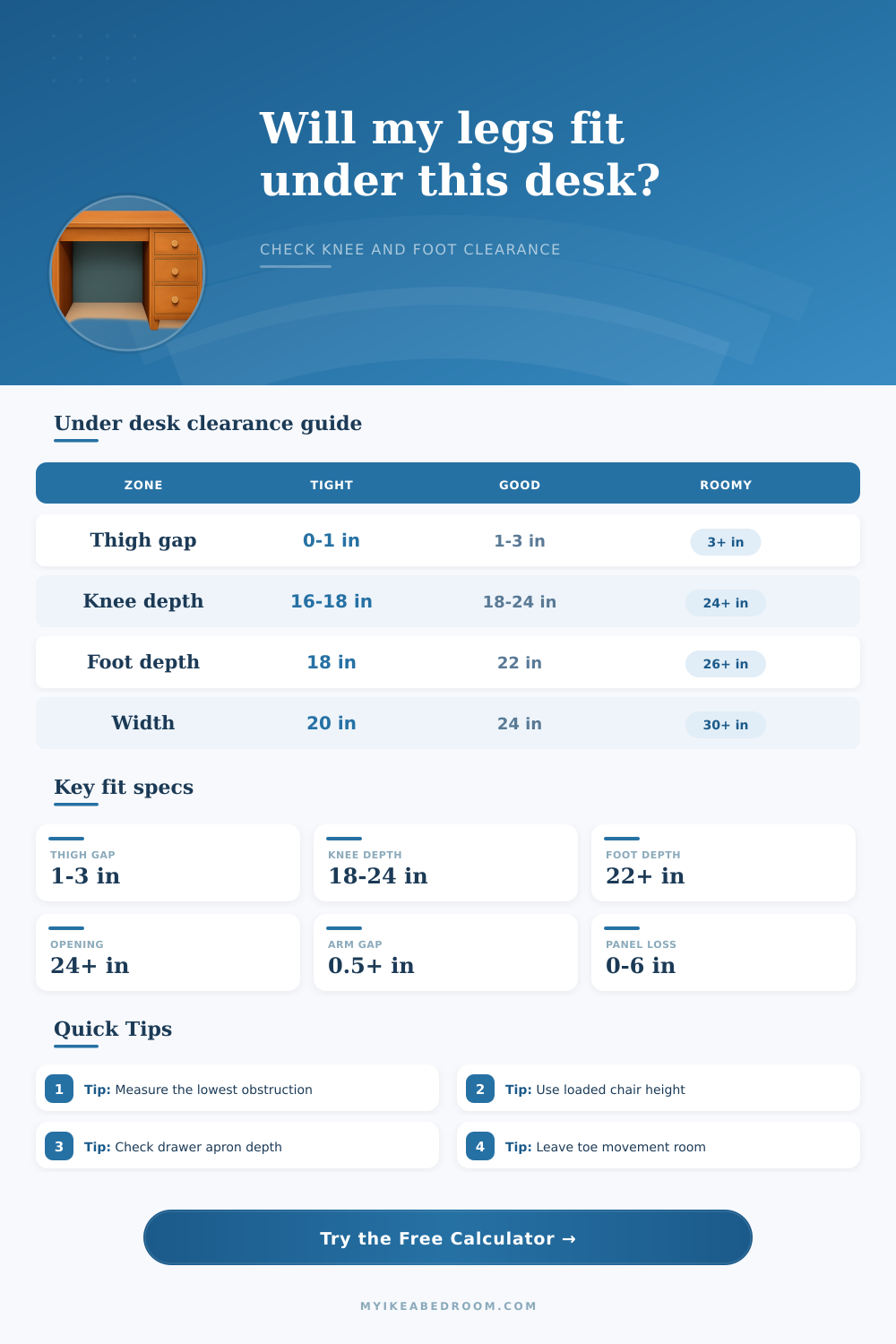
Under Desk Legroom Clearance Calculator
Check vertical thigh gap, knee depth, foot room, opening width, chair-arm tuck, drawer apron drop, and rear panel clearance before choosing or adjusting a desk.
Choose a realistic workstation setup, then replace the numbers with actual measurements from the desk underside, chair, drawer apron, and knee opening.
Legroom fit summary
Enter your desk and chair measurements to see which clearance zone is tightest.
Best first fixes: lower the chair, raise the desk, remove a tray, move a rear panel, or choose a narrower chair depending on which zone fails.
| Measurement | Tight fit | Daily fit | Roomy fit |
|---|---|---|---|
| Thigh gap after cushion compression | 0 to 1 in | 1 to 3 in | 3 in or more |
| Lowest obstruction below desktop | 4 in or more | 1 to 3 in | 0 to 1 in |
| Chair armrest gap under obstruction | Negative to 0 in | 0.5 to 1.5 in | 1.5 in or more |
| Desk raise needed when thighs hit | 2 in or more | 0.5 to 2 in | No raise needed |
| Zone | Compact use | Daily work | Long sessions |
|---|---|---|---|
| Knee depth from front edge | 16 to 18 in | 18 to 24 in | 24 in or more |
| Foot depth from front edge | 18 to 20 in | 22 to 26 in | 26 in or more |
| Knee opening width | 20 to 23 in | 24 to 29 in | 30 in or more |
| Side pedestal depth | 0 to 8 in | 8 to 16 in | Keep clear if possible |
| Desk detail | Typical loss | Clearance affected | What to measure |
|---|---|---|---|
| Slim desktop only | 0.75 to 1.5 in | Vertical | Top thickness from work surface to underside |
| Center drawer or apron | 2 to 5 in | Vertical and knees | Lowest front obstruction below the underside |
| Keyboard tray | 2 to 4 in | Vertical and depth | Tray bottom height and slide depth |
| Modesty or rear panel | 2 to 8 in | Knee and foot depth | How far the panel projects toward the user |
| Pedestal cabinet | 8 to 24 in | Width and knee swing | Inside opening after storage units |
| Scenario | Desk setup | Main risk | Quick adjustment |
|---|---|---|---|
| Writing desk | 29 in high, open front | Usually chair height | Set chair for flat feet and thigh gap |
| Drawer desk | 29 in high, 4 in apron | Thigh contact | Lower chair or use a thinner drawer zone |
| Compact student desk | 23 in depth, narrow opening | Knee width and toe room | Keep rear panel shallow and chair narrow |
| Sit-stand desk | Adjustable height | Set too low when seated | Raise until thigh gap meets the target |
Measure the real lowest point. A desk can look open from the front while a drawer rail, keyboard tray, cable shelf, or metal crossbar quietly steals the vertical clearance your thighs need.
Use the chair after sitting down. Cushion compression changes the loaded seat height, so measure once the chair is carrying weight and the height lever is set where you actually work.
Sitting down at this new desk, you get uncomfortably right away. It is not painful, just a kind of pressure on your knees or thighs. Pressure shows something isn’t quite right about the set up. So maybe you try moving around in your chair, or adjusting it. But then the problem come back. Sound familiar? That’s legroom trouble.
Most people try to fix it by looking at how high their desktop is. Then they think, “Okay, my feet can reach the ground, so I’m good.” Nope. Usually that’s not the problem at all. The problem has nothing to do with the floor. It has everything to do with gap between bottom of the desk and your knees.
Why Legroom Matters More Than Desk Height
Now just input the dimensions of your desk into the calculator above. It’ll do the math for you so you don’t have to guess whether or not having a keyboard tray or drawer will mess up your posture. But what are all those measurements? Let’s get a little more detailed on that.
First, look at vertical gap. Ideally, you’d want to have room over your thighs for both comfort and blood flow. If your desk feature drawers in the middle, the front of it will be lower than rest of the desk. This means you has less room for your legs then you had for the desktop. Even if you have a thick desktop, that won’t save you since your knees aren’t concerned about average height. They only care about lowest obstruction. That’s where the tool comes in: it considers the lowest point to the underside and asks for that measurement.
Another consideration is depth. When you sit down, well, you use your legs. They come in when you lean forward. They go out when you reach for mouse. A rear shelf or even a modesty panel jutting too far forward intrudes on this space. Sure, there’s plenty of headroom, but if every time you change positions your shins bump into something you’ll soon find yourself hovering at an uncomfortabel angle. Your low back will suffer from this over time. The calculator takes into account the usable depth, the distance from the front edge to any rear obstruction. It factors out wall mounts or cable trays so you know exactly how much room you have for your feet.
You might tuck that chair in and find it won’t go all the way underneath. When you push back do the arm rests slip under the desk? Do many desks appears wide on paper, but have narrow gaps between pedestals or legs? Does having a pedestal cabinet on one side mean you can’t move freely? Your knees need some space on the sides (even if there are no armrests). That’s what’s reflected in the fit score in the results. The fit score weigh vertical, horizontal, and depth clearance together to give you a single picture of comfort.
Keep in mind that cushions compress. What may be sufficient height “on paper” will be different than once you’ve been sitting there for an hour. When the cushion settles down, you’ll have less space under your legs (less gap between your thighs and the desk). This reduces your actual seat height. The best measurement is taken when seated. The tool requests your compression value so it can update its calculation to match. It’s a little thing, but it matters quite a bit in terms of feeling supported vs. It feels like you are being squeezed.
In conclusion, a desk needs to be out of sight. While using it, you shouldn’t feel that it’s there. The geometry is failing if you keep readjusting your posture. Run through these measurements before building or purchasing a setup. Examine how far below the desk goes, not just what the desk sits on top of. Consider knee space behind you, not just foot space in front of you. Once you achieve the clearance, the pain goes away. You don’t notice the desk anymore.