TV Stand Width for Screen Calculator
Estimate a TV stand width that looks proportional, supports tabletop feet, leaves room for soundbars or speakers, and still fits your wall or alcove.
Pick a real screen setup, then adjust the diagonal, feet width, soundbar, side gear, overhang, and wall limit for your room.
What the calculator is checking
Proportion: a compact stand can work in tight rooms, while a wider console usually looks calmer under a large screen.
Support: tabletop feet must land fully on the top surface, with margin on both sides.
Gear: soundbars, speakers, game consoles, and side objects often drive the stand wider than the TV itself.
Wall fit: the recommendation is compared with the usable wall or alcove width after edge clearance.
Calculate to compare the stand with the available wall width.
Compact stand
Best for bedrooms, corners, and apartments where wall width is limited.
Balanced stand
A practical default that gives the TV visible breathing room on both sides.
Wide stand
Works well when the console anchors a sofa wall or media wall.
Gear-first stand
Driven by soundbar, speaker, feet, and object clearance rather than style alone.
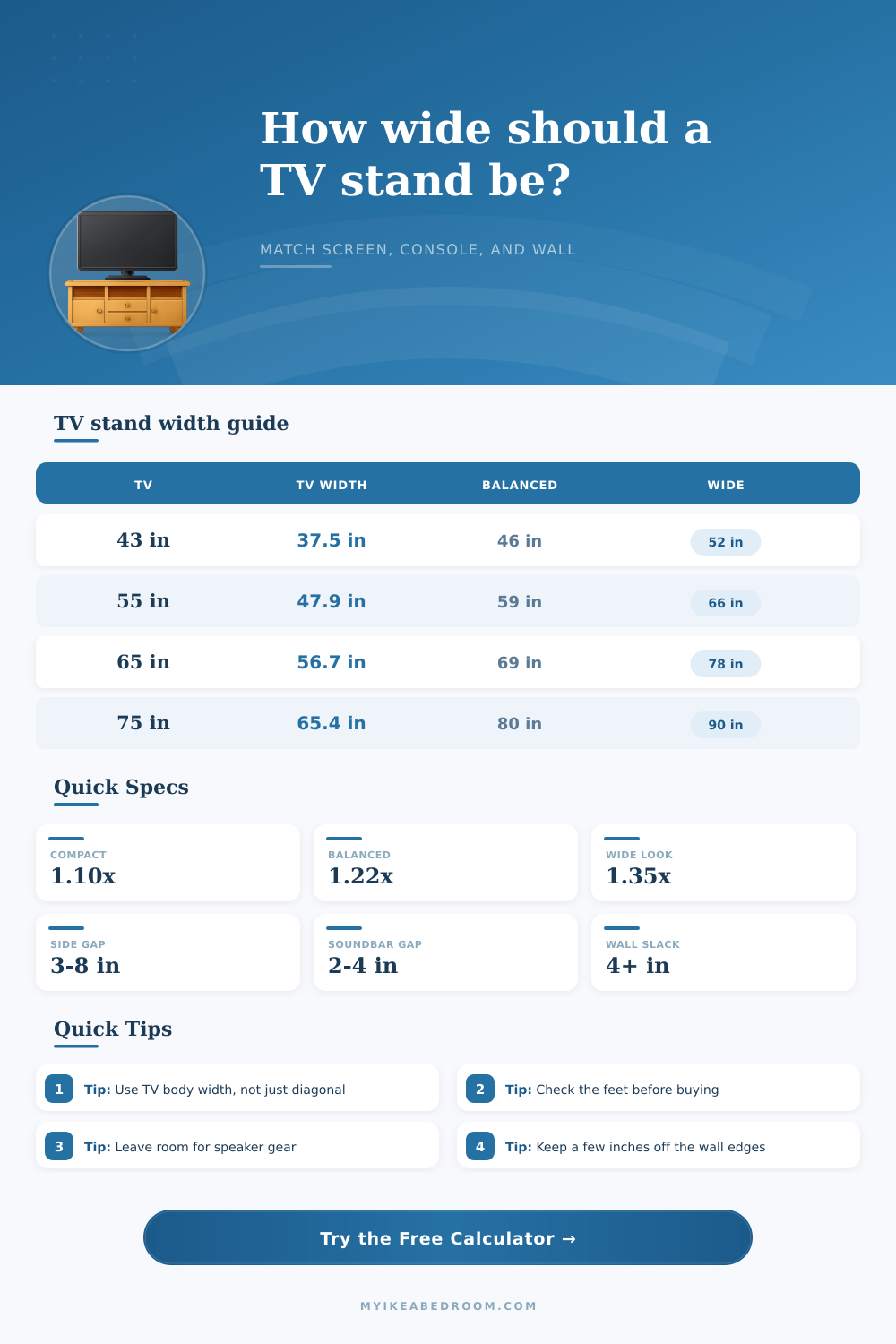
| Advertised diagonal | Screen width | Body width with 0.4 in frame each side | Balanced stand target |
|---|---|---|---|
| 32 in | 27.9 in / 70.8 cm | 28.7 in / 72.9 cm | 36 in / 91 cm |
| 43 in | 37.5 in / 95.2 cm | 38.3 in / 97.3 cm | 48 in / 122 cm |
| 50 in | 43.6 in / 110.7 cm | 44.4 in / 112.8 cm | 56 in / 142 cm |
| 55 in | 47.9 in / 121.8 cm | 48.7 in / 123.8 cm | 60 in / 152 cm |
| 65 in | 56.7 in / 144.0 cm | 57.5 in / 146.1 cm | 72 in / 183 cm |
| 75 in | 65.4 in / 166.0 cm | 66.2 in / 168.1 cm | 82 in / 208 cm |
| 85 in | 74.1 in / 188.2 cm | 74.9 in / 190.3 cm | 92 in / 234 cm |
| Style | Typical multiplier | Side overhang goal | Best use |
|---|---|---|---|
| Compact | 1.10x TV body width | 2-5 in per side | Small bedrooms, corners, narrow alcoves |
| Balanced | 1.22x TV body width | 5-8 in per side | Most living rooms and apartments |
| Wide | 1.35x TV body width | 8-12 in per side | Large sofa walls and low consoles |
| Gallery | 1.50x TV body width | 12+ in per side | Media walls with lamps, speakers, or decor |
| Gear item | Common width | Suggested clearance | Width impact |
|---|---|---|---|
| Compact soundbar | 24-32 in / 61-81 cm | 1-2 in each end | Usually fits under 43-55 in TVs |
| Full-size soundbar | 36-48 in / 91-122 cm | 2-4 in each end | Can drive 55-65 in stand sizing |
| Bookshelf speakers | 6-9 in each | 2-4 in beside each speaker | Adds 16-26 in total width |
| Decor or lamp pair | 8-14 in each | 2-3 in around objects | Often favors wide or gallery style |
| Scenario | Screen | Usable wall width | Good stand range |
|---|---|---|---|
| Bedroom dresser wall | 32-43 in | 48-72 in / 122-183 cm | 36-58 in / 91-147 cm |
| Apartment living room | 43-55 in | 72-96 in / 183-244 cm | 48-68 in / 122-173 cm |
| Family media wall | 55-65 in | 96-132 in / 244-335 cm | 60-84 in / 152-213 cm |
| Large sofa wall | 75-85 in | 120-168 in / 305-427 cm | 82-112 in / 208-284 cm |
Measure the TV body and feet separately. Two TVs with the same diagonal can have different outer widths and very different foot spacing. If the TV is not wall mounted, the feet width is a hard minimum, not just a design preference.
Use the wall limit as a reality check. A wide stand may look best in isolation, but curtains, outlets, doors, radiators, and walking paths can make a slightly narrower balanced stand the better fit.
Why You Buy It: A big TV is all about watching movies, so you purchase one, yet mount it on an unsteady-looking stand. Why? Because we overthink the size of our TVs in terms of their diagonal measurement; what matter is how wide they are. Use the tool below to find your TV’s actualy width instead of its diagonal. This helps you find a proper TV stand based off the screen width, your desired feet spread, wall constraints, and speaker or soundbar location. This results in a balanced, sturdy look for your console setup.
The dimensions aren’t screen sizes (which is marketing numbers); they’re diagonals. Sixty five inches is not a sixty-five inch screen. It’s more like fifty seven inches if you add in the bezel around it, that makes a difference in what kind of furniture you get. You can measure how much wall space you have, then think that since the screen says it’s this many inches, you’ll need a stand that’s that many inches, so you order one that’s too narrow. The calculator take into account aspect ratio and will turn the diagonal into real world body width. Almost all TV these days are sixteen by nine.
How to Find the Right TV Stand Width
If you’re not wall-mounting your TV, then where do its feet go? If the TV has feet, they will likely sits on the outside of the screen. Many new TVs don’t use feet to save packaging space. So whatever you’re mounting the TV on has to be wider than those feet and some kind of safety margin. Otherwise, the TV appears unsteadily balanced. It is a little detail, sure, but it is also important for looks and actualy safety. More than many of us realize, visual proportion matter too.
A stand identical in width to your TV will appear rigid. Interior designers tend to suggest having some width buffer of around 10-35% wider on each side to balance things out. The buffer anchors the electronics and provides a resting spot for the eye. With the calculator, you have options for a wide, balanced, or compact style. The multiplier adjust the recommendation. Try it out and see how various multipliers affect the suggested size.
Don’t overlook extra gear: In many cases, a soundbar is wider than it seems in product shots. Maybe you have a forty-inch soundbar but only thirty-six inches between your TV feet? Now your stand must be wide enough to accommodate the soundbar. Then throw in a gaming console (or maybe a pair of bookshelf speaker) on the side, and that suggested width adds up fast. This tool takes those extras into account, so you don’t wind up with a crowded surface that blocks air flow from one component’s vent to another.
The last piece of real-world feedback involves wall constraints. Perhaps you desire an extra-wide setup with decor and lamps. Maybe your alcove can accommodate nothing more than a compact console? The calculator crunches the numbers by comparing your desired width for the stand to how much wall space exists in your space. Does it factor in radiator, door, or trim clearance? If the math indicates that the stand is wider then will fit, it warns you and helps adjust your expectations before purchase.
There’s no magic number; it’s all about tradeoffs and finding what fits best. Is it more important that there be as much storage as possible or do you want the visual breathing room? Do you want space on either side for speakers, or a cleaner line? Those are your decisions once you’ve made them, then the math works itself out. The result is a proportionally well-done livivng room.
That doesn’t happen by chance. The furnitures is large enough to match the technology it supports. You would of wanted the stand to not look like it could topple over. Instead, you want the stand to dissapears into the background so the picture takes center stage.