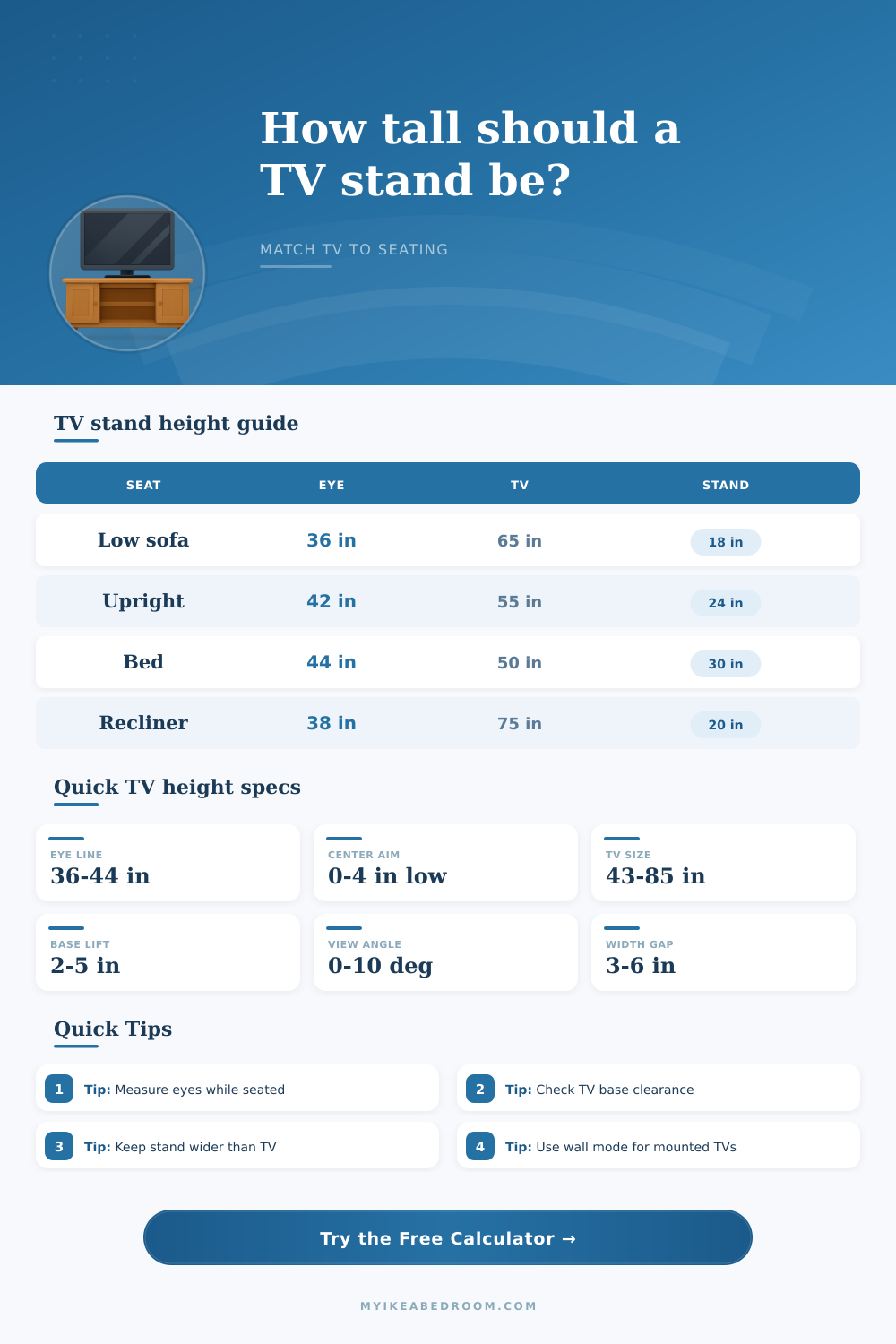
TV Stand Height for Seating Calculator
Match a TV stand, media console, or wall-mounted screen to your sofa, recliner, gaming chair, or bed by calculating eye line, screen center, TV bottom height, width fit, and viewing angle.
Start with a common seating and TV setup, then adjust the exact eye height, screen size, stand clearance, distance, and console width.
How the calculator places the TV
A 65 inch 16:9 TV has a screen height of about 31.9 inches. With a 39 inch eye line and the center at eye level, the screen bottom lands near 23.1 inches.
Stand height formula: desired screen center - half screen height - TV base lift or wall gap.
Width formula: visible TV width + side margin on both sides. Use the actual manufacturer width if the bezel is unusually thick.
Low media stand
Standard console
Tall bedroom unit
Wall mount plus stand
| Seating type | Typical eye height | Best center target | Stand note |
|---|---|---|---|
| Floor cushion or kids seating | 24-32 in | At eye line or 1 in low | Very low stand or wall mount works best. |
| Low lounge sofa | 34-38 in | At eye line to 4 in low | Large TVs often need 16-20 in stands. |
| Standard sofa | 38-42 in | At eye line to 2 in low | 21-26 in consoles usually fit medium TVs. |
| Recliner or chaise | 36-40 in | At eye line or slightly high | Reclined posture tolerates a little height. |
| Bed with pillows | 42-48 in | At eye line to 4 in high | Bedroom units can be taller if angle stays modest. |
| TV diagonal | Screen width | Screen height | Console width with 4 in sides |
|---|---|---|---|
| 43 in | 37.5 in | 21.1 in | 45.5 in minimum |
| 50 in | 43.6 in | 24.5 in | 51.6 in minimum |
| 55 in | 47.9 in | 27.0 in | 55.9 in minimum |
| 65 in | 56.7 in | 31.9 in | 64.7 in minimum |
| 75 in | 65.4 in | 36.8 in | 73.4 in minimum |
| 85 in | 74.1 in | 41.7 in | 82.1 in minimum |
| Stand height band | Works well for | Watch out for | Calculator cue |
|---|---|---|---|
| 12-15 in | Floor seating, oversized TVs, low platforms | Soundbar and storage clearance | Usually appears with TVs 75 in and up. |
| 16-20 in | Low sofas, deep sectionals, large living room TVs | Wide feet depth and center speaker space | Common sweet spot for 65-85 in screens. |
| 21-26 in | Standard sofas and 43-65 in TVs | Large screens may become too high | Most everyday media consoles fall here. |
| 27-34 in | Bedroom viewing, compact TVs, higher eye lines | Neck angle from sofas | Best when viewing distance is longer. |
| 35 in plus | Tall dressers or mixed standing/seated rooms | High vertical angle | Use only when eye line or bed posture supports it. |
| Viewing setup | Distance cue | Good vertical angle | Planning note |
|---|---|---|---|
| Gaming chair or desk | 3-5 ft | 0-5 deg | Small height errors feel obvious up close. |
| Apartment sofa | 6-8 ft | 0-8 deg | Center at eye line or slightly below is comfortable. |
| Family room sofa | 8-11 ft | 0-10 deg | Large TVs can use low stands without feeling low. |
| Recliner or chaise | 8-12 ft | 2-12 deg | A relaxed head angle can handle a raised center. |
| Bedroom viewing | 7-12 ft | 2-12 deg | Pillow height matters more than mattress height alone. |
Measure the viewer, not the sofa. Cushion height, posture, and pillow support can move eye line several inches, so sit normally and measure floor to eyes before choosing the stand.
Use the real TV base lift. Two TVs with the same diagonal can place the screen bottom at different heights because pedestal stands, feet, and soundbars change the bottom clearance.
If you’ve recently bought a big-screen TV, then you’re probably familiar with an all-too-common dilemma: You place the new television on the stand you bought months ago and find yourself tired while watching a film. After just 10 minutes, your neck might be sore from having to look up (or down) at the screen. No matter what the 4K picture looks like, the viewing experience isn’t enjoyable… Not visually anyway. Rather, it’s an ergonomics question.
How close to my eye level should the screen be when I’m sitting? For most people, this answer involve guesswork. They select a stand based off catalog of furniture, hoping it’ll fit. But more times than that, that doesn’t result in good viewing.
How to Find the Best TV Height for Your Room
To eliminate guess work, I built a calculator (on this page) that takes information about the room and spits out concrete numbers. First it prompts you to enter your eye-level when sitting down, because that’s the most important variable here. This is your starting point, the distance from your eyes to the ground. This is more accurate than guessing off of the cushions on your sofa; the lower your eyes are, the closer they’re going to be to your body.
Next, it takes the physical dimensions of your TV (including aspect ratio), measures the diagonal length and uses that as basis to calculate how tall the TV actualy is. From there, it calculates the ideal middle for the image (by taking half the TV’s height and subtracting it from your eye level). And finally, it looks at shape of your TV stand. It considers things like if there is space underneath it when mounted on the wall or if the feet of your TV adds extra lift. Then, it gives an exact stand height recommendation to position the image at a neutral viewing angle.
Why do we care about vertical viewing angles? Because our eyes were created to look forward with just a bit of a downward view. Looking up alters the lighting on the lens, leading to more glare from overhead lamps and potential distortion along the edges of an image. It’s not good for your cervical spine either; while a small adjustment might be tolerable for several minutes, two-hour stretches will lead to sore shoulders. We want the vertical viewing angle to fall between zero and ten degrees. This is calculated automatically by the calculator according to how you tweak the inputs. For example, if you switch seats, such as using a recliner that repositions you, it will take that into account. It will then calculate the eye-level change based on the posture preset you chose.
Another consideration that tends to be overlooked until the TV is actually in place is horizontal fit. This becomes obvious when the TV seem too big or unstable on the stand. To calculate this, add a reasonable margin to both sides of the TV; the calculator gives you that dimension. It isn’t just about looking symmetrical; it is also about visual weight. Even if a wide-screen TV is physically stable atop a narrow stand, it won’t feel balanced. Ideally you want the furnitures to sit comfortabley in the space. On the page, there are reference tables breaking down these dimensions, depending on the type of seating. Because a high-back dining chair has an eye-line higher than a low lounge sofa does, it will have a shorter stand.
TV Size is not the only parameter. People often neglect how much the base lift up from the ground. For example, two identically sized (sixty-five inch) TVs could have vastly different footprints. They could be table-top or hung on the wall. A table top stand could rest flat on a console. But some TVs mounts onto a pedestal which lifts them up several inches off the floor. You want to take into account how high it sits off the floor. The calculator does this automatically but gives you an option to select either wall mounted or tabletop TV.
Wall mounting offers more flexibility because you can adjust the bracket height precisely. With a table top stand, there’s no moving it once it’s bought and you’ll need to get the right height before buying. Running these numbers before you shop will save you time and prevent you from buying furniture that only places the TV at the right height when you are sitting down. You should of checked this earlier.
The home theater environment requires not just technology but also comfort. No amount of calibration will make up for bad ergonomics. You measure your eye line and use the tool to do the geometry for you. Then you sit back down on the couch and don’t strain your neck. All you see is what’s on the screen. It dissapears into the background, which is how you should see it. That is how a luxurius theater should be set up.