Treadmill Desk Height Calculator
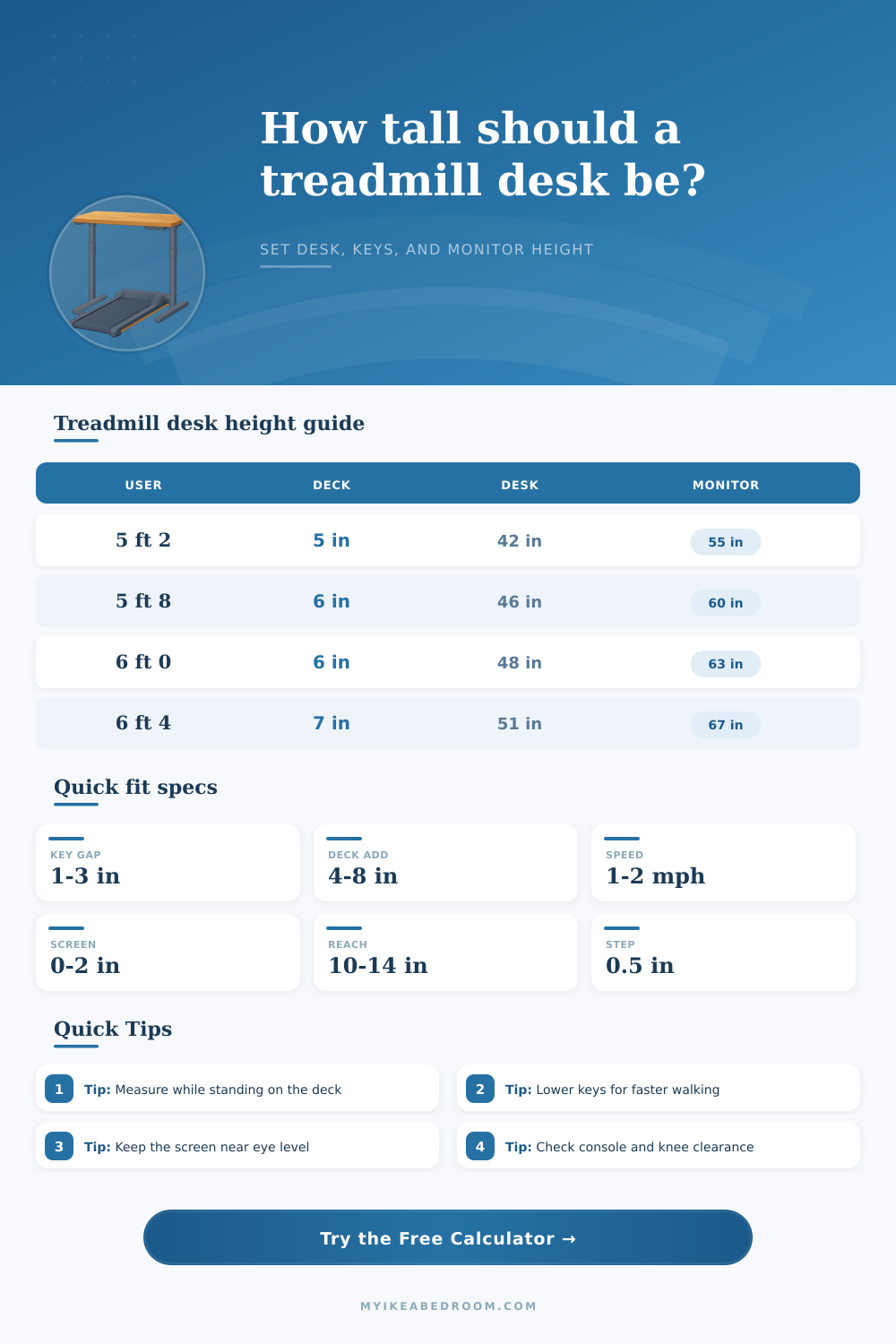
Calculate a treadmill desk height from the walking deck, shoes, elbow height, keyboard thickness, walking speed, monitor position, and console clearance so the desk fits the person and the machine.
Start with a common walking workstation setup, then adjust the exact measurements for your treadmill, keyboard, shoes, monitor, and desk frame.
Ready to calculate
Enter the deck and elbow measurements, then calculate the walking desk surface height, keyboard plane, monitor reference, and clearance status.
Formula basis: working elbow height equals measured elbow plus deck height plus shoes. The keyboard plane sits below that elbow height by a speed-based allowance.
| Walking mode | Typical pace | Key top below elbow | Why it changes | Use when |
|---|---|---|---|---|
| Mostly standing | 0 to 0.8 mph | 0.8 to 1.5 in | Less body sway and smaller reach changes | Detailed pointing or drawing |
| Slow focus walk | 0.8 to 1.2 mph | 1.2 to 2.0 in | Small shoulder relaxation allowance | Email, reading, light typing |
| Normal desk walk | 1.2 to 1.8 mph | 1.8 to 2.6 in | Arms need room for gait rhythm | Daily keyboard work |
| Brisk typing walk | 1.8 to 2.5 mph | 2.4 to 3.2 in | Lower keys reduce shoulder lift | Shorter walking sessions |
| Deck height | Typical equipment | Desk impact | Clearance check | Planning note |
|---|---|---|---|---|
| 3 to 4 in | Very low walking pad | Desk rises about 3 to 4 in | Usually minimal console conflict | Good for shorter desk frames |
| 5 to 6 in | Common under-desk treadmill | Desk rises about 5 to 6 in | Check front controls and crossbars | Most home offices fit here |
| 7 to 8 in | Thicker deck or cushioned unit | Desk may need a tall frame range | Console and side rail gaps matter | Measure before ordering a frame |
| 9 in plus | Full treadmill platform | Often exceeds standard sit-stand range | Handrails can block desktop depth | May need a custom riser setup |
| Screen setup | Target relationship | Typical offset | Watch for | Best adjustment |
|---|---|---|---|---|
| External monitor | Top near or slightly below eye height | 0 to 2 in below eye | Looking up while walking | Lower monitor arm or shelf |
| Laptop plus keyboard | Laptop raised, keys separate | Center near eye line | Neck flexion from low screen | Use riser and external keyboard |
| Large ultrawide | Center slightly below eye height | 1 to 3 in below eye | Screen top too high | Prioritize center comfort |
| Reading-heavy work | Lower center reduces chin lift | 2 to 5 in below eye | Forward head posture | Bring screen closer and lower |
| Scenario | Main height driver | Likely desktop range | Secondary result | Check first |
|---|---|---|---|---|
| Small bedroom office | Low walking pad and compact frame | 40 to 46 in | Keyboard 1 to 2 in below elbow | Desk frame maximum height |
| Daily work-from-home setup | Measured elbow plus 5 to 6 in deck | 44 to 49 in | Monitor top near eye level | Console under desktop |
| Mechanical keyboard user | Thicker keycap height | Desk lower than slim keyboard setup | More key height above desk | Wrist angle and shoulder lift |
| Shared walking desk | Midpoint of two elbow heights | Often a compromise range | Save two desk presets | Shorter user shoulder comfort |
| Console treadmill | Front control height | Depends on underside clearance | Desk may need more height | Handrail and crossbar collision |
Measure from the walking belt. Deck height is the detail that usually makes a treadmill desk much taller than a normal standing desk.
Use keycap height as the typing reference. A thick keyboard can make the desktop height look correct while the wrists still feel too high.
Leave room for the treadmill front. Consoles, raised rails, and desktop crossbars can collide even when the ergonomic height is correct.
Save a standing preset separately. When the treadmill rolls away, the best desk height usually drops by the deck height.
A treadmill desk is not as easy as just buying one and then treating it like a standing desk with wheels. The walking belt increase the distance between your body and the ground, so all of your previously learned ergonomic parameters gets thrown out the window. For example: if you adjust your keyboard and monitor according to your regular (standing) elbow height, your shoulders is going to be up around your ears in about twenty minutes time.
Once you figure out how tall your shoes are and how thick your treadmill’s deck is, the calculator does the rest for you. No guesswork is naturaly necessary. Typically a treadmill deck is four-to-six inches above the ground, which increase your elbow height accordingly. The average adjustable desk only goes up so high, typically about fifty-one or fifty-two inches from the ground. So add in a treadmill deck (six inches), plus whatever your native standing desk height is (say forty-four inches) and bam! You’ve already reached end of the frame’s useful life without having included any other factors such as keyboard placement.
How to Set Up a Treadmill Desk Correctly
You can’t expect to walk into your house, unbox a piece of furnitures, and find it won’t go beneath the console. It also takes into account your footwear, which has more impact on your posture then you may realize. Heavy walking shoes can adds another half-inch or more to your working height. Your elbows should of been bent about ninety degrees when typing. If your work surface is too high, it makes your neck and traps tense. A too-low surface make you slouch forward and stress out your lower back. Relax your shoulders as you move your legs.
Another variable that standard guides ignore is keyboard thickness. A thin membrane keyboard will contribute very little to the height calculation. Conversely, a tall mechanical board with high profile key caps might increase the typing plane upwards of an inch. This changes the wrist posture from neutral to extended, while the reference table on the page lays out how walking speed also dictates where your hands should sit. Your body have a natural sway when you’re walking quickly. In order to accommodate this natural rhythm, you’ll often drop keyboard down slightly compared to a slow walking pace.
Positioning monitors is just as challenging with movement, since our eyes are at different heights. For example, you might instinctively raise the screen to see over the treadmill console, but looking up while walking force your head forward. When walking, looking up causes your head to jut forward. After an hour this puts pressure on the neck, which is not good. Ideally, the top of your screen should be within or slightly beneath eye level. A monitor arm is essential here to pull the display down into viewing distance. It also brings the screen closer to your desk, if your desk needs to be raised to avoid hitting hand rails. Otherwise, you’re paying for ergonomic perks while torturing yourself by straining your neck.
Console clearance is the silent killer of treadmill desks. A lot of treadmills has consoles that project forward toward waist-level (or even higher in some cases), and if your desk frame isn’t tall enough to clear the obstruction, then it’s game over; you can’t operate the machine at all. So you might end up with the ideal ergonomics on paper, only to find that every time you go to pick up a mouse, you bump into the plastic housing. The essential measurement here is how far from the ground that console sits. Measure its highest point and leave at least two inches of space above it. This ensures your shins or knees does not hit it when you take a step back.
On shared desks, you have to think different. If two people of different heights share one desk, neither will ever be perfectly comfortabley. No matter how much the calculator helps you find the middle point, there won’t be perfect comfort. Usually, the solution is to let it bend slightly towards the needs of the taller person (not too much or it’ll mean hunching), or to tweak by hand constantly. Remember: the whole point here is compromise. Smooth adjustability beat static positioning every time.
A treadmill desk is ultimately about fit. Two very different activities are being blended together into one space. Make sure the hardware works for the physics of each. Measure once. All the rest falls into place.