Nap Length Calculator
Plan a nap alarm from sleep latency, a 10, 20, 30, 60, or 90 minute nap type, a desired wake time, cycle length, rounding, and buffer time.
📌Nap timing presets
⚙Nap, clock, and alarm inputs
Nap timing result
📊Core nap timing specs
🧮Alarm time formula
alarm = nap start + wind-down + sleep latency + nap sleep length
Wake-target mode:
alarm = desired wake time - wake buffer
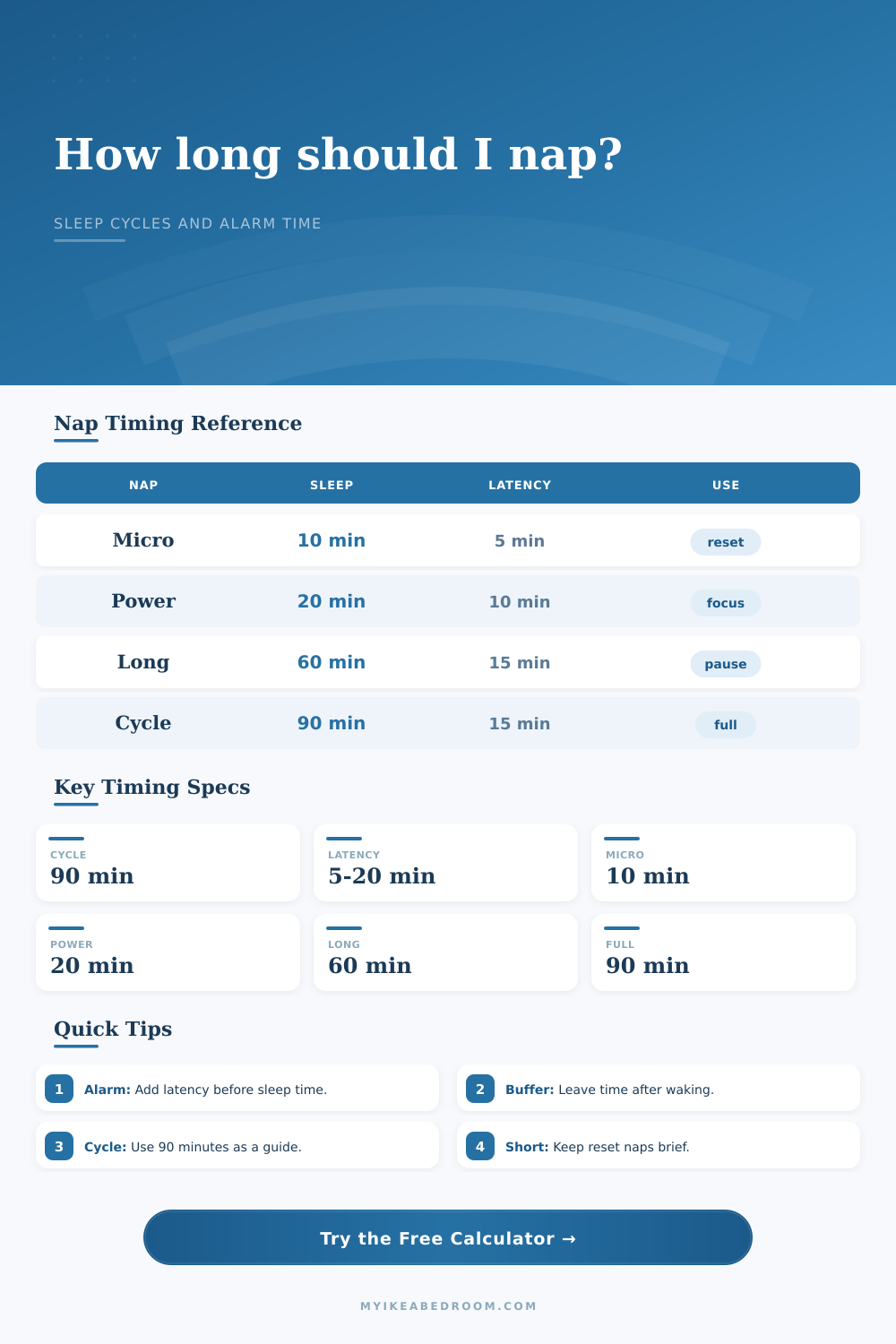
📋Nap type reference table
| Nap type | Sleep minutes | With 15 min latency | Common planning use |
|---|---|---|---|
| Micro reset | 10 minutes | 25 minutes before alarm | Very short pause when the calendar is tight |
| Power nap | 20 minutes | 35 minutes before alarm | Short rest without setting aside a full hour |
| Short nap | 30 minutes | 45 minutes before alarm | Moderate pause when a quick reset feels too brief |
| Long nap | 60 minutes | 75 minutes before alarm | Longer rest block that still fits many afternoons |
| Full cycle | 90 minutes | 105 minutes before alarm | One approximate sleep cycle using the default estimate |
⏰Alarm math examples
| Scenario | Start or target | Timing inputs | Alarm result |
|---|---|---|---|
| Desk reset | Start 1:30 PM | 5 wind-down + 5 latency + 10 sleep | Alarm at 1:50 PM |
| Power nap | Start 1:30 PM | 5 wind-down + 10 latency + 20 sleep | Alarm at 2:05 PM |
| Lunch break | Wake 2:15 PM | 10 buffer + 10 latency + 30 sleep | Lie down by 1:25 PM |
| Full cycle | Wake 4:00 PM | 10 buffer + 15 latency + 90 sleep | Lie down by 2:05 PM |
| Travel layover | Wake 5:30 PM | 20 buffer + 20 latency + 60 sleep | Lie down by 3:50 PM |
🔄Sleep cycle planning table
| Cycle setting | Sleep length at 90 min | Add 15 min latency | Best calculator use |
|---|---|---|---|
| Half cycle style | 45 minutes | 60 minutes to alarm | Use custom minutes when 60 or 90 is too long |
| One cycle | 90 minutes | 105 minutes to alarm | Use full cycle preset or 1 cycle |
| Two cycles | 180 minutes | 195 minutes to alarm | Use cycle count when planning a long rest block |
| Shorter cycle estimate | 80 minutes | 95 minutes to alarm | Adjust cycle length if you prefer a shorter estimate |
| Longer cycle estimate | 100 minutes | 115 minutes to alarm | Adjust cycle length for a wider planning window |
🏠Preset reference table
| Preset | Nap type | Clock mode | Buffer pattern |
|---|---|---|---|
| Desk reset | 10 minute micro reset | Start from 1:30 PM | 5 minute latency, 5 minute wake buffer |
| Power nap | 20 minute power nap | Start from 1:30 PM | 10 minute latency, 10 minute wake buffer |
| Lunch break | 30 minute short nap | Start from 12:45 PM | 10 minute latency, 10 minute wake buffer |
| Deep pause | 60 minute long nap | Start from 2:00 PM | 15 minute latency, 15 minute wake buffer |
| Full cycle | 90 minute full cycle | Start from 1:00 PM | 15 minute latency, 10 minute wake buffer |
| Late afternoon | 20 minute power nap | Wake by 5:00 PM | 10 minute buffer before target |
| Weekend rest | 90 minute full cycle | Wake by 4:30 PM | 15 minute latency, 20 minute buffer |
| Shift break | 10 minute micro reset | Wake by 3:00 AM | 5 minute latency, 5 minute buffer |
| Travel layover | 60 minute long nap | Wake by 5:30 PM | 20 minute latency, 20 minute buffer |
| Evening plans | 30 minute short nap | Wake by 6:15 PM | 10 minute latency, 20 minute buffer |
💡Practical nap calculation tips
You hear the alarm. You try to get up, but you can’t. Your brain’s fuzzy. Your body feel weighed down. And it says that you’ve only been asleep for thirty minutes.
That’s sleep inertia. It’s what makes you so groggy upon waking up at wrong phase of the sleep cycle. More often than not, it’s sleep inertia that messes up napping; not the napping itself.
How to Use the Nap Calculator
Most of us think that taking a siesta during the day is as easy as flipping a switch. Close your eyes and boom! You’ll be alert again. Wrong. Sleep doesn’t work this way.
Sleep architecture is more complex than it seems, and whether you wake up feeling refreshed or exhausted often come down to just a few minutes of timing. Once you know your constraints, the calculator above do the math for you. You do not have to guess about transition times and cycle alignment.
The strategy lies in understanding the inputs. First, what kind of nap do you want? Do you just want a quick boost from a twenty minute power nap (the classic standard)? Or maybe you’re realy tired. In that case, go for a full ninety minute cycle. That’s enough time to complete a full loop of deep and light sleep.
You can choose these presets in the tool. And if you’ve got a weird schedule, it will let you customize minutes, too. Keep in mind that whatever number you choose is amount of actual sleep time. It is not the total time you’ll spend with your eyes closed in a chair.
Which brings us to the forgotten factor (the one that makes all the difference). Latency. Or the amount of time it takes for you to fall asleep. Some people fall right to sleep. Others lay there for 20 minutes before they doze off.
You set an alarm for 20 minutes of sleep, but it takes you 10 minutes to fall asleep. Then you’ve only got 10 minutes of sleep. You’ll wake up groggy and disoriented. The calculator requests an estimate of your latency. It shifts your alarm accordingly. That’s a tiny tweak, but it makes a world of difference.
Sure, you can’t control the speed at which your brain turns itself off. But you can account for it.
There’s also an overlooked layer of wind down time. There’s no on/off switch here. You get up, stroll to the bedroom, lower the lights, perhaps brush teeth and lay down. That’ll take five minutes easy. If you’re counting from when you sat in your chair at work to begin napping, then you’ve already fallen behind. The tool adds this buffer before latency phase. It makes your clock match real world. It closes the gap between theory-based sleep science and the gritty day-to-day grind.
The second thing is wake buffers. Immediately after alarm sounds, you’re not a fully functioning human being. You’ve got to get yourself oriented, splash some water in your face, stretch, etc. If you give yourself 10 minutes between waking up and your hard deadline, then you won’t be panicking about being late. Sure, you’ll still be groggy. But you’ll have plenty of time.
And here’s where the chart on the page comes into play. This chart compares various nap lengths. Not all naps are created equal. How quickly you fall asleep and how fast you wake up plays an enormus role in how useful they are.
So do you start by looking at how much free time you have in your day? You can start with your nap time, or you can look at what time you want to wake up. Wake time)? Start with whatever comes first. You work backwards if you have a two o’clock meeting (go back from there). The other way is if you’ve got a block of free time, that’s when you’d like to be able to take a nap.
The calculator takes into account the time of your alarm based off how long it thinks it will take you to fall asleep. It rounds the alarms to keep things simple and avoid the anxiety of hyper-specific times like 2:03am. That won’t cause as much anxiety as waking up at 2:03am. Consistency beats precision.
You want to skip the deep sleep trap. Deep sleep sucks when you wake up from it. It would of been best if you either get a complete cycle, or stick around in light sleep. That’s what the 90 minute cycle allows for. It is long, but clean. Anything shorter is going to be stuck in the shallows. Anything longer than that might fall into the deep zones if it isn’t long enough to move past them. Basically choose your poison based on actual time available.
It’s a skill. You learn this skill by paying attention to how you feel after. Did you wake up refreshed? That is good. That was the sweet spot. Did you wake up worse then when you started? That is bad. Try again. Use the tool and adjust based on how your body reacts.
The math gives you a framework. Your experience give you the data. Start with the presets. Tweak the latency. Protect your buffer. It’s a small window of recovery. But it can define the rest of your day.