Main-row planning for TVs and projectors
Home Theater Seating Distance Calculator
Blend THX immersion, SMPTE viewing limits, Dolby living-room guidance, and resolution detail so your main row lands in a distance band that fits the screen and the room.
Formula breakdown
| Screen | Width | THX 36 deg | SMPTE 30 deg | Dolby 1.5x | 4K detail |
|---|---|---|---|---|---|
| 55 in TV | 47.9 in | 4.0 ft | 5.4 ft | 6.9 ft | 3.6 ft |
| 65 in TV | 56.7 in | 4.7 ft | 6.3 ft | 8.1 ft | 4.2 ft |
| 77 in TV | 67.1 in | 5.6 ft | 7.5 ft | 9.6 ft | 4.9 ft |
| 85 in TV | 74.1 in | 6.2 ft | 8.3 ft | 10.6 ft | 5.4 ft |
| 100 in screen | 87.2 in | 7.3 ft | 9.8 ft | 12.5 ft | 6.4 ft |
| 120 in screen | 104.6 in | 8.7 ft | 11.8 ft | 15.0 ft | 7.7 ft |
| Resolution | Vertical pixels | Pixel pitch | Detail distance | Use case |
|---|---|---|---|---|
| 1080p | 1080 | 0.89 mm | 9.8 ft | Sit this far back to hide pixels. |
| 4K UHD | 2160 | 0.44 mm | 4.9 ft | Closer seating still looks clean. |
| 8K UHD | 4320 | 0.22 mm | 2.5 ft | Useful only for very close rows. |
| Model | Formula | What it does | Reference |
|---|---|---|---|
| THX immersive | width / (2 x tan 18 deg) | Targets a 36 deg horizontal field of view. | THX screen placement |
| SMPTE viewing | Average of 30 deg and 3.1H | Blends the angle limit with the picture-height reference. | SMPTE ST 2080-3 |
| Dolby room rule | diagonal x 1.5 | Creates a simple living-room starting point. | Dolby home theater guide |
| Resolution detail | (height / pixels) / tan 1 arcmin | Shows the distance where pixel detail is still visible. | RTINGS size to distance |
| Preset | Screen | Room depth | Main-row bias | Why it works |
|---|---|---|---|---|
| Apartment TV wall | 55 in 16:9 | 11.5 ft | Mixed | Lets a compact sofa stay close enough for 4K detail. |
| Family room TV | 65 in 16:9 | 14.0 ft | Balanced | Leaves a rear path without making the TV feel small. |
| OLED movie couch | 77 in 16:9 | 15.0 ft | Immersive | Pushes the couch into a stronger cinema angle. |
| UST basement | 92 in 16:9 | 15.0 ft | Balanced | Supports a big image without blocking walk space. |
| Dedicated theater | 120 in 16:9 | 21.0 ft | Movies | Builds a true main row and keeps room for a rear aisle. |
| Scope cinema | 135 in 2.39:1 | 24.0 ft | Immersive | Scope screens invite a slightly closer movie row. |
When you install a television in your home, you must consider the distance between the seating and the screen. There are many factor that will impact the distance at which you should view your screen, including the size of the television, the detail that you wish to see on the screen, and your physical comfort. If the distance between the seating and the screen is too great, then you will have difficulty seeing the details of the screen.
If the distance is too close to the screen, however, you may have difficulty seeing the edges of the screen, and you may develop neck strain due to constantly turning your head to view the screen from edge to edge. The geometry of the screen will dictate how the individual view the screen. If the screen is too large relative to the field of view of the individual, the individual may have to continuously move their head to view the entire screen.
How Far to Sit from Your TV
If they are too far from the screen, they may lose the fine details of the screen that 4K resolution televisions provide. If they are too close to the screen, the individuals who sit in the side seat of a couch may experience visual distortion. Additionally, there may be other factor that must be considered in the room, such as the placement of coffee table, walkways, and recliner chairs.
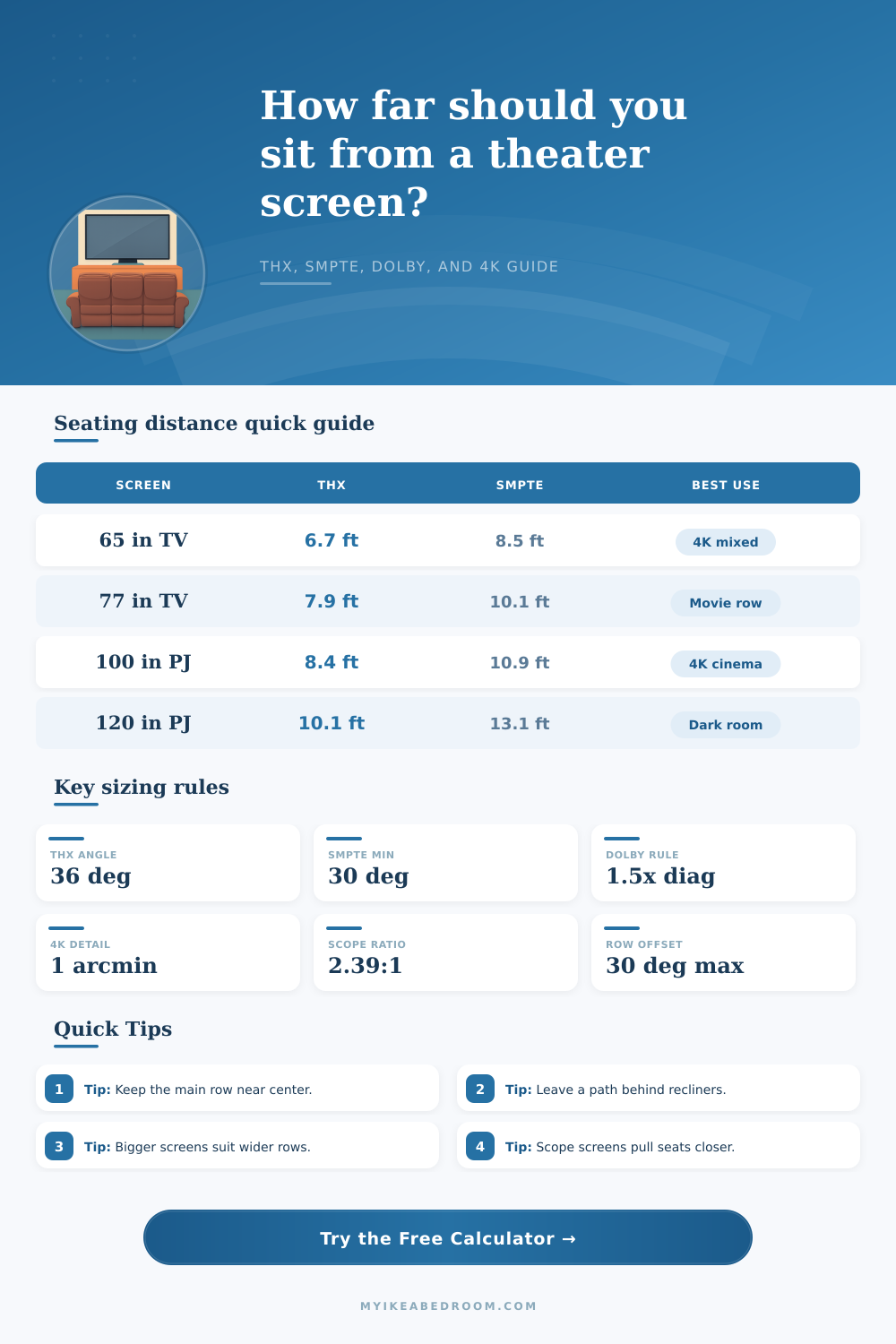
To calculate the viewing distance for your televisions, there are a few industry standards that you can use. The THX standard dictates that the field of view should be 36 degrees, and that the screen should appear dominant within the individual’s field of view. The SMPTE standard suggests a 30-degree field of view, and recommends that the individual should sit at a distance of three times the height of the screen.
The Dolby standard is also available, and is often used for living rooms. The Dolby standard dictates that the distance between the individual and the screen should be approximately one and a half times the diagonal measurement of the screen. Each of these recommendation may change based on the resolution of your televisions; 4K televisions allow individuals to sit more closer than 1080p televisions because the 4K resolution includes more pixels that can focus on the close viewing distances.
The type of content that individuals view on the televisions will also impact the viewing distance for each individual. If an individual plans to view movies, they may wish to use the standards that are establish for the most immersive viewing experience, such as the THX standard. If an individual watches sports on the televisions, though, they may prefer using standards that provide for a more relaxed viewing experience.
Individuals who play video games may require a viewing distance and viewing angle that are in the middle of these two extremes. Thus, depending upon the type of content that is to be viewed, an individual may require different viewing angle to each television. The physical elements of the room will dictate in what manner that you apply the standards for viewing distance.
For instance, if an individual lives in a small apartment, they may have only five feet of space between the 55-inch television and the wall. In this case, the individual may have to make some compromise to their viewing distance. In contrast, a large home theater may provide enough space to place a 120-inch screen many feet from where the individuals will sit.
In either case, though, the individual must account for the additional space that furniture will take up in the room. If recliners are to be used in the room for instance, the individual may have to move each row of seating seat forward in the room to account for the depth that the recliners will require when they are in their reclined positions. Unfortunately, there are some mistakes that the individual may make when they are first setting up their home theater.
For instance, many individuals attempt to use math to calculate the viewing distance, but typically ignoring the aspect ratio of the screen. Additionally, they may only focus upon the center of the room for placement of seating. If they do, though, the individuals that sit on the ends of the couch may have a different viewing angle then the individuals sitting in the middle of the couch.
Thus, the viewing angle for the individuals who sit in the side seats should not exceed certain limits, or they may begin to view a distorted image of the screen. Another factor to consider is the aspect ratio of the televisions. The aspect ratio of most televisions is 16:9.
For cinema screens, though, the aspect ratio is often 2.39:1. The additional width of the screen means that the viewing distance may need to be different for those viewing a 2.39:1 screen. Additionally, the resolution of the televisions will also impact the distance at which they are to be viewed; 8K televisions allow individuals to sit closer to the screen than they can with 1080p televisions.
To successfully establish a viewing distance for the televisions in your home theater, you should first determine the primary row of seating. Additionally, you should establish a comfort band for each row of seating. Finally, it is recommended that you check the viewing angle for the outer seat in the room to ensure that each individual will have a viewing angle that allows them to view the screen.
By using these suggestion, you can create a home theater that allows each individual in the room to enjoy the televisions with both detail and comfort.