Gaming Chair Size Calculator
Estimate the seat width, seat depth, back height, seat height range, armrest height, recline footprint, door fit, and desk clearance for a gaming chair before it lands in your room.
Start with a close body and room profile, then adjust the measurements to match the person and the actual desk zone.
Sizing notes
Enter your measurements to compare body fit, desk fit, recline depth, side movement, and door opening before choosing a chair size class.
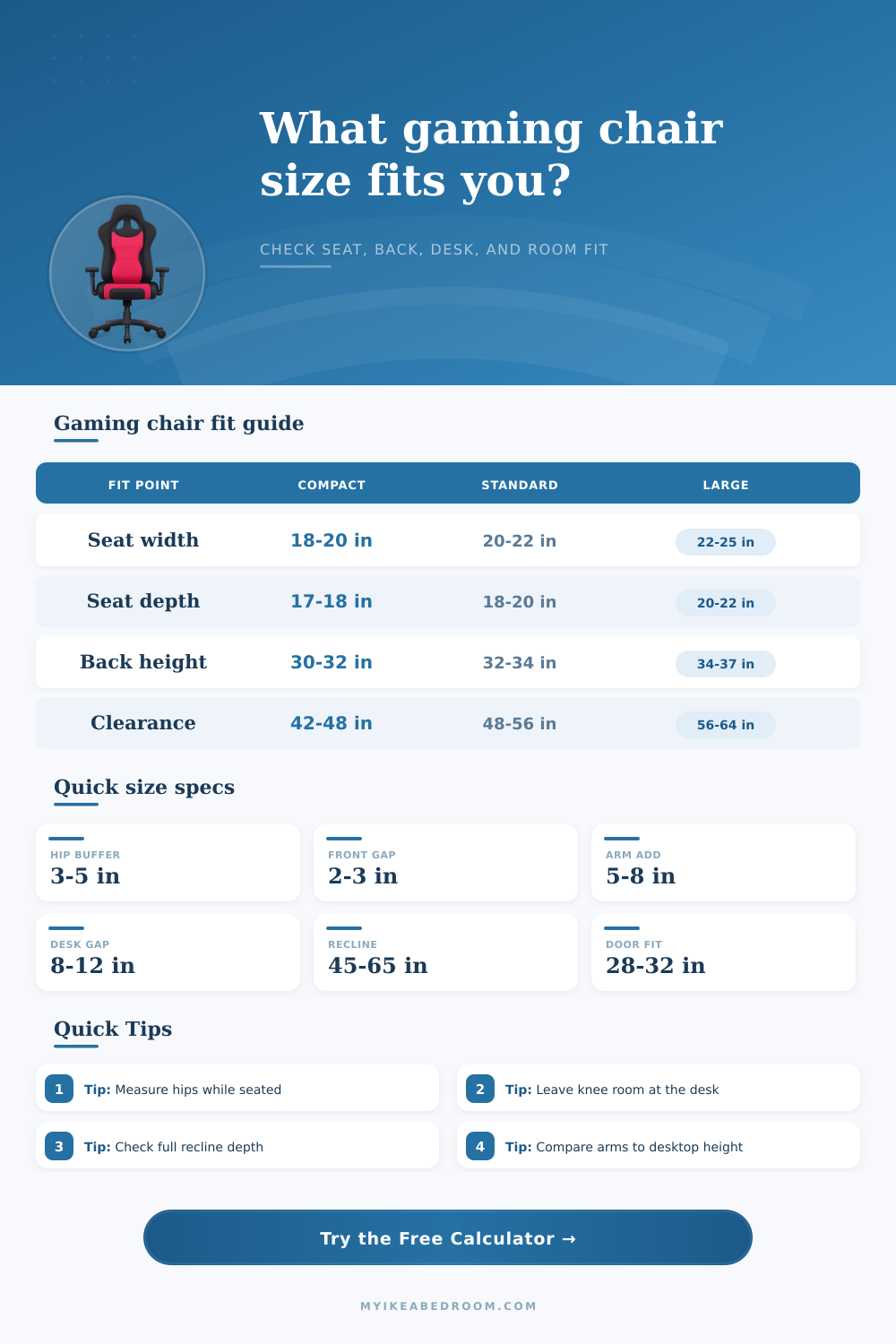
Seat width: hip width plus side buffer keeps arms and bolsters from squeezing the user.
Seat depth: thigh length minus a front gap helps protect knee comfort during long sessions.
Footprint: outside chair width plus side movement, rear wall buffer, recline extension, and front pullback.
| Measurement | Calculator method | Comfort target | Watch point |
|---|---|---|---|
| Seated hip width | Add 5 to 10 inches total depending on fit preference | Seat feels open without sliding side to side | Raised bolsters reduce usable width |
| Thigh length | Subtract 2 to 3 inches for the front seat gap | Seat supports thighs without pressing behind knees | Very deep seats may need a lumbar pillow |
| Lower leg height | Build a seat height range around floor-to-knee height | Feet stay flat with knees near level | Thick cushions can sit higher than listed |
| Torso height | Add shoulder and headrest allowance for back height | Back reaches upper shoulders without neck push | Pillow position matters more than shell height |
| Size class | Typical seat width | Typical back height | Best used when |
|---|---|---|---|
| Compact | 18 to 20 inches | 29 to 32 inches | Small bedrooms, dorm rooms, narrower hips, shallow desks |
| Standard | 20 to 22 inches | 32 to 34 inches | Most adult desk setups with moderate recline space |
| Tall | 21 to 23 inches | 34 to 37 inches | Long torso users, higher shoulder support, deeper seat needs |
| Wide | 22 to 25 inches | 33 to 37 inches | Relaxed side room, broad hips, less restrictive bolsters |
| Recline lounge | 21 to 24 inches | 34 to 38 inches | Controller play, footrest use, and deeper rear room |
| Clearance item | Compact target | Comfort target | What it protects |
|---|---|---|---|
| Side space per side | 3 to 4 inches | 5 to 8 inches | Arm movement, caster drift, elbows, side bolsters |
| Rear upright buffer | 6 to 8 inches | 10 to 14 inches | Wall marks, pillow contact, recline startup |
| Front pullback | 18 to 22 inches | 24 to 30 inches | Standing up, turning out, keyboard posture |
| Desk knee depth | 18 to 22 inches | 24 to 30 inches | Knee clearance, posture changes, cable trays |
| Full recline depth | 48 to 56 inches | 56 to 68 inches | Back tilt, headrest travel, optional footrest |
| Scenario | Chair zone | Likely size class | Secondary check |
|---|---|---|---|
| Bedroom desk beside a bed | 44 x 56 inches | Compact or narrow standard | Door swing and bed corner clearance |
| Home office desk wall | 56 x 72 inches | Standard | Desktop height and armrest slide-under |
| Streaming corner | 64 x 78 inches | Standard or wide | Mic arm, PC tower, and cable space |
| Controller recline setup | 60 x 84 inches | Recline lounge | Rear wall and footrest extension |
| Dorm or shared room | 40 x 52 inches | Compact | Opening width and chair assembly path |
Measure the usable seat, not only the outside shell. Bucket-style bolsters can make a listed 22 inch seat feel closer to 19 or 20 inches where the body actually sits.
Compare armrests with the desktop. If armrests cannot drop below the desk edge, add more front pullback or choose a chair with lower adjustable arms.
Test the recline path with tape. Mark the rear wall buffer, upright depth, and full recline depth on the floor before committing to a large chair.
Leave an assembly path. A chair may arrive in pieces, but the assembled outside width still needs to pass doors, halls, and the desk opening later.
If you’ve ever bought a gaming chair on the internet, this story sounds familiar. We all have. You see some slick-looking chair with special comfort features in the product description. You take out the tape measurer. You look at the cost. You click that buy button and then three days later the package drop onto your doorstep. You build it up, wheel it into position and then quickly discover that it doesn’t fit.
Perhaps it’s just too big for the space, making it impossible to slide it underneath desk. Perhaps it has such a deep seat that your thighs is cut off at the back, causing you to slouch over keyboard. Perhaps it’s so low that it collides with the wall as soon as you lean back. All of this is a bummer after you’re excited about getting something new.
Why Your Gaming Chair Might Not Fit
The thing is, more often than not, the issue isn’t the chair itself. Rather, it stems from difference between what we can reasonably expect to fit in our rooms, how the chair was designed to fit our bodies, and actual amount of square footage available to us. For most folks, it’s as simple as measuring themselves and seeing what size fits. But it doesn’t stop there. The height are half the equation; you must factor in width of your hips, your thigh length, and more.
If you use the calculator above, it does all the number crunching for you based off your inputted numbers, no guesswork about whether that “standard” seat is going to be spacious or cramped. It considers how much room your hip have when sitting down compared to the interior bolstering of your chair. Why? So many gaming chairs say their shell are wide, but then they put aggressive side bolsters that shove you inward. A listed width of twenty-two-inches can feel like a seat with an eighteen-inch usable width if the side wings is aggressive. Know the outer dimensions alone, and you’re only getting part of the picture.
Another trap is seat depth; for people who are taller/shorter, it’s all about seat depth. Do you have enough space in the front to sit without the seat pan pressing into the back of your knee cutting off blood flow (you’ll start sliding forward ruining your posture), or is the seat too deep because you’re shorter, leaving your lower back unsupported? You float in the middle of the chair with no lumbar contact. This is where device takes away a couple of inches from the length of your thigh to make sure that there’s enough front gap.
Next comes the room. Remember that a gaming chair is not a statue. It swivels. It rotates. And if you get one with a recliner, the rearward movement eat up floor space quickly. You should of plan your room layout based on how much space the chair takes up when reclined before purchasing. Some chairs fully recline, adding 15+ inches of length to the chair. Unless you want to knock over your monitor stand or hit the wall every time you try to use the recline feature, don’t forget about this area behind your chair when considering the purchase. This table on the page explains it all. How far back should your clearance be? This shows how much space you need for deep reclining versus just sitting up straight.
The last component of the puzzle is Desk height interaction. When you pull in close, do your armrests gets in the way? Do they knock on the bottom of your desk? This prevents you from sitting close enough to the screen and keyboard without hitting the armrest. And the farther back you have to sit, the worse the posture get over time. Either you need adjustable arms, or clearance under the desktop to slide your elbows underneath. To test this, the calculator compares the size of your desk to how far up the desk your arms would hang (assuming a standard position). Then it lets you know if you’ll sit comfortabley aligned with your work surface, or fight for millimeters of vertical space.
It’s not brand name that matters when choosing a chair, but geometry. Sit down, measure yourself around your hips, rather than standing up. Find out how far your knee sits off the ground. Note the open space between where your desk sit in relation to the nearby wall/bed/etc. If you do your homework beforehand, you’ll save yourself the embarrassing jiggle as you attempt to cram something into a room it was clearly never meant for. Comfort is no fluke. It’s the product of exact fit.