Entertainment Center Size Calculator
Plan a TV wall, media console, or built-in entertainment center with proportional width, comfortable screen height, cabinet depth, storage bays, speakers, and real clearance space.
Load a common room setup, then tune the TV, wall opening, storage, speakers, components, and clearance fields to your exact furniture plan.
Fit summary
Ready: enter your wall and TV dimensions, then calculate.
Viewing-distance guidance will update with the TV diagonal.
Storage guidance will update with component count and storage intensity.
Wall use: 0%
Compact Console
Low-profile width for small rooms and minimal storage.
Balanced Wall Unit
Proportional width with room for AV gear and side breathing space.
Built-In Look
Wider composition for side towers, display shelves, and bridge panels.
Media Wall
Large-room width that makes the TV feel integrated into the wall.
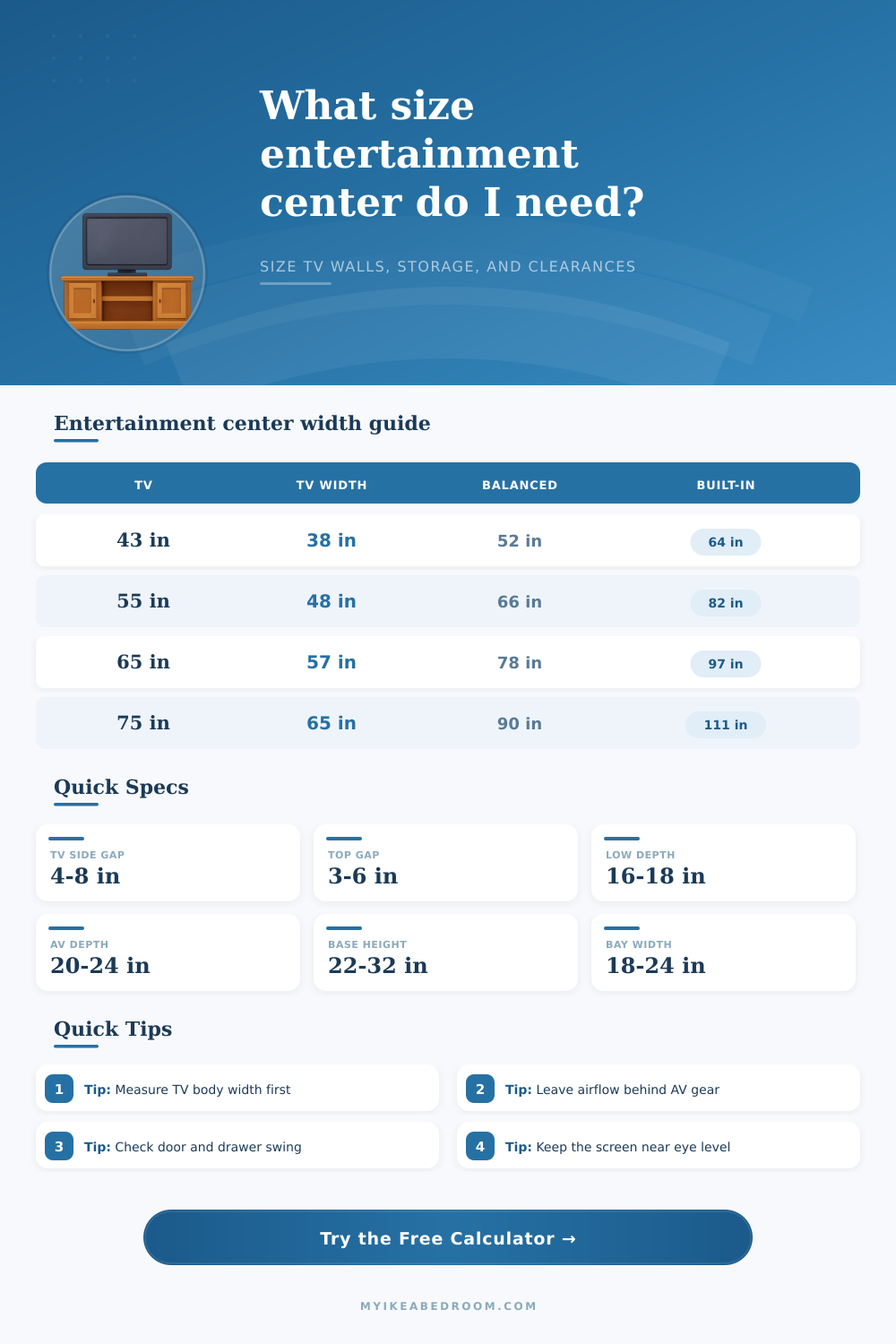
| TV diagonal | Approx TV body width | Compact center | Balanced center | Built-in center |
|---|---|---|---|---|
| 43 in | 38 in | 48 to 54 in | 54 to 60 in | 64 to 72 in |
| 55 in | 48 in | 60 to 66 in | 66 to 78 in | 82 to 96 in |
| 65 in | 57 in | 72 to 78 in | 78 to 90 in | 96 to 112 in |
| 75 in | 65 in | 84 to 90 in | 90 to 108 in | 110 to 132 in |
| 85 in | 74 in | 96 to 108 in | 108 to 126 in | 132 to 156 in |
| Gear profile | Typical gear depth | Add for cables | Suggested cabinet depth | Best front style |
|---|---|---|---|---|
| Streaming box and router | 5 to 9 in | 2 in | 12 to 15 in | Closed or open |
| Game console | 11 to 15 in | 3 in | 16 to 20 in | Ventilated door |
| Soundbar shelf | 4 to 7 in | 2 in | 10 to 14 in | Open shelf |
| AV receiver | 15 to 18 in | 4 to 6 in | 20 to 24 in | Open or mesh |
| Record player | 14 to 17 in | 2 in | 18 to 22 in | Open top bay |
| Clearance area | Minimum | Comfortable | Why it matters | Calculator input |
|---|---|---|---|---|
| Beside TV | 2 in each side | 4 to 8 in each side | Keeps towers from pinching the screen | Side TV clearance |
| Above TV | 2 in | 3 to 6 in | Helps with heat and visual balance | Top clearance |
| Behind components | 2 in | 4 to 6 in | Allows cable bends and airflow | Deepest component depth |
| In front of cabinets | 12 in | 18 to 30 in | Lets drawers and doors open cleanly | Door and drawer clearance |
| To wall ends | 3 in | 6 to 12 in | Avoids a squeezed built-in look | Usable wall width |
| Room setup | Typical TV | Suggested width | Suggested height | Suggested depth |
|---|---|---|---|---|
| Apartment living room | 43 to 50 in | 60 to 78 in | 24 to 60 in | 15 to 18 in |
| Bedroom media cabinet | 43 to 55 in | 54 to 84 in | 28 to 64 in | 14 to 18 in |
| Family room wall unit | 55 to 75 in | 84 to 132 in | 72 to 90 in | 18 to 24 in |
| Built-in alcove | 55 to 85 in | 96 to 156 in | 78 to ceiling | 18 to 24 in |
| Home theater wall | 75 to 98 in | 120 to 180 in | 72 to 96 in | 20 to 26 in |
Measure the TV body, not just the diagonal. Two 65 inch TVs can have different outer widths, foot positions, and cable exits. Manufacturer width is the best input when a unit has a tight opening.
Depth is usually set by the deepest component. A shallow cabinet can look clean, but an AV receiver, console, or record player may need 4 to 6 inches behind it for plugs, HDMI bends, and ventilation.
Consider this: there’s a big ol’ box, a wall that would be perfect for it, and you’re standing in the middle of a livig room. Chances are that the cabinet won’t fit properly, nor will the screen be at eye level. Knowing the size of items in relation to your own height is important when sizing up an entertainment center.
With a calculator tool, you’ll transform vague uncertainty into precise measurements before buying. Don’t rely solely on diagonal size either; that’s what I had at first and found out a sixty-five inch screen doesn’t slip into a sixty-five inch gap. TVs is rectangular and unless you have an especially narrow one with weird speakers or bezel, you want to know how wide the thing is. If you leave the override box blank it will estimate the footprint for you. Otherwise enter the precise dimensions from maker. It only takes a second but can save some guessing later as you slide it around in a snug area.
How to Choose the Right Size for Your TV Stand
Is it looking too big (out-of-proportion) compared to what’s around you? That’s about width… If the piece of furnitures is as wide or narrower than the screen, it looks unstable. The calculator have presets for Built-In, Balanced & Compact Looks. Generally speaking, a Balanced look will need approximately 1.5x as much space in total width as the width of the TV’s body as this allows for sufficient space for storage while not completely separating the TV from the room itself. For reference, the tables indicates how much more space horizontally (more than a small screen) is needed to achieve this comfortabley proportionality on larger screens.
The majority of failed plans stem from assuming that a standard cabinet can accommodate any device. Game consoles and AV receivers in particular are far deeper than their exterior dimensions suggest, requiring additional space behind them to allow bending of cables and dissipation of heat. Placing the cabinet back flush with the wall will prevent these devices fitting entirely, or force them to hang out awkwardly. By taking into account the depth of your deepest component, the calculator provide appropriate space for wiring and makes certain the furniture itself has enough depth to conceal the technology inside.
Most people place their TV mount way too high, often ending up with screens placed near eye level when standing but way too high when sitting down. So it’s important that the center of the screen is roughly on or slightly beneath the line of your seated eyes so you don’t have to strain your neck for hours on end. This is what the tool will suggest based off your seated eye height. If you’re mounting it inbuilt, it also considers ceiling height. This ensures you leave enough vertical space above the TV so it doesn’t feel cramped against the molding.
Depending on the number of devices you have (and their capabilities), storage requirements will differ: While someone who’s just using a streaming stick for now probably only needs one shelf, a serious home theater fan might need several open bays to fit a receiver, multiple consoles and more, all while making sure everything stay properly ventilated. To meet these different needs, the calculator will adjust its recommendation based on your component count and how much you use each device. You might want to keep things clean by hiding them in sleek closed cabinets, or keep your gear cool on open shelves where you’ll constantly have to pick up after it.
Invisible Design: It’s called “clearance,” and you know what happens when you don’t have any? Air doesn’t circulate, and neither do your eyeballs, as they stare at one big solid block of something. The Top and Side Clearance inputs lets you play with negative space and see just how much your wall can handle before things start looking too cluttered vs curated. And you can watch the visual preview update in real-time so you know if you’re on the money or not.
Measure twice, it’s the golden rule, since these numbers matter for making sure your tech fits nicely into your home, not overpowers it. When done right, a good-looking entertainment center vanishes into the background while hiding those pesky cables. It puts your backside in a comfy posture, transforming a bunch of gadgets into a fully functional living room. You should of checked the depth first.