Dual Monitor Width Calculator
Estimate the real left-to-right footprint of two monitors from diagonal size, aspect ratio, portrait or landscape orientation, inward angle, bezel gap, desk width, desk depth, and side clearance.
Pick a common two-screen layout, then adjust the angle, bezel gap, portrait mix, and desk dimensions to match your workspace.
| Monitor type | Diagonal | Aspect ratio | Landscape width | Portrait width |
|---|---|---|---|---|
| Compact office | 22 in | 16:9 | 19.2 in / 48.7 cm | 10.8 in / 27.4 cm |
| Standard office | 24 in | 16:9 | 20.9 in / 53.1 cm | 11.8 in / 29.9 cm |
| Large productivity | 27 in | 16:9 | 23.5 in / 59.8 cm | 13.2 in / 33.6 cm |
| Taller productivity | 27 in | 16:10 | 22.9 in / 58.2 cm | 14.3 in / 36.4 cm |
| Large creative | 32 in | 16:9 | 27.9 in / 70.8 cm | 15.7 in / 39.9 cm |
| Ultrawide | 34 in | 21:9 | 31.3 in / 79.6 cm | 13.4 in / 34.1 cm |
| Pair example | Angle each side | Projected span | Width saved | Extra depth cue |
|---|---|---|---|---|
| Two 24 in 16:9 | 0° | 42.3 in / 107.4 cm | 0 in / 0 cm | No angle depth added. |
| Two 24 in 16:9 | 15° | 41.0 in / 104.1 cm | 1.4 in / 3.6 cm | Each side reaches about 5.4 in deeper. |
| Two 27 in 16:9 | 20° | 44.6 in / 113.3 cm | 3.4 in / 8.6 cm | Each side reaches about 8.0 in deeper. |
| Two 32 in 16:9 | 25° | 51.1 in / 129.8 cm | 4.8 in / 12.2 cm | Each side reaches about 11.8 in deeper. |
| 34 in plus 27 in | 20° | 52.0 in / 132.1 cm | 4.2 in / 10.6 cm | Ultrawide side drives the depth need. |
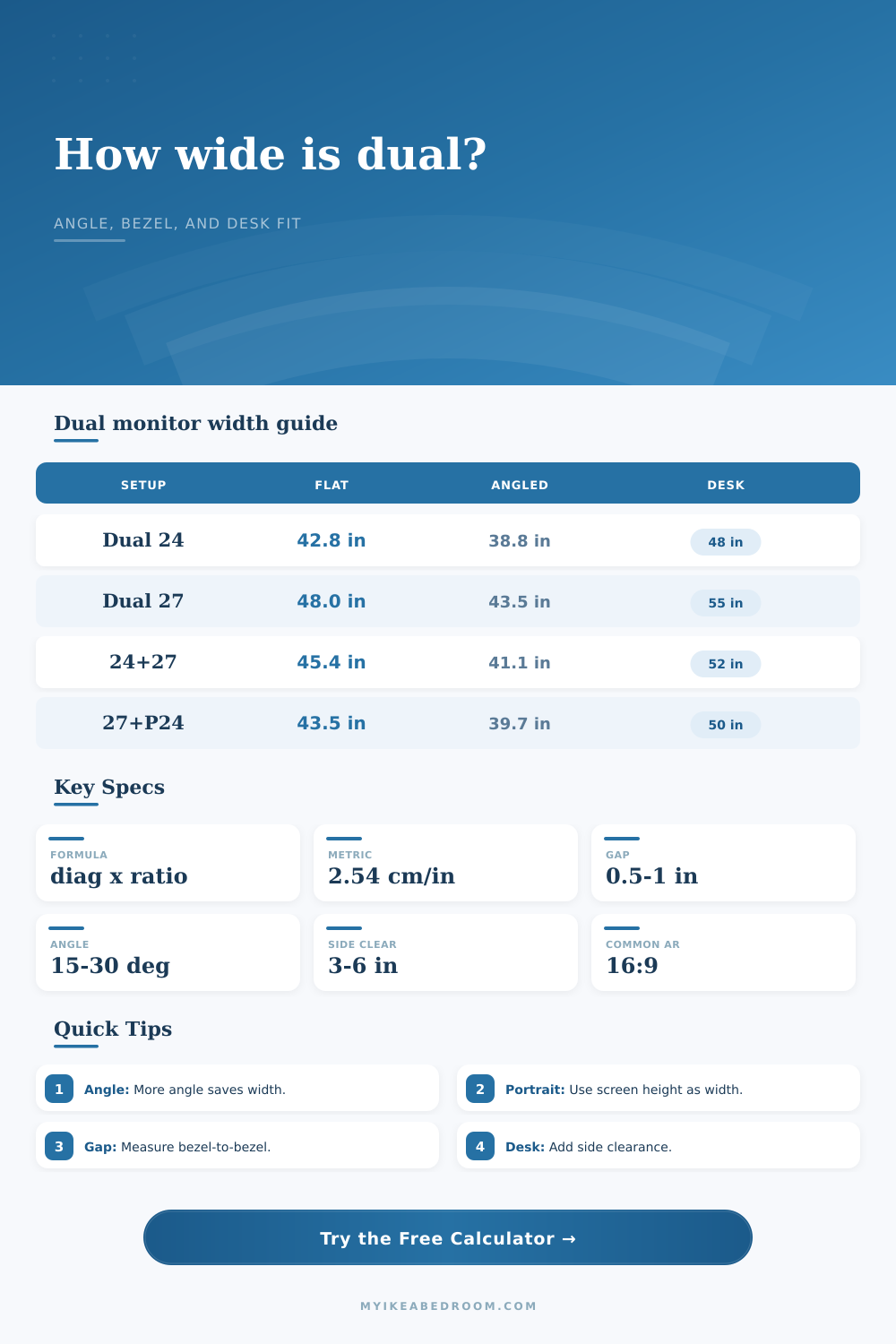
| Setup | Flat span | Angled span | Desk width target | Planning note |
|---|---|---|---|---|
| Dual 22 in landscape | 38.8 in / 98.5 cm | 36.5 in / 92.7 cm | 48 in / 122 cm | Works on a compact desk with modest side clearance. |
| Dual 24 in landscape | 42.3 in / 107.4 cm | 39.6 in / 100.6 cm | 48 to 55 in / 122 to 140 cm | Typical home-office dual-screen arrangement. |
| Dual 27 in landscape | 47.5 in / 120.7 cm | 44.5 in / 113.0 cm | 55 to 63 in / 140 to 160 cm | Needs more side room for speakers or a lamp. |
| 27 in plus 24 in portrait | 35.8 in / 90.9 cm | 34.1 in / 86.6 cm | 48 to 55 in / 122 to 140 cm | Portrait secondary can save a lot of width. |
| 34 in plus 27 in | 55.3 in / 140.5 cm | 52.0 in / 132.1 cm | 63 to 72 in / 160 to 183 cm | Check both width and depth before committing. |
| Measurement | Compact value | Comfort value | Use in calculator |
|---|---|---|---|
| Bezel gap | 0 to 0.5 in / 0 to 1 cm | 0.75 to 1.5 in / 2 to 4 cm | Adds once between the two monitors. |
| Side clearance each end | 2 to 3 in / 5 to 8 cm | 4 to 6 in / 10 to 15 cm | Adds on both outer sides of the pair. |
| Rear wall clearance | 2 in / 5 cm | 3 to 5 in / 8 to 13 cm | Protects cable bend and arm movement. |
| Stand depth allowance | 6 to 8 in / 15 to 20 cm | 9 to 12 in / 23 to 30 cm | Combined with angled depth swing. |
Use the diagonal formula: A 27 inch 16:9 screen is not 27 inches wide. The calculator derives width from diagonal and aspect ratio before adding gaps.
Account for angle depth: Angling two monitors inward narrows the footprint, but the outside corners move toward you and may need a deeper desk.
Portrait changes the width: A portrait secondary monitor uses its calculated height as the left-to-right footprint, which can make a mixed layout much easier to fit.
Measure the clear desk: Side panels, shelves, monitor arms, cable trays, wall gaps, and speaker stands can reduce the useful width even on a large desktop.
Don’t just buy a monitor based off its diagonal size; you should think in terms of width and depth instead. When you see something with a twenty-seven inch display, that sounds good right? But then you put two next to each other and find out they is almost four feet across your desk. This is where you go wrong.
The diagonal number doesn’t tell you anything about the actualy physical width or depth of your work area. The number only tells you length between opposite corners. It completely disregards what sort of shape that might be.
Why Diagonal Size Is Not Enough
If you want to know whether it will fit on your desk, you need to think in terms of physical width and depth, not marketing numbers.
Of course, the calculator does all that geometry for you (above). It use your exact monitor aspect ratio and size to calculate the actual screen width. It adjusts for bezel gap, subtracts for any inward angling, and even gives room for necessary side clearance.
This tells you how far back from edges of your screens you want to sit. Everything else falls into place. That’s the answer to “is my desk too small?” The answer is right there.
If your primary monitor is landscape but your secondary is portrait, the tool flip those numbers to save space; the height of screen becomes the horizontal footprint in portrait mode.
Typically you’ll angle the monitors inwards so the total width become smaller. But there’s a catch: when you angle the monitors inwards to frame your view, their outer corners will come forward (closer to you). So now the span from one side to another is smaller, but the front-to-back requirement go up. What appears to be wide enough from a top-down sketch may end up being more shallow after you angle the monitors.
That’s why the calculator factors in this tradeoff: it tells you how much narrower you get as well as how much deeper you has to go. You may find yourself hitting the wall before you’ve fully adjusted the monitor angle, if your desk is just two feet deep.
Size does matter, specifically the aspect ratio. For example, if two monitors has the same diagonal size, the one with a standard sixteen-by-nine aspect ratio will be wider than the one with a sixteen-by-ten aspect ratio. And that’s important, because the latter is taller. It’ll give you more space on a cramped desk.
For those who’re out of space, swapping your second monitor to a taller aspect ratio lets you free up some inches without sacrificing any vertical viewing space. The page’s reference tables provides the breakdown for popular sizes so you can easily visualize just how much extra breathing room you’ll get with a different aspect ratio.
Don’t neglect the bezel gap. Although moddern monitors have slim borders, those borders are still there. If you’re cramming two big screens into an already small area, that half inch can add up. You can specify exactly how much there is (and how much side clearance you’d like), too.
Two inches is all some folks require for elbow room; others need four or five inches to keep from knocking over a coffee mug. Either way, the calculator account for this in finding total required width. That’s a real-world number, not some kind of theoretical minimum.
Consider the stand depth allowance and determine the depth of your clamp zone if you are using monitor arms. Monitor arms can saves valuable surface space but they demand room underneath a grommet hole or beyond the edge of the desk. This input handles this.
It guarantees that the overall footprint takes into account both the screens and the hardware itself. This is particularly relevant if you work with fixed desk that lacks much rear clearance.
The bottom line: finding the right fit for a dual monitor configuration is all about tradeoffs. Comfortable margins vs. Tight fits; screen size vs. Aspect ratio; depth vs. Width.
The calculator doesn’t dictate your purchase. It measures the price (in terms of physical space), that each purchase will cost you.
Carefully measure the width of your clear desk, taking into account side panels, walls, legs, etc. Run the numbers. Positive margin? Good deal. Negative margin? Time to rethink the orientation, the angle, or perhaps even the desk itself.
A bit of math up front could of saved a lot of headaches down the road.