Desk Monitor Riser Height Calculator
Find the monitor riser height that puts your visible screen center near a neutral gaze line while checking shelf thickness, monitor base fit, and keyboard storage clearance.
Start with a common desk setup, then adjust the eye height, monitor size, stand offset, and riser shelf dimensions to match the actual workstation.
Balanced riser target
Enter your desk and monitor measurements, then calculate to see the shelf lift, screen center, and storage clearance.
Formula: recommended riser height = target visible screen bottom - desktop height - monitor stand offset.
Fit check: the calculator compares monitor base width and depth to the riser top, then checks usable clearance below the shelf after shelf thickness.
| Riser height | Best use | Typical screen change | Storage clearance | Watch point |
|---|---|---|---|---|
| 1 to 2 in | Small adjustment for low monitor stands | Raises screen center slightly | Little or no keyboard storage | May not clear thick keyboards |
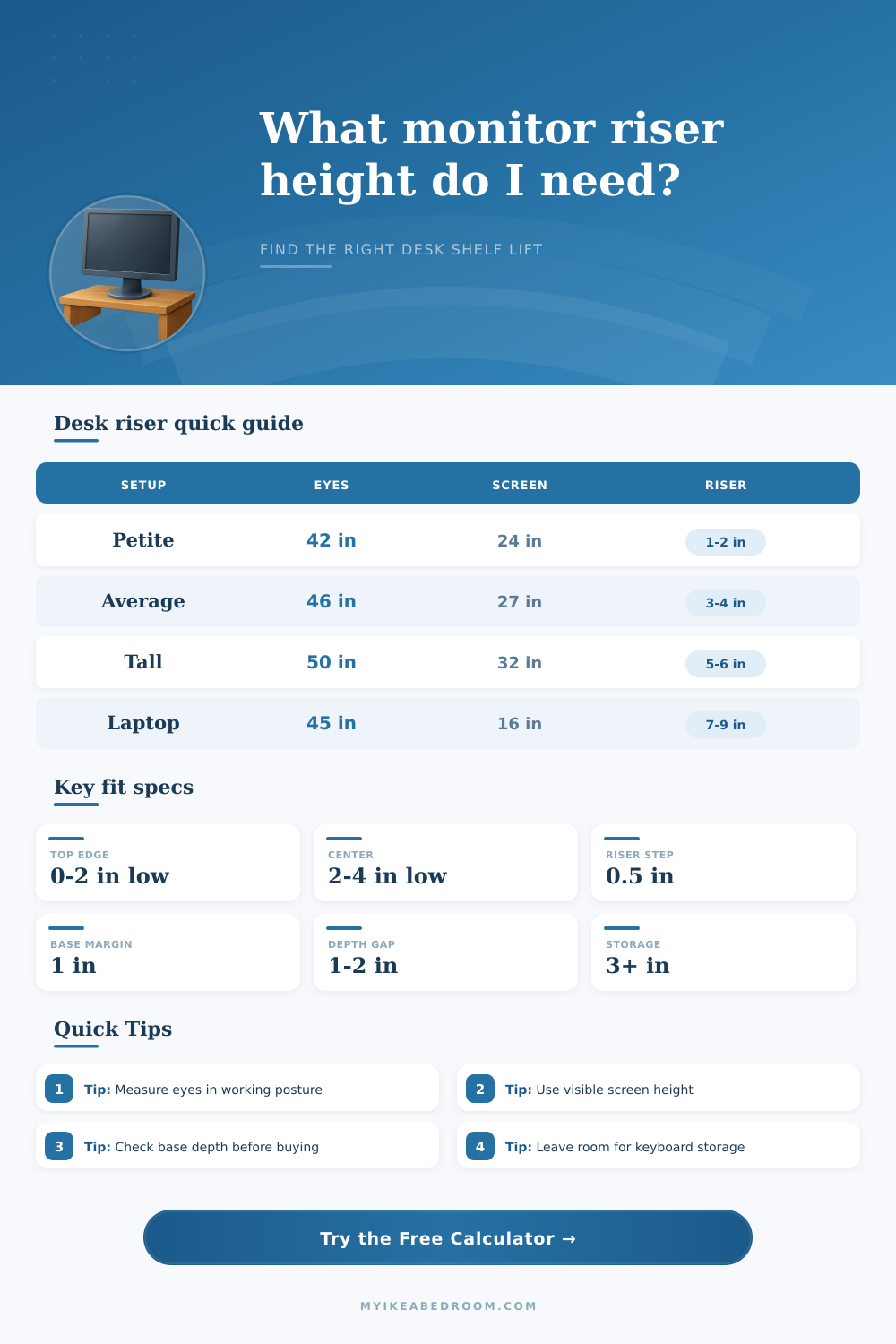
| 3 to 4 in | Most seated desk setups | Often enough for 24 to 27 in screens | Fits slim keyboard or notebook | Check top edge for shorter users |
| 5 to 6 in | Tall users or low fixed stands | Large lift without using an arm | Useful open shelf area | Can place top edge above eyes |
| 7 to 9 in | Laptop screen lift with external keyboard | Brings small screens closer to eye line | Plenty of storage clearance | Needs stable base and adequate depth |
| Screen | 16:9 height | 16:10 height | 21:9 height | Riser note |
|---|---|---|---|---|
| 24 in | 11.8 in | 12.7 in | 9.4 in | Compact monitor, modest lift |
| 27 in | 13.2 in | 14.3 in | 10.6 in | Most common home office target |
| 32 in | 15.7 in | 17.0 in | 12.6 in | Top edge rises quickly |
| 34 in | 16.7 in | 18.0 in | 13.4 in | Often wide with lower center |
| Item | Measure | Minimum margin | Comfort margin | Why it matters |
|---|---|---|---|---|
| Monitor base width | Left to right base footprint | 0.5 in each side | 1 in each side | Prevents edge overhang and wobble |
| Monitor base depth | Front to back base footprint | 0.75 in total | 1.5 in total | Keeps the base fully supported |
| Keyboard storage | Tallest stored item | 0.25 in above item | 0.75 in above item | Allows easy sliding under the shelf |
| Shelf thickness | Top board thickness | Subtract from opening | Use exact measurement | Thick shelves reduce usable clearance |
| Workspace | Eye height | Monitor | Stand offset | Likely riser |
|---|---|---|---|---|
| Small bedroom desk | 43 in | 24 in 16:9 | 6 in | 1 to 2 in |
| Standard home office | 46 in | 27 in 16:9 | 6.5 in | 3 to 4 in |
| Tall seated user | 50 in | 32 in 16:9 | 6.5 in | 5 to 6 in |
| Laptop with keyboard | 45 in | 15.6 in 16:9 | 1 in | 8 to 9 in |
| Standing desk | 62 in | 27 in 16:9 | 6.5 in | 4 to 6 in |
Measure the visible screen, not the frame. The calculation uses the panel bottom, center, and top because bezels and monitor chins do not affect gaze height.
Check the actual stand offset. Two monitors with the same diagonal can need different riser heights if one stand already holds the screen much higher.
Confirm shelf footprint before choosing height. A perfect height still fails if the monitor base is deeper than the riser top.
Leave under-shelf clearance only if you use it. A storage-first riser can push the screen too high for a shorter seated user.
Unless you have a sore neck, you probably haven’t thought much about monitor height… and that’s the problem. Almost every person who moves their computer around, or switches between different screens ends up in this position: they’ve tweaked things until it feel right, but it involves either slouching down or craning their neck up. Over the course of an eight-hour workday, all that minor discomfort add up.
You want to be looking at a neutral gaze, with roughly one-third of the screen at eye level, allowing you to stare straight ahead instead of looking up or down. To get there, it’s a matter of geometry (not guesswork). If you know your measurements, then the calculator does all the math for you (above); saving you the pain of trying out cardboard boxes and stacks of books.
How to Find the Perfect Monitor Height
It takes into account seated eye height, rather than standing height; what’s important is how high up on your desk you see when you’re sitting down. It also includes level of your desk surface. Then it accounts for the height of the screen you can actualy see, not the diagonal number marketed by manufacturers, but the height of pixels you’re actually seeing. Why? Because different manufacturer have wildly varying bezel sizes. A 27″ monitor with thin bezels will offer more vertical space then a similarly sized old monitor of the same diagonal measurement.
The calculator figures out roughly how far away from your eyes the center of that viewable portion should of be. Few folks realize how much their monitor stand impacts the overall height. The plastic pedestal holding up your display? That’s typically two or three inches thick on its own. Add a riser and forget about that already-present elevation and guess what, you’ll be staring at the ceiling. To avoid this mistake, the calculator requests the offset caused by your monitor stand. It deducts the base height from desired value. This allows you to calculate exactly how tall the shelf must be, rather than just how high the monitor itself reach. Again, it may seem like a minor point, but it makes all the difference when determining if something will fit.
But physical footprint is another thing. Who wants their monitor hanging over the side like a cliff-side home with a riser? The tool measures your monitor size, its width and depth… Compared to the shelf you tell it about. If the base is wider than the shelf, your monitor will fall over. Ideally, you have at least an inch of clearance all around so the setup is stable. This keeps your head from wobbling as you turn from side to side or lean in closer to read more carefuly. This also keeps cables from getting trapped underneath the rim of the stand. Who cares about stability until they drop a four-hundred-dollar display on the floor? At that point, stability becomes the most important thing in the whole goddamn room.
Another overlooked variable is under-riser storage. Maybe you’re hoping to store your keyboard out of the way so you can free up some wrist space. What you didn’t realize was the thickness of the shelf beneath it. For instance, maybe that’s made from a solid piece of wood and is an inch thick, which reduces your clearance space. Perhaps you’d like enough room for both a mousepad and mechanical keyboard? That will add two inches, requiring you to account for its thickness. The calculator shows the total clearance space minus the board itself. It weighs these conflicting requirements. This forces you to decide if aligning your eyes perfectly is worth hiding your hands.
Generic advice often fails because one size fits no one when head size and trunk length vary so much. But what if you’re over six feet? You’re probably going to be looking down at your screen’s lower bezel with that standard three inches of riser. That’s why the tool adjusts its target gaze line for the input height. For shorter people, it’s just the reverse: They might only need a small amount of rise, but now they’ve got top of the screen right above their brows. Generic recommendations obviously aren’t doing anyone any good. With such diverse lengths from trunk to head, there’s no one-size-fits-all here.
If you have an ultrawide monitor or you’re sitting at a laptop stand, the tool’s reference tables provide context so you can see how common those things are. That small monitor, when positioned low on your desk, isn’t an unusual seven-inch lift. It just appears weird in relation to a thirty-two-inch one. Normal depends on context.
Run your own numbers through the calculator. See clearly where you need to be. Stop guessing; begin measuring. Your neck will thank you for the precision.