Conference Room TV Size Calculator
Size a meeting room display from real seating distances, room depth, table depth, resolution, content type, viewing angle target, mounting height, and camera or speaker clearance.
Pick a room type, then tune the nearest and farthest seats, display resolution, mounting line, camera space, and participant count.
Display sizing breakdown
--
These cards update from your farthest and nearest seat distances, so you can compare standard TV sizes against the calculated recommendation.
55 in
Run the calculator to compare this size.
65 in
Run the calculator to compare this size.
75 in
Run the calculator to compare this size.
86 in
Run the calculator to compare this size.
| Content type | Comfort target | Use when | Watchout |
|---|---|---|---|
| Video calls and faces | 24° to 30° | People are the primary visual | Too large can feel theatrical near the front row |
| Slides and dashboards | 30° to 36° | Charts, status boards, and normal presentation text | Farthest seats may need larger text below 30° |
| Spreadsheets and dense text | 34° to 40° | Fine rows, code, finance sheets, or small UI text | Nearest seats can exceed a comfortable 45° |
| Training media mix | 28° to 34° | Mixed video, slides, whiteboard camera, and demos | Check side seats for off-axis viewing |
| Agenda or room signage | 20° to 26° | Short glanceable content, schedules, and room status | Not enough for dense presentation slides |
| Resolution | Best conference use | Text detail | Practical note |
|---|---|---|---|
| 1080p Full HD | Small huddle rooms | Large slides and video | Use larger UI scaling for seats past 8 ft |
| 1440p QHD | Medium rooms | Dashboards with moderate detail | Sharper than 1080p on 65 in to 75 in screens |
| 4K UHD | Most boardrooms | Small text, shared apps, and spreadsheets | Common choice for 75 in to 98 in displays |
| 8K UHD | Very large displays | Dense content at 98 in and above | Source quality and app scaling still matter |
| Room type | Typical seats | Farthest seat | Common display range |
|---|---|---|---|
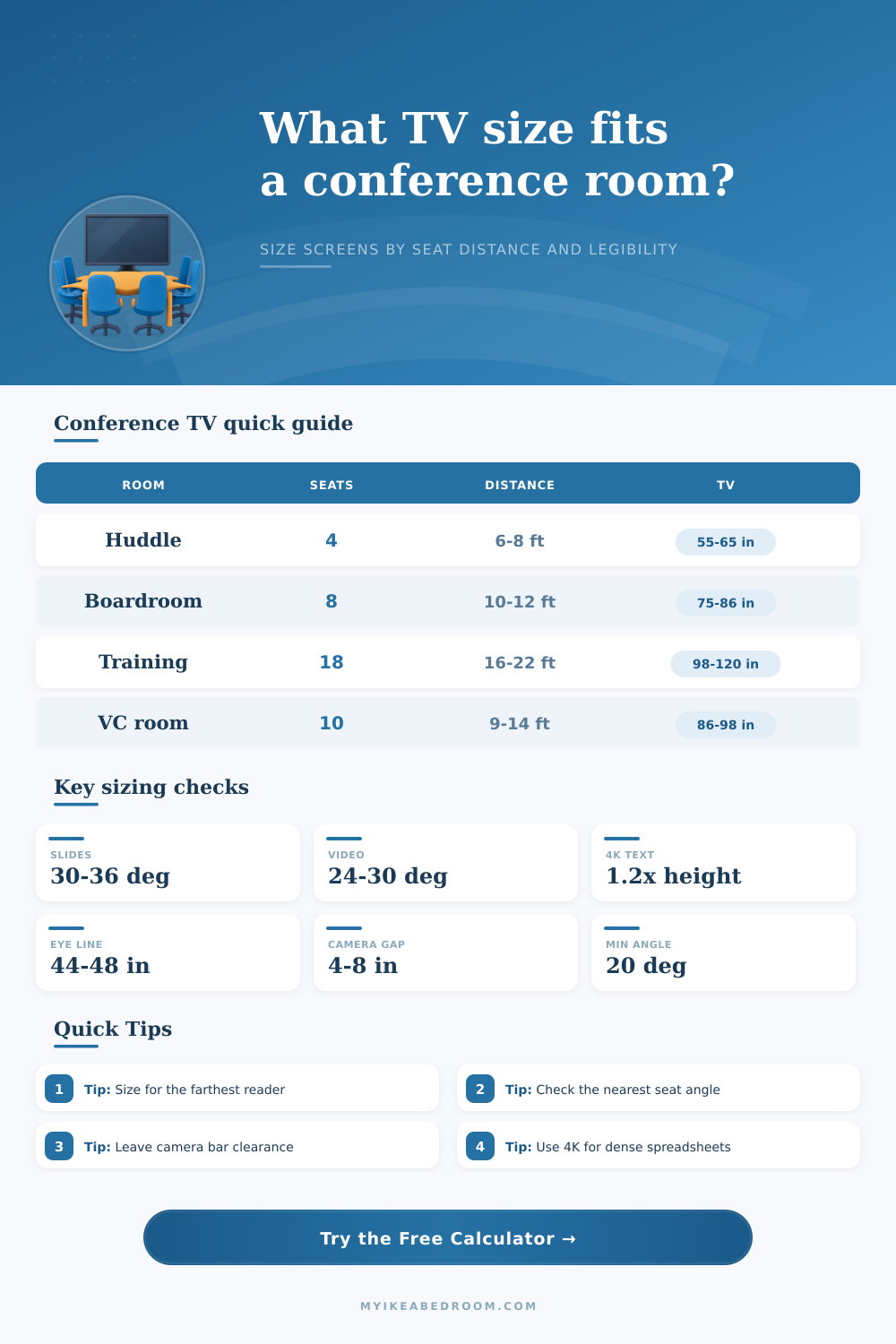
| Small huddle room | 3 to 5 people | 6 ft to 8 ft | 55 in to 65 in |
| 8-seat boardroom | 6 to 8 people | 10 ft to 12 ft | 75 in to 86 in |
| 12-seat boardroom | 10 to 12 people | 12 ft to 16 ft | 86 in to 98 in |
| Training room | 16 to 30 people | 18 ft to 28 ft | 98 in to 120 in plus |
| Video conference room | 6 to 12 people | 9 ft to 14 ft | 75 in to 98 in |
| Mounting check | Typical target | Why it matters | Calculator use |
|---|---|---|---|
| Seated eye height | 42 in to 48 in | Keeps the image close to natural sight line | Feeds centerline target |
| Screen bottom | 34 in to 42 in | Clears table items and seated heads | Checked against usable bottom input |
| Camera bar gap | 4 in to 8 in | Leaves space for room camera or speaker bar | Added above screen height |
| Top of display | Below ceiling gear | Avoids vents, soffits, and acoustic panels | Reported in breakdown |
When you choose an screen for a professional room, you must take into account the distance from each viewer to the screen. Many people will consider the size of the wall when they chooses a screen for the room, but this does not take into account the distance from the screen to the farthest viewer in the room. If the distance from the screen to the farthest viewer are too great, those viewers will not be able to read the text on the screen easly.
Thus, you must ensure that the screen you choose is large enough to allow all individual in the room to read the text legibly. The type of content that the screen will display is another factor to consider when choosing the size of the screen. Content such as video calls will require less screen detail then financial spreadsheets or architectural blueprints.
How to Pick the Right Screen Size for a Room
The reason for this is that video calls only require the viewers to be able to recognize the face of the individual on the screen. In contrast, spreadsheets and architectural drawings contains a small amount of text and detail that must be visible to the viewers. Thus, if the screen is too small for the details of the spreadsheets or blueprints, those text will be blurry on the screen.
Therefore, the type of content that will be displayed on the screen will inform the screen size that are necessary for the room. In order to determine the screen size that will best suit the room, it is also important to take the distance from the screen to the viewers into consideration. Such a distance should be measured from the eyes of the person in the last chair in the room to the face of the screen.
If a person measures the screen from the wall to the back of the room, the viewing distance is likely to be underestimate due to the presence of the table and viewers in the room. Thus, by measuring from the eyes of the person in the last chair to the face of the screen, you will obtain an accurately viewing distance for that room. This distance will allow you to properly calculate the screen size that will work best for that room.
Another factor to consider when choosing a screen size is the screen resolution. A screen with 4K resolution may appear sharp on a screen with a size of 55 inch, but the same screen may appear soft when the screen is 120 inches across the room. This is due to the fact that the larger screen will have larger pixels, and larger pixels will have a lower pixel density.
Lower pixel densities makes it harder for individuals to read fine text on the screen. Thus, you must consider the resolution of the screen and the viewing distance to ensure that the text on the screen is legible for everyone in the room when viewing twenty feet from the screen. In addition to the viewing distance, the mounting height of the screen is another factor that impact the viewers in the room.
If the screen is mounted too high above the viewers, it can cause viewers to develop neck strain. To avoid this, the installer should mount the screen to a height that is slightly above the eye level of individuals when they are sitting in their chairs. Additionally, there should be enough space to allow for a camera bar to be mounted above the screen.
If there is not enough space above the screen, the camera will be mounted too close to the ceiling. In this case, the individuals on the screen will be displayed with a downward angle, which can make individuals in the presentation feel uncomfortably while they are viewing the content. Another factor to consider is the distance from the nearest seat in the room to the screen.
If the screen is too large for the nearest seat, the individual sitting in that nearest seat may have to turn their head to view the screen. This could be uncomfortable for the individual. Thus, you must ensure that the screen is not so large that the size of the screen overwhelms the nearest seat.
Therefore, by considering the distance of the nearest seat to the screen, you can ensure that the screen is comfortable for individuals in the closest seat. Not all rooms are the same, and there are different screen size that are appropriate for each type of room. For example, huddle rooms have screens of smaller sizes than training and presentation rooms.
This is due to the fact that training rooms have individuals who is sitting in the back of the room who must also be able to view the screen. Thus, room configuration tables can help screen designer and architects understand the number of screens of each size that should be in each type of room. If these tables include factors like the distance to the farthest reader and the mounting height of the screen, it will allow them to calculate the screen size needed for each location so they can focus on the data and the faces of their colleague.