🎮 Gaming Desk Height Calculator
Find your ideal ergonomic desk, chair, and monitor height based on your body measurements
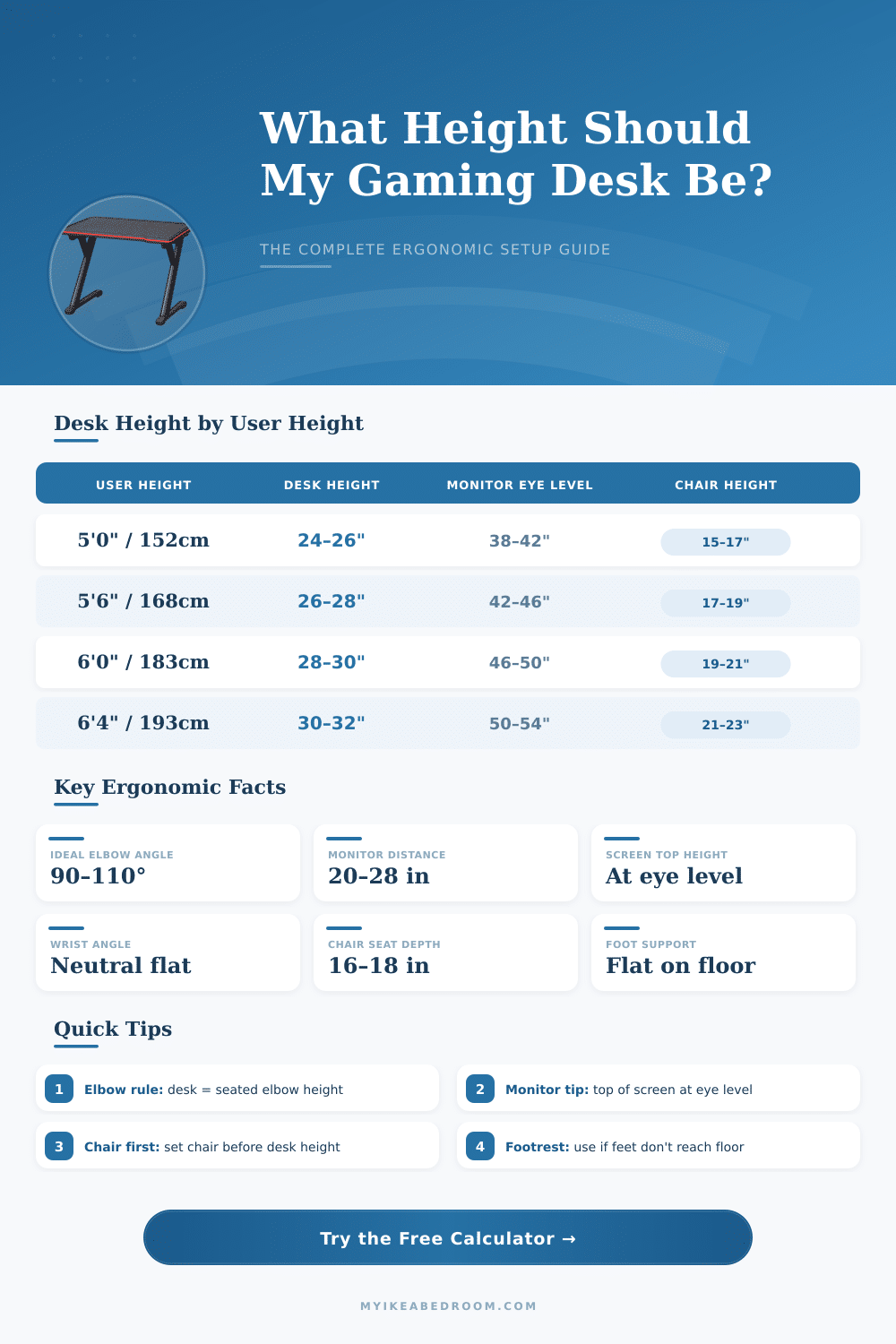
| User Height | Desk Height (in) | Desk Height (cm) | Chair Height (in) | Monitor Eye Level (in) |
|---|---|---|---|---|
| 5'0" / 152 cm | 24–26" | 61–66 cm | 15–17" | 38–42" |
| 5'2" / 157 cm | 24.5–26.5" | 62–67 cm | 15.5–17.5" | 39–43" |
| 5'4" / 163 cm | 25–27" | 64–69 cm | 16–18" | 40–44" |
| 5'6" / 168 cm | 26–28" | 66–71 cm | 17–19" | 42–46" |
| 5'8" / 173 cm | 27–29" | 69–74 cm | 17.5–19.5" | 43–47" |
| 5'10" / 178 cm | 27.5–29.5" | 70–75 cm | 18–20" | 44–48" |
| 6'0" / 183 cm | 28–30" | 71–76 cm | 19–21" | 46–50" |
| 6'2" / 188 cm | 29–31" | 74–79 cm | 20–22" | 48–52" |
| 6'4" / 193 cm | 30–32" | 76–81 cm | 21–23" | 50–54" |
| Monitor Size | Min Distance | Max Distance | Stand Height Range | Notes |
|---|---|---|---|---|
| 24 inch | 20" | 24" | 4–6" above desk | Standard 1080p/1440p |
| 27 inch | 22" | 26" | 4–6" above desk | Most popular gaming size |
| 32 inch | 24" | 28" | 5–7" above desk | Immersive gameplay |
| 34" Ultrawide | 26" | 30" | 5–8" above desk | 21:9 aspect ratio |
| 38" Ultrawide | 28" | 34" | 6–9" above desk | Curved recommended |
| 49" Super UW | 30" | 38" | 7–10" above desk | Dual monitor replacement |
| Chair Type | Seat Height Range | Ideal Desk Height | Armrest Height | Best For |
|---|---|---|---|---|
| Standard Gaming Chair | 16–20" | 26–30" | 25–29" | Long sessions |
| Ergonomic Office Chair | 16–21" | 26–31" | Adjustable | All-day use |
| Compact / Budget Chair | 15–19" | 25–29" | Fixed 24–28" | Casual gaming |
| Kneeling Chair | 22–25" (hip) | 24–26" | N/A | Back pain relief |
| Floor Seating | 6–12" | 16–22" | N/A | Low desk gaming |
| User Height | Standing Desk Height (in) | Standing Desk Height (cm) | Anti-Fatigue Mat |
|---|---|---|---|
| 5'0" / 152 cm | 37–39" | 94–99 cm | Recommended |
| 5'4" / 163 cm | 39–41" | 99–104 cm | Recommended |
| 5'8" / 173 cm | 41–43" | 104–109 cm | Strongly Recommended |
| 6'0" / 183 cm | 43–45" | 109–114 cm | Strongly Recommended |
| 6'4" / 193 cm | 45–47" | 114–119 cm | Essential |
Find the apt height for gaming desk is more important than many believe. For the most many gaming tables, the best range falls between 28 and 30 inches measured from the floor to the surface. That height works well for folks with height around 173 to 178 centimetres.
Naturally, if you are not in that range, whether shorter or taller, probably you need to adjust to something different.
How High Should Your Gaming Desk Be
Here the basic rule for that. Your elbows form a 90-degree corner, when you sit with hands on the keyboard and the mouse. Hold the forearms flat and parallel to the floor and to the surface.
And avoid leaning, keep the back straight. The table must place your elbows at the same level as your trunk, with everything in loose, straight position.
There is a real math method for counting the ideal height according to your body. Take your height in centimetres, multiply it by 0.198, then add 39.27 to get the wanted table height in centimetres. Even so, that only gives a starting point.
Because each person is diferent, personal tastes and physical details weigh just as much as those figures.
Interestingly, some tall players ignore standards and choose tables less high than the usual. Even someone at 190 centimetres can drop to about 26 inches and feel more well, what seems odd, but works for them. The gaming community shows interesting data about this.
In forums of CS:GO, users average tables at 77.3 centimetres, while other groups aim for the range of 75 too 78 centimetres.
Sometimes, setting the chair height can fix a table, that is badly placed. Even so, that fix has limits, your knees and feet maybe will suffer. Problems in the upper body usually matter more, but low physical pain builds during long gaming sessions.
Many finally buy a footrest so that everything works well.
Here something, that folks commonly miss: the monitor height is also important. Perfect table height does not help, if the monitor stands badly placed. A good arm lets you adjust the angle, and you can change it based on the game, that you play, or the task, that you do.
The viewing angle should fall between 20 and 50 degrees below eye level. Too high tables force the neck always up, what almost always causes tension and pain.
Adjustable desks fix many of those troubles. Some models start at around 29.5 inches in the lowest spot and reach above 48 inches up. Others have six settings between 27 and 30 inches, if you like manual fixing.
Electric sit-stand options go more far, from about 26 to 53 inches, and many include memory settings for quickly switching between favourite heights. Picking a table, that is quitewide and deep, also helps, because it gives space for several monitors, extras and the rest.