Soundbar Width for TV Calculator
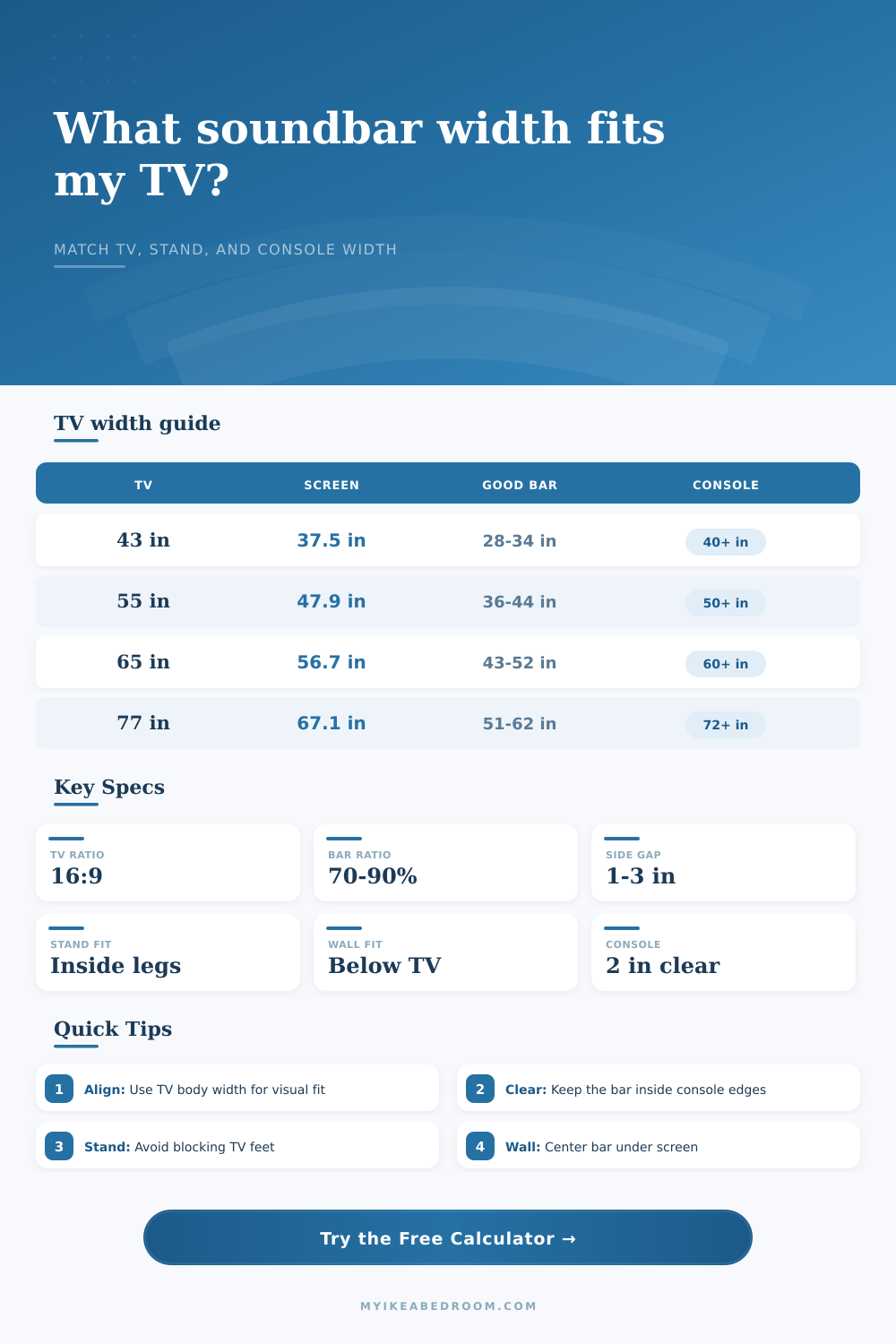
Size a soundbar around TV diagonal, true screen width, stand span, console width, channel class, side clearance, and wall or furniture mounting.
📌Soundbar and TV Width Presets
📏Measure the TV, Stand, and Soundbar Space
🔊Channel Class Width Ratios
📋TV Diagonal to Screen Width Reference
| TV diagonal | 16:9 lit screen width | Estimated body width | Balanced 2.1 to 3.1 soundbar range |
|---|---|---|---|
| 32 in TV | 27.9 in screen | 28.7-29.5 in body | 19-27 in soundbar |
| 43 in TV | 37.5 in screen | 38.3-39.3 in body | 25-36 in soundbar |
| 50 in TV | 43.6 in screen | 44.6-45.8 in body | 29-42 in soundbar |
| 55 in TV | 47.9 in screen | 49.0-50.3 in body | 32-46 in soundbar |
| 65 in TV | 56.7 in screen | 57.8-59.2 in body | 38-54 in soundbar |
| 75 in TV | 65.4 in screen | 66.7-68.4 in body | 43-63 in soundbar |
| 77 in TV | 67.1 in screen | 68.4-70.1 in body | 44-64 in soundbar |
| 85 in TV | 74.1 in screen | 75.6-77.4 in body | 49-71 in soundbar |
🛋Console, Stand, and Mounting Clearance Table
| Placement style | Width limit to check | Clearance target | Best visual rule |
|---|---|---|---|
| On console shelf | Usable console shelf width | At least 2 in per side | Bar can be 70-95% of TV body width |
| Between TV feet | Inside distance between feet | At least 1 in per side | Bar must clear feet before matching TV width |
| In front of TV feet | Console width and TV body width | At least 2 in from console edges | Keep bar centered and below the screen |
| Wall mounted below TV | TV body width or wall bracket span | Use visual symmetry, not shelf width | Bar can approach TV body width |
| Floating shelf below TV | Shelf width minus side clearance | At least 2 in per side | Bar should not overhang the shelf |
📐Aspect Ratio Screen Width Formulas
| Aspect ratio | Width formula from diagonal | Why it matters for soundbars | Example at 65 in diagonal |
|---|---|---|---|
| 16:9 TV | D × 16 / sqrt(16² + 9²) | Most living room TVs use this screen width | 56.7 in screen width |
| 21:9 ultrawide | D × 21 / sqrt(21² + 9²) | A smaller diagonal can still be very wide | 59.8 in screen width |
| 4:3 classic | D × 4 / sqrt(4² + 3²) | Older displays are narrower for the same diagonal | 52.0 in screen width |
| Measured screen | Use tape-measured lit panel width | Best when bezels or screen format are unusual | Entered width overrides formula |
🎯Common TV and Soundbar Width Pairings
| TV and furniture setup | TV body width to use | Soundbar class fit | Width note |
|---|---|---|---|
| 43 in bedroom TV on 39 in stand | About 39 in | Compact 2.0 or slim 2.1 | 26-32 in keeps the look calm |
| 55 in TV on 48 in console | About 50 in | Slim 2.1 or 3.1 | 36-42 in if console edges are tight |
| 65 in TV on 70 in console | About 58-59 in | 3.1 or 5.1 | 44-52 in usually aligns well |
| 75 in wall mounted TV | About 67-68 in | 5.1, 7.1, or Atmos | 56-68 in can look proportional |
| 77 in OLED on wide bench | About 68-70 in | Atmos or wide 5.1 | 58-70 in can match the body |
💡Soundbar Width Fit Notes
The movie fills your field of view (that’s why you bought a big TV). Now you want a soundbar to make explosions loud and dialogue clear so you buy one. You mount the bar on the stand, but something look off. The bar is too wide. Or maybe not wide enough. It’s too thin.
Getting the width correct help maintain sound symmetry and visual balance. When speakers aren’t aligned with your ears and eyes the sound feel disconnected. After plugging in your room’s constraints, the calculator (above) do the rest of the math for you. From there, it translates what you’re familiar with (the size of the diagonal) to what actualy impacts the placement (its true horizontal width).
How to Choose the Right Width for Your Soundbar
The TV itself will be wider than the actual lit up part; most people assume they should place the TV according to their screen size alone. Instead, they should align to that outer frame of bezel. That’s where their bar need to match.
The first thing is the stand width. This is the biggest trap. Moddern TVs often have spreading-out feet (making for narrow space in the middle and big fat feet on the outsides). Measure where your bar would go across the inside of your stand (where it will hit the feet), or consider sliding the bar down to the lower console. There, completely free of the space taken up by the TV itself.
Next, consider how wide the piece of furniture is. The bar shouldn’t sit flush against the side of the shelf. You want some space (typically an inch or two) for the eyes to land. This also stops vibration from moving between the bar and the shelf. How wide is your console? If your console are narrow, you may have to settle for a shorter bar that has more power. Wide = you have room for bars with larger numbers of driver.
That is how you find a happy medium. Your bar will sit securely on your furniture without feeling like it is going to swallow it whole. But then again, it changes the game when you start talking about wall mounting. Now, shelf width doesn’t matter because there’s no console. Now, you’re limited by actual body of the TV. Ideally, the bar hanging right below the mounted screen should be about the same width as the TV. Too short and it’ll look like it makes the whole thing top heavy; too long and it’ll appear as though it’s an entirely separate appliance pasted on to your wall.
There’s no negotiating centering. As soon as it’s off center, the eye immediately go away from the screen. Physical size is another consideration decided by the channel class. For example, a basic 2.0 or 2.1 system will generally keep things slim, spanning about sixty to eighty percent of your TV’s width. If you opt for an Atmos or 5.1 system that includes both upward-firing drivers and a dedicated center channel for dialogue, the setup will span more space, in some cases almost entirely. This means you may require a larger bar, like one that’s 50 inches instead of 40, to make the system look proportional when placed below a 65-inch TV, for instance.
The goal is to make sure the visuals matches the audio setup. The other factor is aspect ratio. Ultrawide monitors extend a lot further on either side, but their overall size are shorter vertically. If you’re using one of those, you need to take into account how long it’ll be across your wall, a standard bar could appear stubby below a 21:9 monitor.
To illustrate these relationships, the tool’s reference tables does the math for more common 16:9 aspect displays (the overwhelming majority of livig room TVs). They tell you that a 55-inch TV typically looks best alongside a bar in the 36- to 44-inch range. This is wide enough to fill out the space without overpowering it.
Measure twice, guess never. Get a tape measure out and measure the screen. Measure the TV stand. Measure your console. Then input actual measurements instead of guessing. You should of used more precision. You’ll see what’s going to work for you and what won’t.
It’s all about harmony. Once the width is right, you don’t notice the equipment anymore. You just notice the picture.