Furniture Budget By Room Calculator
Allocate one user-entered furniture budget across rooms, room groups, furniture category shares, priority weights, and a separate contingency reserve.
Budget allocation results
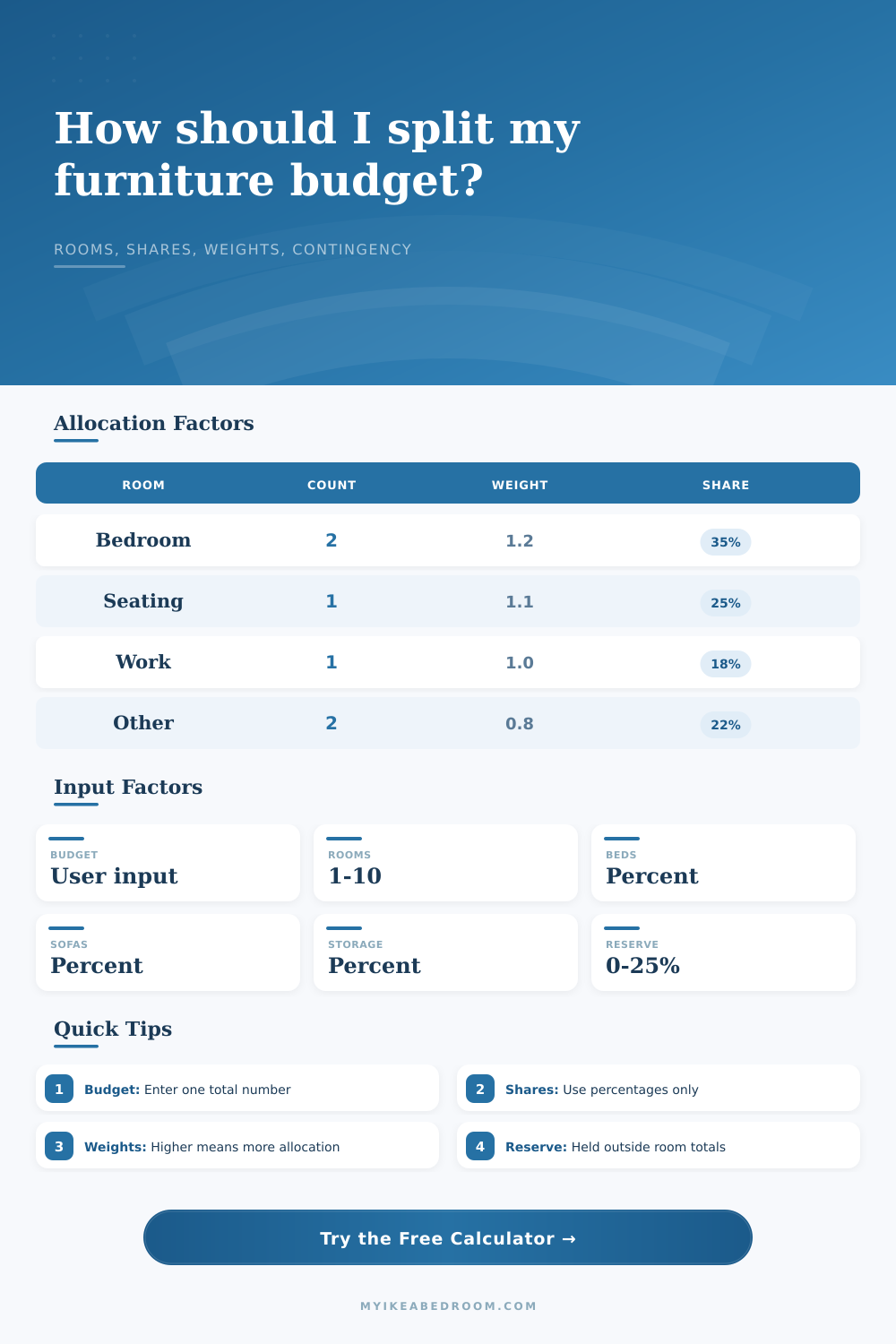
| Room group | Count | Priority weight | Calculated allocation |
|---|---|---|---|
| Bedrooms | 2 | 1.2 | $0 |
| Seating rooms | 1 | 1.1 | $0 |
| Table or work rooms | 1 | 1.0 | $0 |
| Other rooms | 0 | 0.8 | $0 |
| Room group | Category pieces included | Per-room amount | Share of net budget |
|---|---|---|---|
| Bedrooms | Bed, storage, flexible | $0 | 0% |
| Seating rooms | Sofa, storage, flexible | $0 | 0% |
| Table rooms | Table, storage, flexible | $0 | 0% |
| Other rooms | Storage, flexible | $0 | 0% |
| Line | Uses | Formula | Output |
|---|---|---|---|
| Contingency reserve | Total budget and reserve percent | Total x reserve % | Held aside before allocation. |
| Net allocatable budget | Total and contingency | Total - reserve | Amount split across furniture categories. |
| Category allocation | Bed, sofa, storage, table shares | Net x normalized share | Category totals from entered percentages. |
| Priority allocation | Room counts and weights | Group weight / all weights | Storage and flexible amounts split by weighted rooms. |
| Per-room amount | Group total and group count | Group total / room count | Room-level planning amount. |
| Preset | Total rooms | Reserve | Largest share |
|---|---|---|---|
| Studio apartment | 1 | 8% | Storage 30% |
| One bedroom home | 3 | 10% | Bed 36% |
| Two bedroom home | 5 | 10% | Bed 38% |
| Shared kids rooms | 5 | 12% | Storage 35% |
| Office and bedroom | 4 | 10% | Table 28% |
| Whole-home refresh | 8 | 15% | Bed 34% |
| Weight | Meaning in calculator | Effect | Example use |
|---|---|---|---|
| 0 | Excluded from weighted extras | Receives no flexible or storage-weighted extras | Room group is counted only by direct category share. |
| 0.5 | Half-weight group | Receives a smaller flexible allocation | Secondary or lightly furnished room. |
| 1.0 | Baseline group | Receives standard proportional allocation | Neutral room priority. |
| 1.5 | Raised-weight group | Receives a larger flexible allocation | Room group receiving more of the entered budget. |
| 2.0+ | High-weight group | Receives strongly concentrated flexible allocation | Main room group for the current plan. |
Normalize the shares: If bed, sofa, storage, and table shares add above 100%, the calculator scales them back proportionally and sets flexible share to zero.
Use room groups consistently: A room can be represented by the group that best matches the furniture share you want included in the allocation table.
Keep contingency separate: The reserve is removed before room allocation, so room totals always show only the allocatable amount.
Read outputs as math: The largest group and per-room values are calculated from entered counts, percentages, and priority weights only.
There is a classic furniture budget trap. You see this great looking sofa in the showroom. It will look awesome! But what are you going to sleep on? Then you watch your money dissapears to things like storage, lamps, and rugs.
A furniture budget is more than just a number. It’s a decision about where to spend. Which rooms to blow it out on, and which ones to skimp on.
How to Make a Smart Furniture Budget
And once you plug in your priorities and total, the calculator do all the math for you, no need to split hairs between percentages or guess at coefficients. It translates an “I think I’m spending too much” feeling into a clear road map.
Everyone begins in the wrong place. Everyone asks “How much money do I have?” Wrong. The correct question is: “How do I make this room work?”.
A bedroom is not simply four walls and a roof. It’s a storage room, it’s a sleeping room, and it’s frequently a dress-up/dress-down room. A living room is both a media center and a social space.
Why does that matter? If you assume every square foot of your home are the same, you will end up with just a folding chair and a nice coffee table in guest room. And that’s what so many people do wrong.
This is where weights comes in. Each room type has a priority. Typically you’ll want to prioritize bedrooms (they’re expensive), with beds, dressers, and nightstands that can’t be negotiable. Shelving units and wardrobes for storage also tend to have high impact on budgets. Therefore, they should of be prioritized.
When there aren’t weights, the system will distribute equally. Sounds fair right? But it isn’t always practical. Your coat closet doesn’t need as much than your main bedroom. With the calculator, you can bend the scale wherever it makes sense.
And then there are the category shares. What percent do you want to allocate to storage? Sofas? Beds? Tables? Bump up the table share if you love to have people over for dinner parties. That desk and chair allocation will becomes critical if you work from home. Add all these categories together, and they should equal one hundred percent of your spendable amount. Overshoot, and the tool normalizes them. But it’s cleaner just to plan ahead.
Think of these as your design values, they force you to acknowledge what you realy care about.
Contingency is budgeting’s unsung hero. Life happens. Shipping costs goes up. A piece of fabric sucks in real life. Reserving ten to fifteen percent for the unexpected protects against panic buying at the discount outlet. The calculator takes that cushion out first. Then, what do you’ve got left? What can you actualy work with? Separating these two things matters. When you’re staring down a throw pillow and thinking about dropping your safety net, that separation will keep you safe.
Preset: The tool includes sets of room weights for typical situations. It offers more versatility for smaller space. It provides tighter discipline for whole-home refreshes. Shared kids’ rooms has higher storage weights. It’s not guesswork. These are tried-and-tested room weightings reflecting cost realities out there.
So if you don’t know where to begin: select the preset closest to your layout. Then adjust the weights. That’s when the plan gets refined.
The bottom line is that furnitures is an everyday part of your life. It is an investment in how you live your days. You sleep on it. You sit on it. You livig in it.
Without a strategy, what you have is a budget, which is simply a spending limit. With one, you take control. You make informed choices with your eyes open: to buy quality, or to buy quantity, or a mix of the two. You don’t waste money and run out halfway through. You finish strong. That’s how you build a home that doesn’t feel like it was half-finished; it feels complete.