Renovation Contingency Calculator
Estimate a renovation reserve from your base budget, project age, scope complexity, unknown conditions, expected change orders, and selected contingency percentage.
🏠Scope presets
⚙Budget and risk inputs
Contingency planning results
📊Risk factor grid
🧮Formula used
Total planning budget = base budget + contingency reserve + unknown allowance + change allowance + design buffer + permit buffer + approved fixed changes
📋Contingency percentage guide
| Project profile | Typical contingency | When it fits | Calculator setting |
|---|---|---|---|
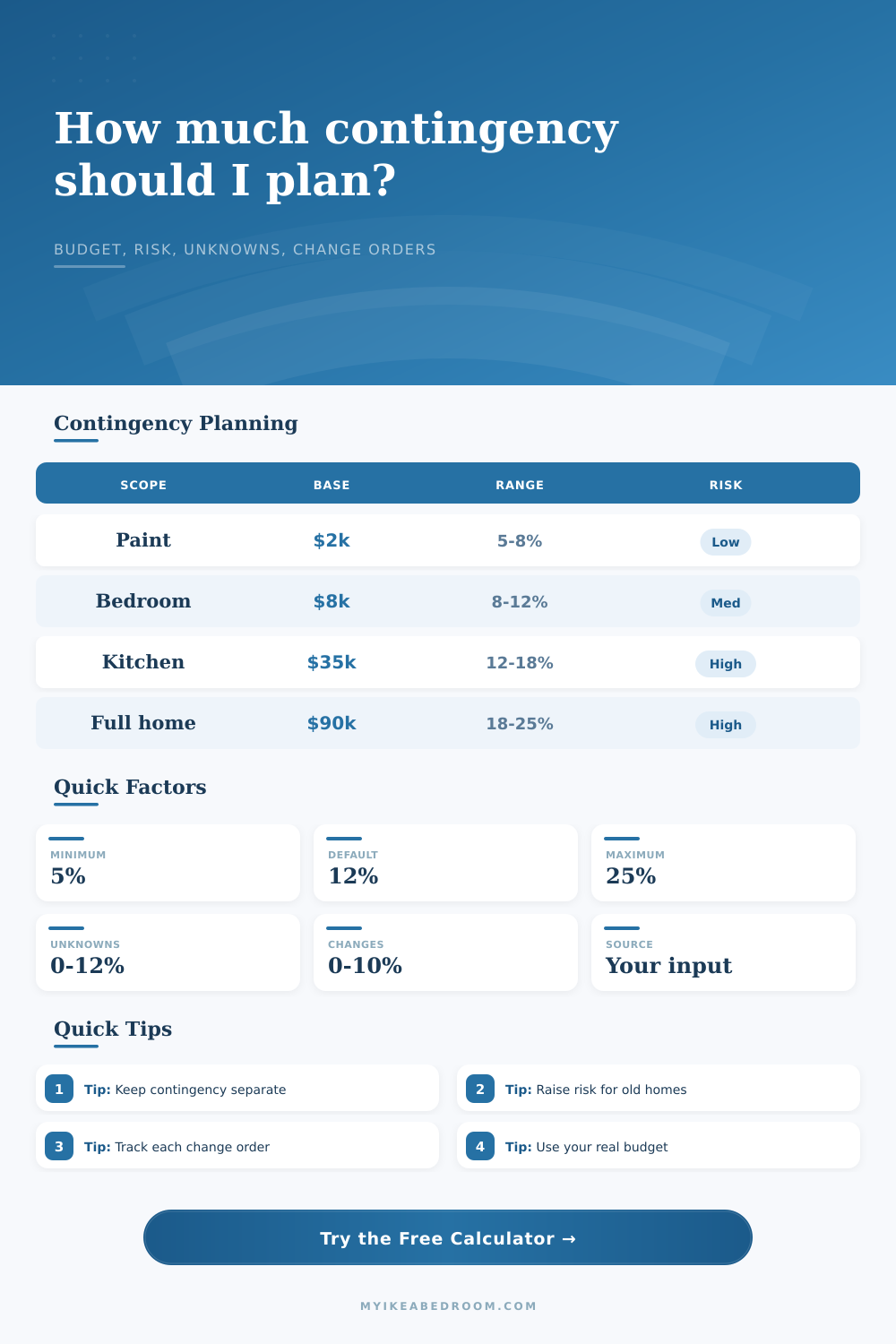
| Cosmetic refresh | 5% to 8% | Paint, hardware, trim, simple surface work with few hidden areas. | Set slider near 5% to 8%. |
| Light room update | 8% to 12% | Bedroom, office, storage, closet, or surface changes with modest unknowns. | Set slider near 8% to 12%. |
| One-room remodel | 12% to 18% | Kitchen, bath, laundry, flooring, or projects involving several trades. | Set slider near 12% to 18%. |
| Major renovation | 18% to 25% | Structural work, additions, older homes, phased whole-home projects. | Set slider near 18% to 25%. |
🏗Unknown and change order reference
| Reserve line | Low input | Medium input | Higher input |
|---|---|---|---|
| Unknown conditions | 0% to 3% | 4% to 8% | 9% to 12%+ |
| Expected change orders | 0% to 2% | 3% to 6% | 7% to 10%+ |
| Design decision buffer | 0% to 1% | 2% to 4% | 5% to 8%+ |
| Permit or inspection buffer | 0% to 1% | 2% to 3% | 4% to 6%+ |
💰Base budget examples
| Base budget | 10% contingency | 15% contingency | 20% contingency |
|---|---|---|---|
| $5,000 | $500 reserve | $750 reserve | $1,000 reserve |
| $15,000 | $1,500 reserve | $2,250 reserve | $3,000 reserve |
| $35,000 | $3,500 reserve | $5,250 reserve | $7,000 reserve |
| $75,000 | $7,500 reserve | $11,250 reserve | $15,000 reserve |
| $120,000 | $12,000 reserve | $18,000 reserve | $24,000 reserve |
🛋Scope preset reference
| Preset | Base budget | Main reserve | Planning note |
|---|---|---|---|
| Paint refresh | $2,500 | 6% | Finish-only work keeps the contingency band low. |
| Bedroom update | $7,500 | 9% | Light scope with a little room for small change orders. |
| Closet buildout | $5,500 | 10% | Built-ins and wall conditions can add measured uncertainty. |
| Bath remodel | $18,000 | 16% | Hidden water, wall, floor, and fixture conditions raise risk. |
| Kitchen remodel | $38,000 | 18% | Multiple trades and layout choices justify a higher reserve. |
| Flooring swap | $12,000 | 13% | Subfloor or transition surprises can affect the plan. |
| Basement finish | $45,000 | 20% | Moisture, framing, mechanicals, and inspection steps add risk. |
| Room addition | $90,000 | 22% | Structural, exterior, and approval risk belongs near the top band. |
| Whole-home phase | $120,000 | 25% | Phased work and many decisions deserve the maximum slider setting. |
💡Contingency planning tips
When most people start a remodel, there’s one number in their mind. This is the contractor cost to do what’s seen, plus a bit more for things they remember seeing mentioned somewhere online. Sounds reasonable. At least until first wall is taken out. What you’re left staring at is typicaly decades of patch jobs, suspect materials and structural oddity that can’t be accounted for up front.
How you address these unknowns is frequently what sets a trouble-free remodel apart from money-pit.
How to Plan Your Remodel Budget
The paper price, or your base budget, is how much you paid (or would pay) for that plan. New cabinets? Check. Fresh paint? You got it. Flooring installed? Yep. It includes all the labor necessary to get this project done. Nice starting point; if only house could cooperate. But houses don’t.
That’s where the difference between paper and reality comes into play: the true expense. To help with that, we have a calculator that breaks numbers down, showing you exactly how much of a reserve you should save based off the type of risk you’re facing.
But here’s the thing: Your selection of inputs matters. Painting is pretty low-risk, it doesn’t involve any changes to hidden systems or structure. But when you start messing around in bathrooms and kitchen, things get complicated fast. Now we’re talking about plumbing, electrical work, maybe even some structural framing. Throw an old home on top of that, and you’ve got yourself another layer of risk. Maybe your subfloor’s soft. Maybe the wiring hasn’t been updated since it was built 40 years ago. The tool adjust for that, knows that a newly built home requires less of a safety net than a historic home.
Separate knowns from unknowns as well. Unknowns include things that is hidden (like opening up a wall to discover mold). That’s not something you can control. Change orders include things like deciding partway into a project that you want to upgrade the light fixture. Those aren’t the same thing. One is a type of cost (mold remediation) and one is another (change order). By lumping them in the same bucket, it becomes difficult to track what money was spent where.
When they’re separated, you can see precisely where the dollars were spent: What did the house throw at me? What did I spend on my preferences? The surprise is coming, and there will be change orders. You’ll realize you like the look of a different countertop material in person. Or you’ll discover something else along the way that wasn’t on your radar. Having this explicitly budgeted removes the sting of the surprise. For changes you’ve already agreed to, list them as a fixed cost. For general fear of additional changes, apply a percent buffer. Knowing the difference keeps you honest about how much money you spend.
And that’s what you come out with: the total planning budget. This is the number you should of. You are safe if you have this number. Compare your held-back cash (the cash outside the project) against the reserve. If your reserve is bigger than your held-back cash, then you’re at risk.
And here’s where people go wrong. They say, “Oh I don’t need that contingency; we won’t need to spend it.” That’s not correct. You don’t get to keep it. The contingency is there for holes in the ceiling.
You also get a risk score calculated from your entries. If you’re being dangerously optimistic or overly cautious, it will tell you that. If you’re realistically thinking about the project, then your score will be moderate. If it’s high, you know to either raise more money or tighten up your plans. On the page, there is also a helpful reference table showing the typical ranges depending on scope. It is handy to see how your thoughts compares to industry standard.
Renovation projects can be an emotional roller coaster. You’ve got that vision in your head for what the room is going to look like when it’s done, and it’s easy to get carried away with that side of things. The math side is cold and hard. It doesn’t give a rip about aesthetics. It doesn’t care if it matches your style. It just wants to know if you’re prepared to pay for the surprises.
Enter in your numbers before those demo guys show up and let the tool tell you where you stand. If the unexpected happens, you’ll already have a plan. The peace of mind you gain from that preparation is worth every single penny. Sure, maybe you don’t end up spending the entire reserve amount, but at least you’ll sleep well knowing it’s there. And when those walls come back together again, looking just as you’d imagined, you’ll know you built it on a solid foundation.