Cable Length for Desk Setup Calculator
Estimate monitor, laptop, dock, peripheral, and power lead lengths from device-to-hub distance, vertical rise or drop, routing path, slack, sit-stand travel, and monitor arm movement.
Choose a real desk layout, then adjust the individual distances to match the route your cables actually follow.
Desk cable length result
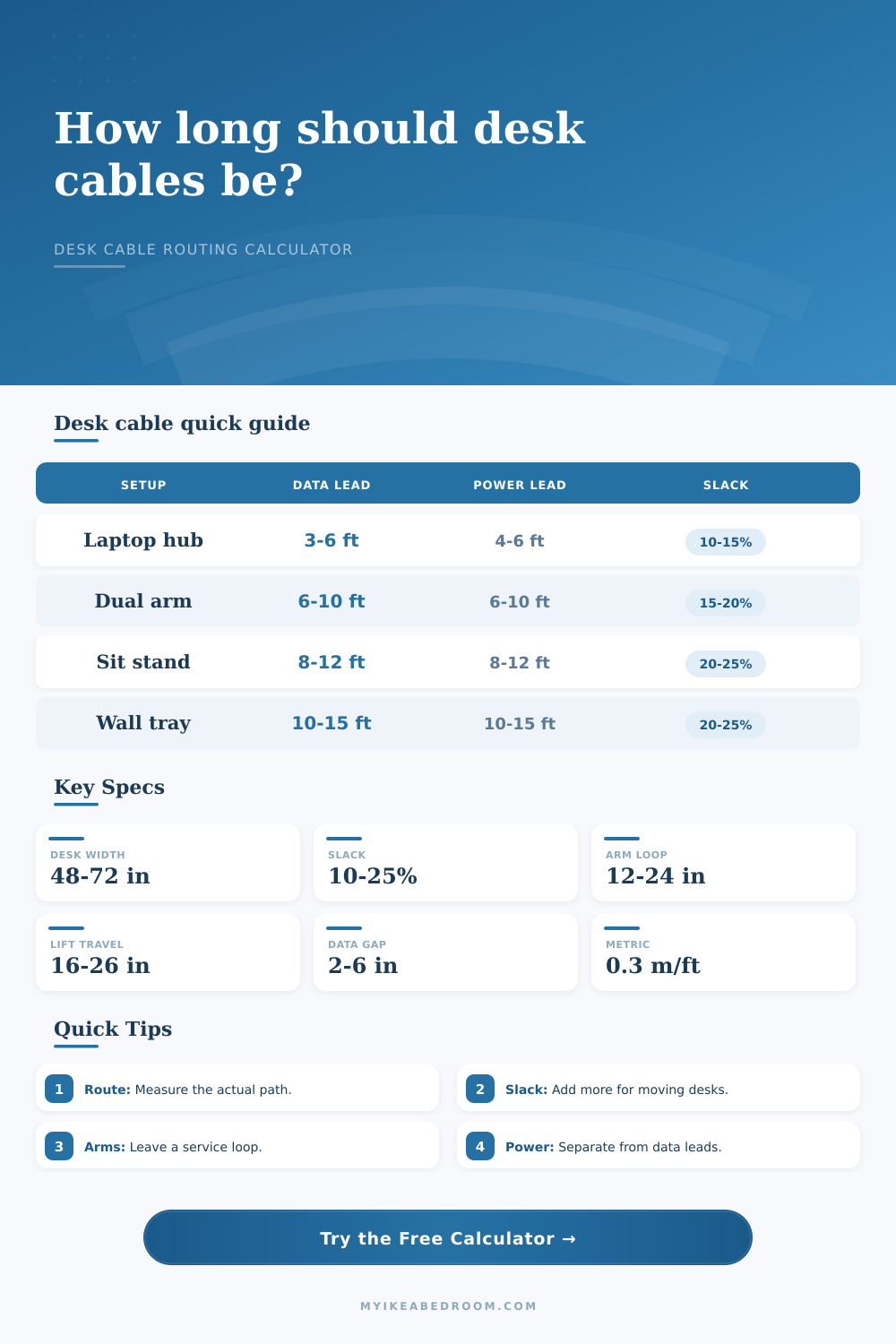
| Desk setup | Typical data cable | Typical power lead | Slack range |
|---|---|---|---|
| Compact laptop hub | 3-6 ft / 1-2 m | 4-6 ft / 1.2-2 m | 10-15% |
| Single monitor arm | 6-8 ft / 2-2.5 m | 6-8 ft / 2-2.5 m | 15-20% |
| Dual monitor arms | 6-10 ft / 2-3 m | 6-10 ft / 2-3 m | 15-20% |
| Sit-stand dock | 8-12 ft / 2.5-3.5 m | 8-12 ft / 2.5-3.5 m | 20-25% |
| Wall tray route | 10-15 ft / 3-4.5 m | 10-15 ft / 3-4.5 m | 20-25% |
| Routing path | Added path factor | Best use | Measure carefully |
|---|---|---|---|
| Direct across desktop | 0% | Short temporary runs | Device bend radius |
| Rear edge tray | 8% | Tidy fixed desks | Back corners |
| Under-desk tray | 12% | Hidden power and dock | Tray entry drop |
| Down leg channel | 18% | Sit-stand cable spine | Full lift travel |
| Corner raceway | 22% | L desks and wall plates | Outside turns |
| Nominal cable | Metric equivalent | Useful routed length | Common desk use |
|---|---|---|---|
| 3 ft | 0.9 m | 2.5 ft / 0.75 m | Laptop to nearby hub |
| 6 ft | 1.8 m | 5 ft / 1.5 m | Monitor to rear tray |
| 8 ft | 2.4 m | 6.5 ft / 2 m | Arm plus under-tray run |
| 10 ft | 3 m | 8.5 ft / 2.6 m | Side tower or wall plate |
| 12 ft | 3.7 m | 10 ft / 3 m | Sit-stand route |
| 15 ft | 4.6 m | 12.5 ft / 3.8 m | Corner desk or floor route |
| Route condition | Extra gap | Length effect | Recommended handling |
|---|---|---|---|
| Parallel short run | 2 in / 5 cm | Small | Clip in separate lanes |
| Under-tray mixed route | 4 in / 10 cm | Moderate | Put power at rear edge |
| Long wall raceway | 6 in / 15 cm | Moderate | Cross at right angles |
| Sit-stand cable spine | 6 in / 15 cm | High | Keep loops independent |
Building out a clean desk requires you to often buy stuff just to realize there isn’t enough cable with it. The cable might fall three inches short. It’s not usually the device; it’s the way in which your devices is positioned compared to each other. People tend to think about straight line through air. That’s not how a wire goes. Cables go around corners, they fall into trays then bounce back up again. They has to route for motion.
Enter in your specific path and let calculator do its thing. For example, will an eight-foot HDMI cable be sufficient for your dual-arm set-up? If you were to guess, don’t. Use real-world numbers when calculating the length of your cable. Consider the total distance the wire will travel. Don’t use a straight-line calculation. Include vertical drop between the desk surface and the under-desk tray. Next, include horizontal run to your dock. Small details matter here they make all the difference between a clean-looking setup and one that’s a mess.
How to Measure Your Cables
Another variable is slack. There must be sufficient slack in cable, but not too much slack. Too much slack mean the cable will sag noticeabley. Ten percent buffer may suffice for a fixed desk. You may need more if the desk is sit-stand desk. If the desk have a lift mechanism, then the cable needs to go through its full vertical range. That’s why the tool requests the total sit-stand travel plus the monitor arm loops as inputs. These value correspond to added feet required.
Then there’s the service loop. Without a service loop, every time you move up or down you risk damaging the internal wiring or even the connector itself. How you route makes a difference too. If your cable runs directly across your desk, that’s the shortest way, right? That’s not the prettiest looking either and it’s difficult to handle. People like things concealed. These include rear trays, leg channels, and corner raceways. These all increase length of the run. There are curves and dips for the cable to go through. Sharp right-angle corners in a corner raceway add much more length than going straight. The following table shows effect various routings have on the final distance.
Then there are the power cables. Power leads should of been kept away from data cables. For one thing, it reduce electromagnetic interference. Second, it’s easier to untangle your devices when they’re unplugged. That’s why calculator has an input for separation gaps. By running your USB hub on one leg of your power strip and then running your power strip down another leg, you add more distance. It’s a trade-off you make for cleaner cable management and better signal integrity.
Start by thinking about the longest individual run. That’ll probably be the monitor to the dock. It could also be the PC tower to the hub. From there, choose normal-sized cables based off how long that one needs to be. Normal cable sizes include ten feet or six feet. Those should cover almost all moderately sized desk, with enough left over for extra space. And if you calculate out to nine and a half feet, get the ten-foot cable.
Don’t attempt to combine two smaller ones. It’s not about connecting everything. It’s about connecting everything so that it last through everyday use. A planned-out cable run will hide itself from view when not needed. When you have to rearrange things, it’ll dissapears entirely. Plan for the actualy world, where things get moved around, dropped, and bent.
That way you don’t end up with last-minute extension cords because you didn’t plan ahead. Your desk remains clean. Your cables remains intact. That’s what happens when you plan it out on paper before you start plugging things in.