Floating Desk Depth Calculator
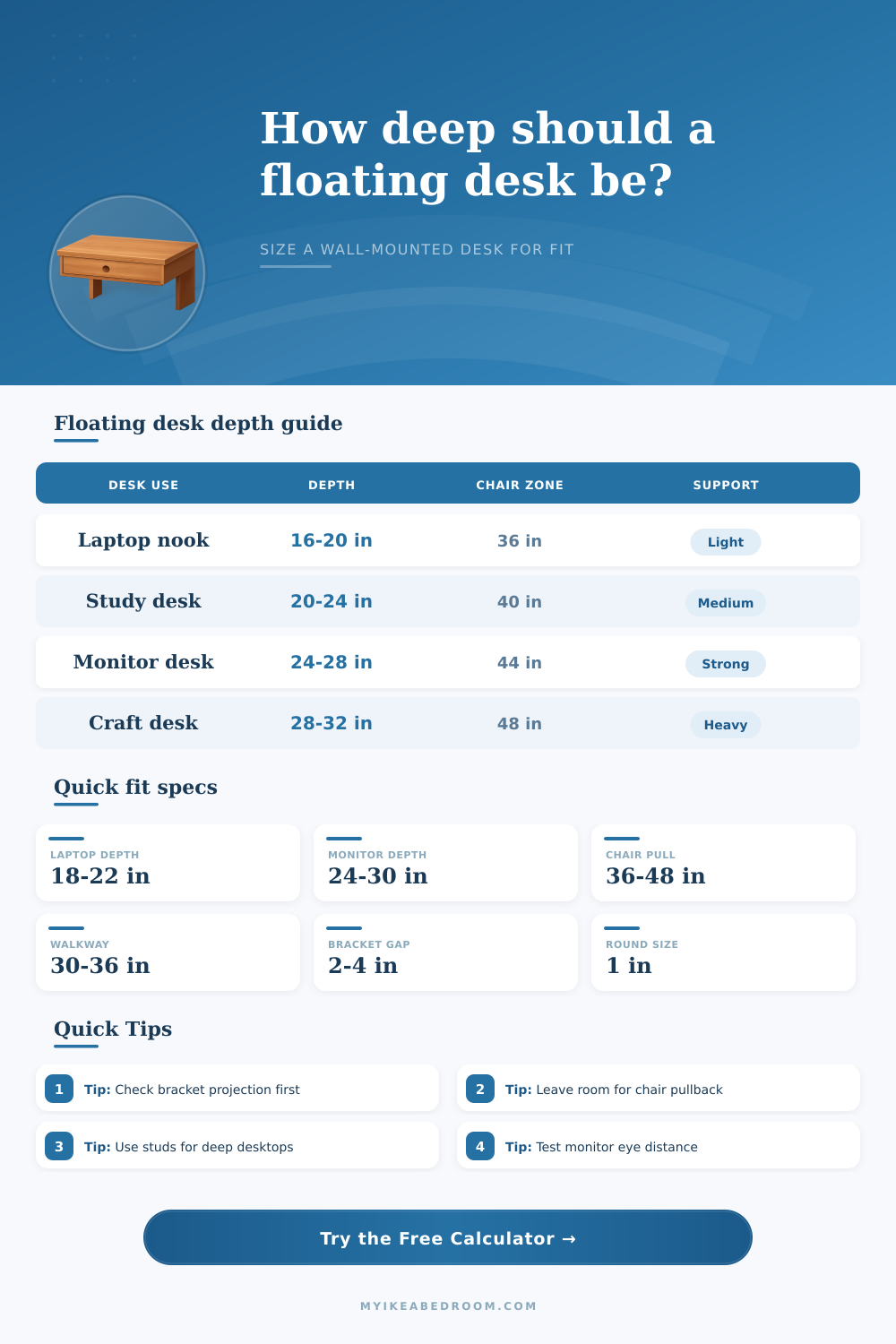
Find a practical wall-mounted desk depth by balancing working surface needs, chair pullback, walkway clearance, monitor distance, wall support projection, desktop thickness, and expected load.
Choose the closest wall-desk scenario, then replace the defaults with your measured room and support details.
Floating desk summary
Enter your room, chair, work surface, and support measurements to size the desktop.
Method: the calculator compares five limits: room envelope, working depth, monitor distance, forward reach, and support projection. The final recommendation rounds down to a buildable depth.
| Use case | Typical depth | Front clearance | Planning note |
|---|---|---|---|
| Hallway laptop ledge | 14 to 18 in | 24 to 30 in | Best for short sessions or a stool that tucks below. |
| Bedroom study wall desk | 18 to 24 in | 36 to 42 in | Balances notebooks, laptop use, and bed-side clearance. |
| Monitor and keyboard desk | 24 to 30 in | 42 to 48 in | Allows better screen distance and a comfortable wrist zone. |
| Craft or sewing wall desk | 28 to 34 in | 44 to 54 in | Only works well when reach and support projection are strong. |
| Support style | Good depth range | Front overhang | Use in calculator |
|---|---|---|---|
| Heavy shelf brackets | 18 to 28 in | 2 to 4 in | Good general choice when anchored into studs or blocking. |
| Wall cleat plus side brackets | 16 to 26 in | 2 to 3 in | Works well for small office desks and writing ledges. |
| Side panels or cabinet support | 22 to 32 in | 2 to 6 in | Side support helps wider and deeper desktops feel steadier. |
| Hidden floating frame | 18 to 30 in | 1 to 3 in | Depth depends heavily on frame rating and wall structure. |
| Clearance item | Compact value | Comfort value | Why it matters |
|---|---|---|---|
| Chair pullback | 34 to 36 in | 40 to 48 in | Lets the user sit down, swivel, and move away from the wall. |
| Walkway behind chair | 28 to 30 in | 32 to 36 in | Keeps the room passable when the chair is in use. |
| Cable and wall gap | 1 in | 2 to 3 in | Protects plugs, rear rails, base trim, and slightly uneven walls. |
| Side obstruction buffer | 2 to 4 in | 6 to 10 in | Prevents door trim, bed corners, or drawer pulls from pinching the layout. |
| Imperial depth | Metric depth | Common use | Fit signal |
|---|---|---|---|
| 18 in | 46 cm | Laptop shelf | Usually easy to support and clear. |
| 24 in | 61 cm | Standard wall desk | Good all-around floating desk depth. |
| 28 in | 71 cm | Monitor workstation | Check bracket reach and chair zone. |
| 32 in | 81 cm | Deep work surface | Needs strong support and a generous room. |
Support before depth: a desktop can fit the room but still feel poor if the bracket projection, wall anchoring, or side support is undersized for the front edge.
Mock up the chair zone: tape the calculated desktop front edge on the floor, then pull the chair back and check whether a walkway, bed, or drawer still works.
What likely comes to mind when you think “desk”: its slick desktop. Its glossy finish, whether real wood or laminate; looks good on camera and helps fit the moddern look of your home office. But as it turns out, it’s not all about appearance; there are practical considerations, such as how deep the desk need to be for the chair to fit easy underneath. How big is the work surface required? Will those brackets supports the weight without ripping through wall? Get the equation off-kilter and you risk having a desk that seem too small, or else one that blocks your only pathway in your bedroom. The key is knowing what’s realy behind that tidy visual line.
Walls are long; depth is difficult. It quickly eats into limited floor area. A typical configuration for a home office usually falls somewhere between 20″ and 24″ deep. It provide sufficient space for laptop and a few notes while still leaving plenty of room around it. If you’re running dual monitor, however, then the equation change, you’ll need more real estate. More specificly, you want to push those monitors back far enough that you won’t be pressing your face against them for hours on end while editing video.
Practical Reasons to Choose Desk Depth
Once you know how far away from the monitor you’d like to sit and size of the monitor’s base, you can use the calculator above to crunch the numbers. This is better than having to eyeball clearance areas that feel awkward until you’ve sat down in them.
The silent killer of most floating desk projects are support projection. On paper, you can get your desk’s thirty-two inch deep top to fit in dimensions of your room, but the reality is that your wall anchors only goes out twenty inches from your studs; there’s no support for the front edge, which exerts leverage that pulls at the screws every time you lean forward or type with any force. The issue is made much worse by heavier materials such as solid hardwood slabs; the dead weight of the desk itself become a problem before you even put a monitor on it. Laminated particleboard or plywood are lighter and easier to support, but they lacks the stiffness of a thicker slab. Here, you have to trade material character for structural ease.
Another constraint you learn about too late (on install day) is the issue of chair pullback. For instance, when sitting at a desk in a rolling office chair, I like to be able to swivel around and sit down comfortabley, which requires about forty inches of clear space behind the desk. Unless you’ve got some kind of magical apartment where there’s no bed next to the wall or a super-wide hallway, this may not be possible. Do you want more room to spread out over your desk? Or do you want to sit comfortable? The answer is typically: you’d better compromise on depth rather then whether you can even use the chair without slamming it into the door or knocking your knee against the dresser.
Many people don’t realize how important eye distance is. Craning forward strain your neck if you sit too close; leaning in to see small print is no better. Ideally, you want to be at roughly arm’s length from your screen. That establishes a geometrical relationship between the front edge of your desk and where your elbow sits. A shallow desk mean your keyboard is up close. This pulls your chair forward and brings your face nearer the monitor. This is a chain reaction triggered by depth.
The weight of materials also factors into your bracket choice. Standard shelf brackets may be fine for lightweight hollow core panels. However, dense slabs of oak is best supported by heavy duty cantilever supports or an unseen framing system screwed straight into several wall studs. Better brackets aren’t expensive, a torn out drywall repair costs more.
Finally, check your reach. Yes, it’s nice to have a deep desk that looks awesome, but if the back edge is beyond comfortable reach of your arms, then that real estate is wasted. You’ll start reaching around your body or leaning over which defeats the whole point of having an ergonomically correct workstation.
Before you drill anything, tape off the depth you’ve decided on the floor. Then sit down in the chair, type for five minutes and ask yourself whether this area feels natural. The numbers will tell you what fits; only your body would of known what feels right. Plan for how things fit, not just how they look.