Office Chair Seat Height Calculator
Calculate chair seat height from lower-leg length, shoes, cushion compression, desk height, keyboard height, armrest position, thigh clearance, and footrest needs.
Start with a common workstation or body-size scenario, then adjust the exact dimensions from your chair, desk, shoes, and keyboard setup.
Chair height summary
Use the calculator to compare lower-leg fit, desk typing height, armrest clearance, foot support, and chair adjustment range.
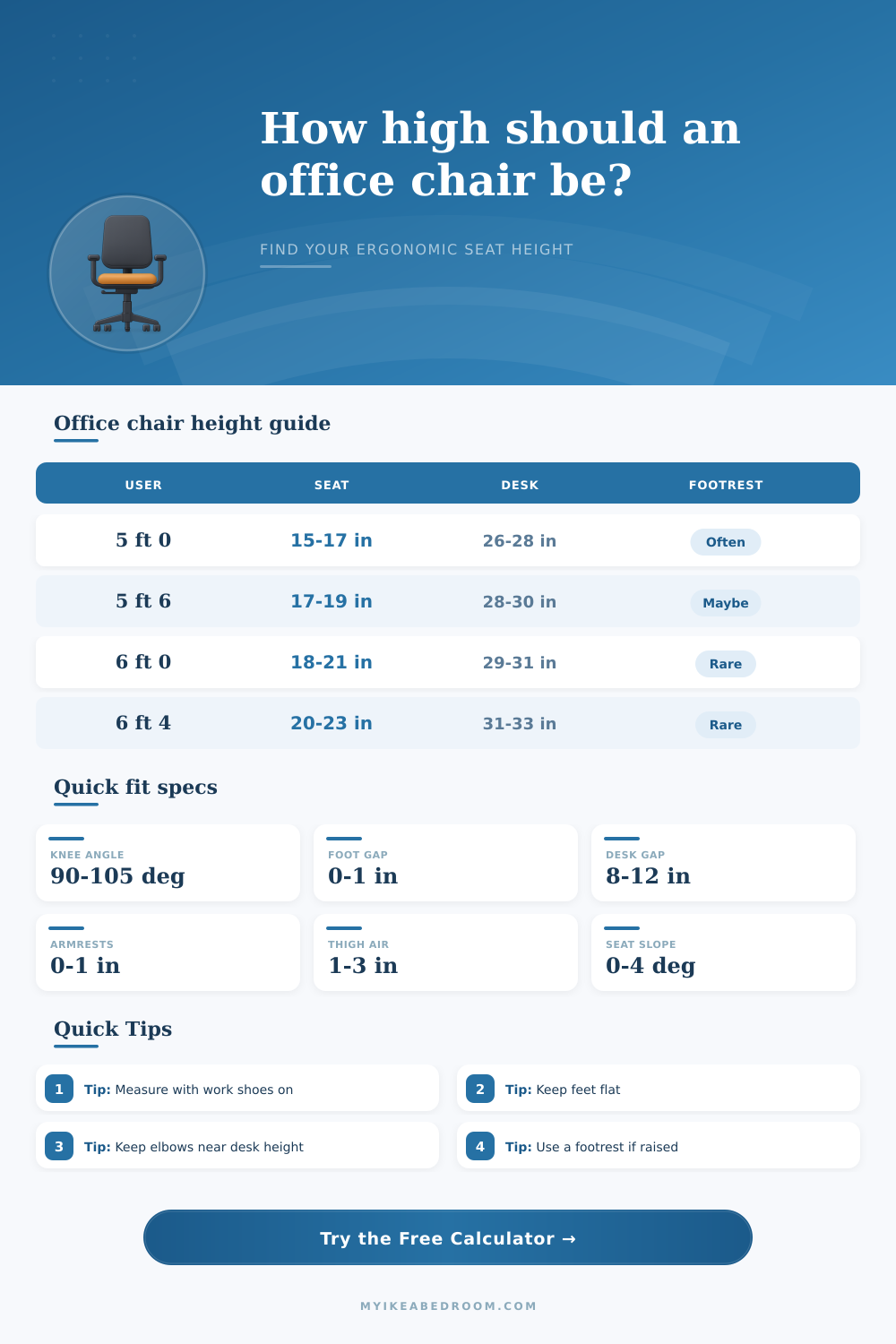
The strongest seat height usually starts with feet flat, then checks whether the keyboard surface and desk underside still work.
| Approx user height | Likely lower-leg height | Common loaded seat height | Unloaded chair setting | Footrest chance |
|---|---|---|---|---|
| 5 ft 0 to 5 ft 3 | 14.5 to 16.5 in | 15 to 17 in | 16 to 18 in | Often with fixed 29 in desks |
| 5 ft 4 to 5 ft 8 | 16 to 18 in | 16.5 to 18.5 in | 17 to 19.5 in | Sometimes, depending on desk |
| 5 ft 9 to 6 ft 1 | 17.5 to 20 in | 18 to 20.5 in | 18.5 to 21.5 in | Less common |
| 6 ft 2 to 6 ft 6 | 19.5 to 22 in | 20 to 22.5 in | 20.5 to 23.5 in | Rare; may need taller desk |
| Work surface | Good desk-to-loaded-seat gap | Keyboard effect | What it means | Likely adjustment |
|---|---|---|---|---|
| Keyboard tray | 8 to 10 in | Tray is already lower | Seat can stay closer to leg-based height | Check tray knee clearance |
| Standard desk | 9 to 11 in | Keyboard adds 0.5 to 1 in | Elbows should hover near key top | Raise seat or lower keyboard |
| Thick mechanical keyboard | 8.5 to 10.5 in | Keys may sit 1.2 in higher | High keys can force wrist extension | Lower tray or use wrist-neutral tilt |
| Counter or drafting desk | 10 to 13 in | Often needs foot ring | Feet may not reach the floor | Use stable foot support |
| Low desk | 7 to 9 in | May crowd thighs | Lower seat can improve clearance | Check knee and thigh space |
| Chair type | Typical seat range | Best for | Watch point | Calculator use |
|---|---|---|---|---|
| Low task chair | 15 to 19 in | Shorter users, low desks | May not rise enough for fixed desk | Check desk priority |
| Standard office chair | 16 to 21 in | Most home offices | Petite users may need footrest | Use balanced priority |
| Tall cylinder chair | 18 to 23 in | Taller users, high desks | Can be too tall at minimum | Check range minimum |
| Drafting chair | 22 to 32 in | Counter-height work | Foot ring becomes essential | Use footrest result |
| Scenario | Main seat target | Secondary check | Possible issue | Practical fix |
|---|---|---|---|---|
| Bedroom desk with fixed height | Lower-leg height plus shoes | Desk-to-elbow alignment | Desk may be high for petite user | Raise chair and add footrest |
| Compact desk with drawer | Slightly lower loaded seat | Thigh air clearance | Drawer apron crowds knees | Lower chair or remove tray obstruction |
| Daily typing workstation | Balanced leg and desk fit | Keyboard top near elbow | Wrists bend upward | Lower keyboard or seat slightly higher |
| Shared home office chair | Midpoint of two lower-leg heights | Footrest for shorter user | One setting rarely fits both | Mark two cylinder positions |
| Drafting or counter chair | Desk-driven seat height | Foot ring support | Feet cannot reach floor | Use a wide stable foot support |
Measure the body first. Sit with feet flat, knees relaxed, and measure floor to the crease behind the knee; that gives the strongest starting seat height.
Then test the desk. If the desk forces the chair higher than your lower-leg fit, use a footrest rather than leaving feet unsupported.
Use loaded seat height for posture. A soft cushion can drop the body after sitting, so the chair setting and actual working height are not the same.
Check armrests last. Armrests should support relaxed shoulders, but they should not block the chair from sliding close enough to the keyboard.
We all know that when sitting in an office chair, we fiddle with the seat to get our feet grounded and our shoulders down, and then call it good enough. We make the knee happy; next thing you know, your elbow are floating up off the keyboard. Or maybe we drop the chair low enough to get our feet planted squarely on the floor… but now we’re smashing into the desk apron with our thighs.
It’s about knowing what gets measured underneath the cushion, not just reading the click of the lever. Instead of relying on confusing conversions and coefficients in standard advice, the calculator above do all the math for you after you input your measurements. It starts with popliteal height: the distance between the back of your knee (when seated upright) and the floor. That’s the key reference point for nearly everything else, since getting this one wrong will cause everything else to be wrong.
How to Adjust Your Office Chair
Most fitting guides completely neglect the shoes you are wearing, or how much seat foam compresses under your bodyweight. Both alter effective height by as much as a half-inch or more. And that little bit can mean the difference between poor blood flow and a neutral posture you’ll sit in for hours at a time, free of fatigue.
The tool also tests how well your elbows align with your typing plane: How high off the ground do you need your elbows to sit when your hands are on the keyboard? If you’re sitting properly, your forearms will be parallel to the ground; they shouldn’t be elevated above or below the plane of your keyboard. The keyboard should be at the same level as top of your arm when your hand reaches the home row, instead of being at level of your desktop. Mechanical keyboards in particular can make this a problem, since many of them is pretty thick and elevate that imaginary line of correct height way up into the air; making it necessary to lift your chair higher then you’d like just to reach the keyboard.
The footstool suggestion serves as a counterweight to people whose knees aren’t very long but their desk is already set to twenty-nine inches tall. Otherwise, if you lift the chair to meet the keyboard, your feet will be left dangling, which cuts off circulation and shifts your weight onto seat’s edge.
On the page, it shows relationship between body size and these adjustments with a table of references. It explains why one setting doesn’t work for shared workspaces. An office may have two people sharing a desk, like a five-foot-tall person and a six-foot-four-inch person. They will likely need their seats set nearly eight inches different than each other for the best positioning. When you try to split the difference by sitting at a midway setting, neither person get a good fit so instead you just settle for being uncomfortable together.
To take all this into account, calculator includes a feature where you can enter another user’s leg length if your chair is shared. It finds the midpoint that reduces strain for both people without requiring a foot rest for the shorter person and flags it as such.
Think about arm rests, as a lot of folks never consider them at all. You don’t want them to make you hunch up or lift your shoulders, yet you do want them to provide support for those shoulders. You also want them to be able to slip underneath your desk when you sit down to type (as opposed to having to stretch out). Before you start fussing with vertical position, then, try taking off the arm rests completely or sliding them in and out until they’re within range of your desk clearance (as shown by the calculator).
It is a small detail, but keep it in mind; constantly reaching forward strain your upper back and neck over the course of the day. So how do you know what height’s correct? Well, it’s not as much about getting the best geometric angle as it is about balancing a series of compromises between your torso, arms and legs. Unless you’re sitting in a custom-built chair using a fully adjustable standing desk where you can dial-in your precise body measurements, you won’t often find all variables lines up perfectly.
But that’s fine, you just want to rid yourself of the worst offenders (i.e. His thighs were compressed, his shoulders were hunched, and his feet were dangling. Nail down these first points of contact and everything else will be an easy adjustment instead of a constant struggle. Begin at the knees, verify your elbows and let the numbers carry you out of fidgetland, which is what makes most office chairs unpleasent.
You should of checked those measurements first to avoid discomfortable sitting.