Projector Throw Ratio Calculator
Check whether a projector lens can create your bedroom screen size from the available lens-to-screen distance, including zoom range, screen geometry, seating distance, and brightness targets.
Choose a layout close to your room, then adjust the lens distance, screen measurement, throw range, and gain to match your projector specification sheet.
| Diagonal | Image width | Image height | Screen area |
|---|---|---|---|
| 80 in | 69.7 in / 5.81 ft | 39.2 in / 3.27 ft | 19.0 sq ft |
| 92 in | 80.2 in / 6.68 ft | 45.1 in / 3.76 ft | 25.1 sq ft |
| 100 in | 87.2 in / 7.26 ft | 49.0 in / 4.08 ft | 29.7 sq ft |
| 110 in | 95.9 in / 7.99 ft | 53.9 in / 4.49 ft | 35.9 sq ft |
| 120 in | 104.6 in / 8.72 ft | 58.8 in / 4.90 ft | 42.7 sq ft |
| 135 in | 117.7 in / 9.81 ft | 66.2 in / 5.51 ft | 54.0 sq ft |
| Screen diagonal | 0.5 short throw | 1.2 standard | 1.6 standard |
|---|---|---|---|
| 80 in | 2.9 ft | 7.0 ft | 9.3 ft |
| 92 in | 3.3 ft | 8.0 ft | 10.7 ft |
| 100 in | 3.6 ft | 8.7 ft | 11.6 ft |
| 110 in | 4.0 ft | 9.6 ft | 12.8 ft |
| 120 in | 4.4 ft | 10.5 ft | 13.9 ft |
| 135 in | 4.9 ft | 11.8 ft | 15.7 ft |
| Use case | Seat distance | Foot-lamberts | Room condition |
|---|---|---|---|
| Movie night | 1.3-1.6x width | 14-22 ftL | Dark room |
| Mixed TV | 1.2-1.5x width | 22-35 ftL | Dim light |
| Gaming | 1.0-1.3x width | 25-45 ftL | Controlled light |
| Daytime | 1.2-1.6x width | 35-60 ftL | Shades drawn |
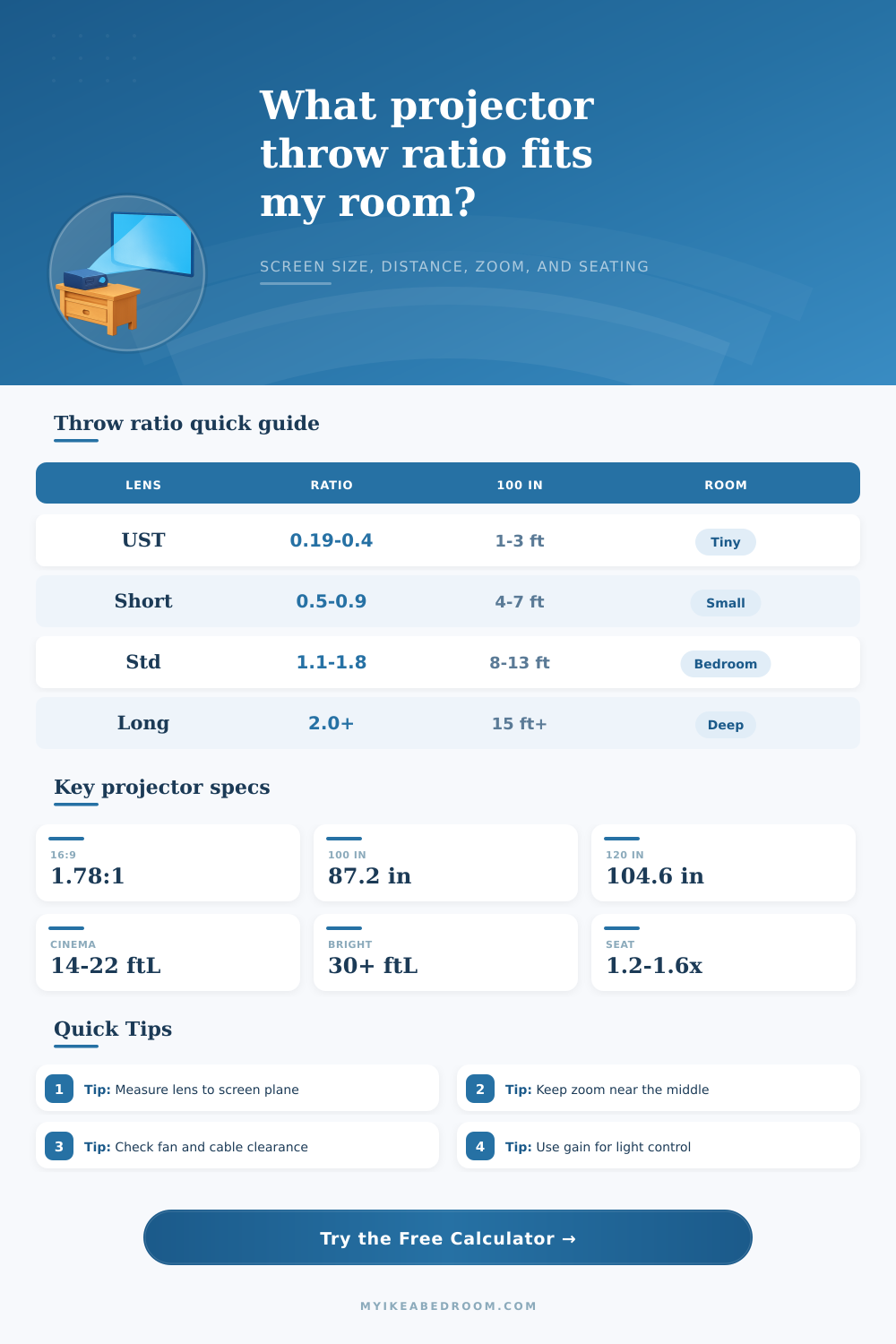
Ratio: 0.19 to 0.40
Best when the bed blocks rear placement or the room is very shallow.
Ratio: 0.50 to 0.90
Good for small bedrooms where a standard lens would overshoot the wall.
Ratio: 1.10 to 1.80
Flexible for 92 to 120 inch screens when joists and outlet placement cooperate.
Ratio: 1.80 and up
Useful in deep rooms, but cable clearance and zoom position become critical.
Throw ratio tip: Divide the lens-to-screen distance by the visible image width. Use the same units for both numbers before comparing with the projector spec.
Shelf fit tip: A shelf mount needs room depth for the throw distance, the projector body, lens inset, cable bend, airflow, and any rear trim or wall plate.
Zoom range tip: If the required throw ratio is very close to the listed minimum or maximum, move the mount slightly or adjust screen size for easier focusing.
Brightness tip: Foot-lamberts estimate screen brightness from lumens, screen gain, and image area. Real output may be lower in quiet or cinema modes.
When you plan to use a projector in a bedroom, you must consider several technical factors. Two of the more important factors relate to the size of the screen and the quality of the picture from the projector; the most important factor relates to the distance between the projector lens and the wall. The throw ratio of a projector determines the distance between the lens and the screen; if the projector’s throw ratio falls in the range that the projector manufacturer has specified, the projector will produce a focused image.
If the projector’s throw ratio falls outside of this range, you must either move the projector or change the screen size. Calculating the distance that a projector should be positioned from the screen can be challenging because there is a variety of objects in the bedroom that will take up some of the space in the room; these objects include the bed, any nightstand, a dresser, any cables that must exit the projector, and the body of the projector itself takes up several inches of space behind the projector lens. A calculator will help you to input these measurements into the calculator to make sure that you have an understanding of the distance that the lens must travel to reach the screen; this eliminates guesswork about whether or not the lens will be able to reach the screen from it’s designated shelf or mount.
How to set up a projector in your bedroom
Many bedroom projectors will be standard-throw projectors since the distances between the screen and the projector will likely be set up in a way that is suitable for standard-throw projector lenses. Short-throw projectors are useful in bedrooms where the distances between the screen and the projector are short, or where the furniture in the room makes it impossible for the projector to be placed in an area where the lens will not be blocked. Ultra-short-throw projectors are useful in situations where you must place the projector very close to the screen; however, these projectors can create challenges in that they often emit a great deal of heat, they can be loud due to the fans that assist in cooling the projector, and their screens must be flat to allow the lenses to effectively reflect the image of the objects onto the screen.
In each of these instances, you should choose a projector based off the distances in the room, not upon the newest technology for projectors. The screens that are used with projectors can have different aspect ratios; the standard aspect ratio for televisions and computer monitors is 16:9, and 2.35:1 is another ratio that those who wish to stream movies often prefer. Since the aspect ratio of the screen will affect the width of the screen and the distance that the projector’s lens must travel to effectively project the image onto the screen, you will need to use a projector calculator to calculate in what distance the projector should be positioned if you plan on using a screen with a different aspect ratio.
Brightness plays an important role in your bedroom projector if you plan to use the projector during daylight hours or if the lamp on the projector is on. The brightness of the projector will depend upon the amount of light that the projector will output, the size of the screen, and the reflectiveness of the screen. High-gain screens will focus the projector’s light on the audience; this is helpful for bedrooms that are not completely dark.
However, viewers that is to the side of the screen will see a dimmer image on the screen. Projector calculators can calculate the foot-lamberts of the screen so that you know if the size and gain of the screen will provide enough brightness for your bedroom. The distance of the seating area in the bedroom from the screen is important for providing the viewer with the most comfortable viewing experience.
If an individual is sitting too close to the screen with too large of a screen the viewer may begin to see the individual pixels of the screen; an individual that is too close to the screen may also have to move their head to follow the objects in the screen that are moving. An individual that is too far from the screen will find the picture to be lacking in impact. The recommended distance is for the main seat to be between one and one-and-a-half times the width of the screen.
This distance can be changed based upon the type of content that will be displayed on the screen; the projector calculator will show the relationship between the distance that the viewer should be positioned from the screen and the width of the screen. The depth of the bedroom can limit the positioning of the projector. The depth of the room is the distance from the screen to the projector.
The depth of the bedroom will take into account the space that the bed will take up, the space for the nightstand or dresser, the space for the projector’s cables to exit the projector, and the space that the body of the projector will take up behind the projector lens. Any screen or projector that you order online will have a screen depth that must be taken into account. The projector calculator will alert you to any screen depths that would not suit the depth of your bedroom.
The height of the projector must also be considered when placing the projector into a bedroom. For example, if you choose to mount the projector to the ceiling it will be out of the way; however, the video and power cables will have to exit the ceiling or the baseboards of the bedroom. Placing the projector on a rear shelf will make installation easy; however, the projector will be too close to where people will be sitting in the bedroom, and too much noise will be created due to the projector’s fan.
The placement of the projector will have to be based upon how the bedroom is wired and how much noise the projector can create. The zoom range of the projector can provide flexibility in the placement of the projector. For most projectors the zoom feature will allow you to make the image on the screen larger or smaller; this is useful in cases in which the calculated distance between the projector and the screen may be near the limits of the projector’s lens range.
Most projectors will be sharpest and show the least amount of distortion of the screen if the lens is placed in the middle of the zoom range. The projector calculator will show you where the distance between the screen and the projector fits within the zoom range of the projector. The features that the projector has will affect where you place the projector and how comfortable the individuals who use the screen will find the experience of watching the screen.
Projectors that have vertical lens shift will allow the screen to be positioned vertically in relation to the projector without tilting the projector; vertical lens shift will preserve the geometry of the screen. Projectors that have horizontal lens shift will allow the screen to be positioned horizontally in relation to the projector without tilting the projector; this also will preserve the geometry of the screen. Projectors that do not have lens shift will require the projector to be mounted in a precise way to the wall; if you angle the projector the image will appear soft on the screen.
The distance that must be measured from the projector lens to the screen can be challenging. The throw ratios of the projectors that are manufactured by the companies indicate the distance that the projector should be measured from the lens; it should not be measured from the back of the projector or from the wall behind the projector. If you place the projector on a shelf the body of the projector will be further from the lens than the screen.
The projector calculator will ask for the distance between the body of the projector and the lens of the projector. Once you have calculated the distances you can make decisions about the comfort of the viewers. For example, you will have to consider how the projector’s cables will be routed, where the remote control will be placed, and if the projector’s brightness will be adequate in the bedroom.
A projector that is technically perfect will not be of any use to you if it is difficult to find the remote control or if the fan makes too much noise for the projector to be enjoyed in your bedroom. The goal is to create a projector that will suit the dimensions of the bedroom and that will provide you with a clear picture from your seating area without having to adjust the projector very often.