Lumens to Watts Calculator
Estimate input watts from target lumens, lighting technology, real lumens-per-watt efficacy, driver efficiency, dimming headroom, fixture count, color temperature, lumen depreciation, task type, and circuit voltage.
Load a common brightness target, then adjust efficacy, fixture count, headroom, color temperature, lumen depreciation, and voltage to match your actual lamps or fixtures.
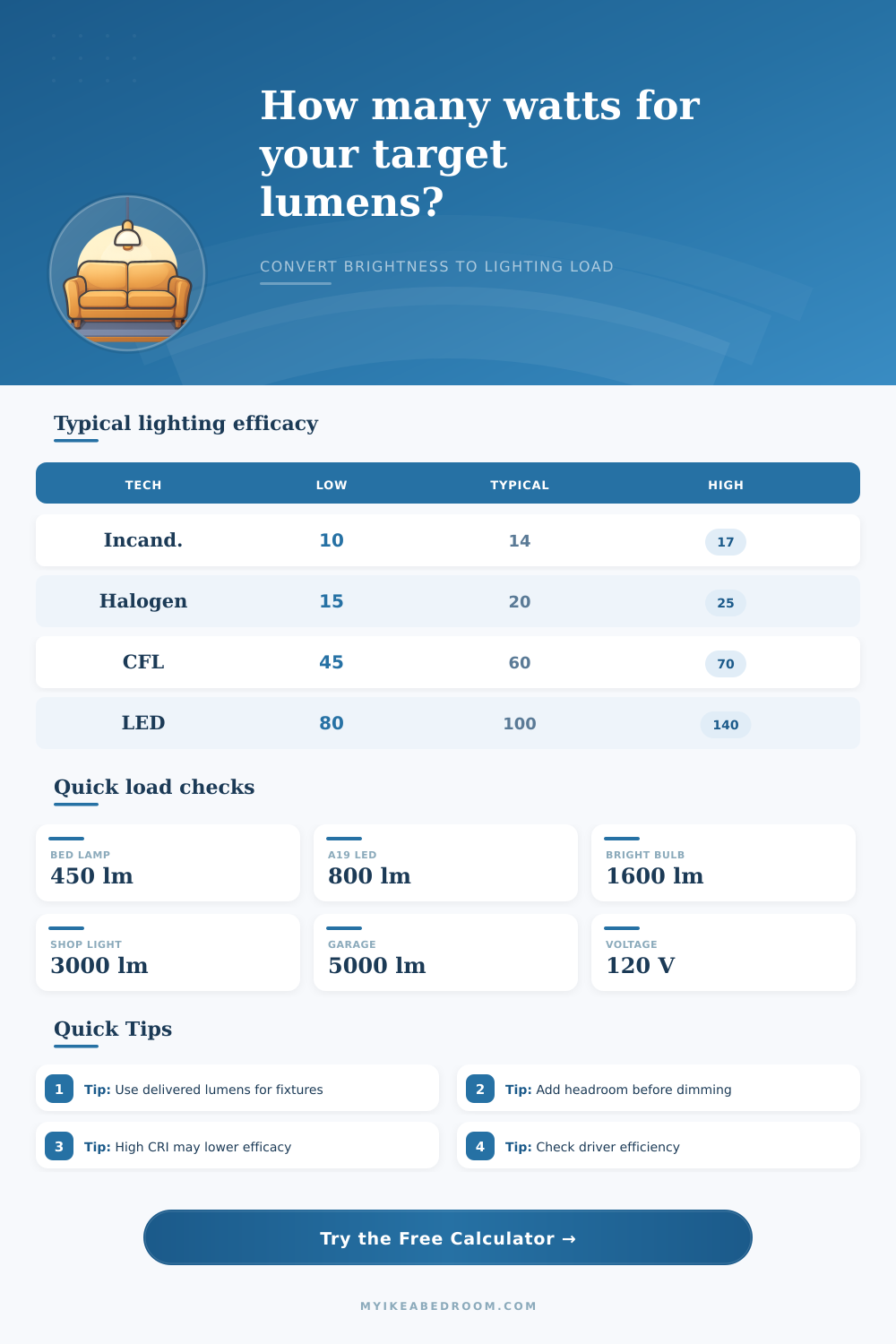
| Technology | Conservative lm/W | Typical lm/W | Efficient lm/W |
|---|---|---|---|
| Incandescent bulb | 10 to 12 | 14 | 16 to 17 |
| Halogen lamp | 15 | 20 | 22 to 25 |
| Compact fluorescent | 45 | 60 | 65 to 70 |
| Linear fluorescent | 60 | 85 | 90 to 105 |
| LED bulb or downlight | 80 | 100 | 115 to 140 |
| LED panel or shop light | 90 | 120 | 140 to 160 |
| Lighting target | Delivered lumens | At 80 lm/W | At 120 lm/W |
|---|---|---|---|
| Soft bedside lamp | 350 to 500 lm | 4.4 to 6.3 W | 2.9 to 4.2 W |
| Standard A19 replacement | 800 lm | 10 W | 6.7 W |
| Bright room bulb | 1600 lm | 20 W | 13.3 W |
| Shop light bar | 3000 lm | 37.5 W | 25 W |
| Garage panel | 5000 lm | 62.5 W | 41.7 W |
| Category | Typical effect | Calculator factor | Planning note |
|---|---|---|---|
| Warm 2200K-2700K | Slightly lower efficacy | 0.97 | Warm phosphors may need a few more watts. |
| Soft white 2700K-3000K | Baseline household rating | 1.00 | Good default for bedrooms and living areas. |
| Neutral 3500K-4000K | Slight efficacy gain | 1.02 | Common in closets, offices, and task areas. |
| Cool white 4000K-5000K | Often higher efficacy | 1.04 | Useful for garages, workrooms, and utility spaces. |
| High-CRI or tunable | Lower output per watt | 0.90 to 0.94 | Color quality and mixing can reduce efficiency. |
| Legacy bulb class | Approx lumens | Modern LED range | Use case |
|---|---|---|---|
| 25 W incandescent | 200 to 300 lm | 2 to 4 W | Nightstand, accent, or decorative lamp. |
| 40 W incandescent | 400 to 500 lm | 4 to 7 W | Warm bedside or small shade lamp. |
| 60 W incandescent | 750 to 850 lm | 7 to 10 W | Common table lamp or ceiling socket. |
| 100 W incandescent | 1500 to 1700 lm | 13 to 20 W | Bright room bulb or large fixture lamp. |
| 300 W halogen work light | 4500 to 5500 lm | 35 to 65 W | Garage, workbench, or utility lighting. |
Use for: lamps, ceiling sockets, and small fixtures.
Estimate: 80 to 120 lm/W covers many common bulbs.
Watch: enclosed shades and high CRI can lower output.
Use for: panels, downlights, vanity bars, and shop lights.
Estimate: use delivered lumens when the spec lists them.
Watch: driver efficiency and dimming headroom.
Use for: legacy CFL, tube, and utility fixtures.
Estimate: 45 to 90 lm/W depending on lamp and ballast.
Watch: ballast losses and warm-up behavior.
Use for: comparing familiar old wattage classes.
Estimate: 10 to 17 lm/W for rough brightness matching.
Watch: equivalent watts are not actual LED watts.
Use the right lumen number: Bare lamp lumens can be higher than delivered fixture lumens after lenses, shades, diffusers, and reflectors. For integrated fixtures, use delivered lumens when available.
Separate brightness from load: Incandescent-equivalent wattage is a brightness label, not electrical demand. For circuits, drivers, smart switches, and dimmers, use actual input watts or VA.
When you want to change the brightness in a room, you will have to consider the difference between lumens and watts. Lumens represent the amount of light that come out of the light fixture. Watts represent the amount of energy that goes into the light fixture to produce that light.
People often think that the higher the wattage of a bulb the brighter the light will be in the fixture. However, lumens are the true representation of brightness. Many LED light produce a high number of lumens while using fewer watts of energy.
How to Convert Lumens to Watts
This calculator will help you to convert the number of lumens that you would like in your room to an estimate of the number of watts that you will need to provide that amount of light to your room. The efficacy of a light fixture is the amount of lumens that the light fixture produce per watt of energy that the light fixture uses. Different brands of lights use different amounts of energy to produce the same amount of lumens.
For instance, LED bulbs tend to have high efficacy ratings, but not all LED bulbs are the same. Some LED bulb produce less light with the same number of watts of energy because the heat or the lens of the LED bulb absorbs the light. If you use a high efficacy number for LED bulbs, you might find that you are assuming the efficacy of one brand of LED bulb for another with lower efficacy.
Therefore, you should use a more realistic efficacy number for the LED bulbs that you plan to use in your fixture. There are a few different factor that will affect the total wattage that you will need for your space. The color temperature of the light will affect the efficacy of the light.
If you select a higher color temperature (white light) in your light fixture you might need more watts to achieve the same number of lumens as if you used a warmer color light (yellow). You might want to include some headroom for dimmers in your light fixture. Lights will depreciate over time, so you might want to give up some headroom for the lights to reach full brightness when the dimmers are at their highest setting.
Many lights lose some of their lumens over time due to the accumulation of dust and the heat that the lights often emit. These factor will be included in your calculations with this calculator so that you can account for the depreciation of light and color temperature. The wattage that you calculate is the total wattage that will be used in lighting your space.
You will also want to make sure that the electrical circuit in your space can handle this many watts. The voltage of your space will automatically calculate the wattage, and the total wattage will be compared to the capacity of your electrical circuit. You should also consider the power factor of your lights.
A poor power factor can cause an increase in the apparent load of the lights in your circuit, which may cause the circuit to draw more current than the wattage calculation suggest. If the total wattage of the lights that you want to install is higher than the capacity of one electrical circuit, you may need to install additional circuit or use more efficient drivers for your lights. The number of lights that you use will change the total wattage that you must provide.
If you use many small lights instead of a few large lights, the wattage may be the same, but the way that the heat and the electrical load is distributed will be distributed differently. If you are using a task light for a desk, you will need more lumens per square foot in that area than if you were using a general-purpose light for a main area of the room. Therefore, the task light may require a different wattage than the general light for your room.
This calculator will provide these two different values in the results so that you can determine the total wattage of your lights and the wattage of each individual fixture. Many people will attempt to use the wattage (energy consumption) values from old incandescent lightbulbs to determine the wattage of LED bulbs. However, the wattage of old incandescent bulbs does not tell you how many lumens the LED bulbs will produce.
Therefore, you can use the legacy comparison on this calculator to determine the LED wattage of old incandescent bulbs, but you should leave the two wattage inputs separate so that you do not make the common mistake of using the old wattage value for LED lights. You should always check the printed product data sheet that comes with any light fixture that you would like to purchase. The calculator will give you an estimate of the number of watts that will be required to provide the amount of lumens that you would like in your space.
However, the product data sheet will have the actual number of lumens and watts for the light fixture. Some data sheets will list the lumens that the bulbs emit, but these values are called lamp lumens. The shade or lens of the fixture may absorb the light that is emitted by the bulbs, so the total lumens that will radiate from the fixture may be less than the lamp lumens.
You can also check the thermal performance of the light and the efficiency of the driver of the LED bulbs. These values will tell you whether the light fixture will lose any lumens to heat or to the absorption of the light by the driver. Therefore, if your fixture depreciates in lumens due to heat, you may want to account for that in your calculations.
Using the data sheet for your light fixture and this calculator will allow you to determine the true wattage that is required to provide the amount of light that you want in your fixture. Heat and dirt will affect the performance of your light fixtures. If the light fixtures is enclosed they may trap heat which can reduce the efficacy of LED bulbs.
Additionally, the accumulation of dirt on the lights may absorb some of the light that the bulbs produce so that it does not reflect off the fixture and exit the space. These factor can be accounted for in the depreciation and driver-efficiency fields of this calculator. If you take these factor into account, you can be sure that the room will be bright and lit instead of potentially feeling too dim after the lights have been used for a year.
The calculator will help you to determine the total number of watts that will be used by the lights in your fixture, as well as how much current the lights will draw. Based on these calculations you can determine whether you need to change the technology of the lights, the number of lights in your fixture, or you may need to install a new electrical circuit for the lights in your fixture. By using this calculator you can have a better idea of the electrical requirements of your fixtures for lighting your room.