Compound Miter Angle Calculator
Convert corner, crown spring, ceiling slope, saw orientation, bevel reference, out-of-square correction, kerf, and test-cut allowance into miter and bevel settings for compound trim cuts.
Pick a close setup, then adjust the measured wall angle, spring angle, slope, saw orientation, and allowance values before cutting finished trim.
Cut setting breakdown
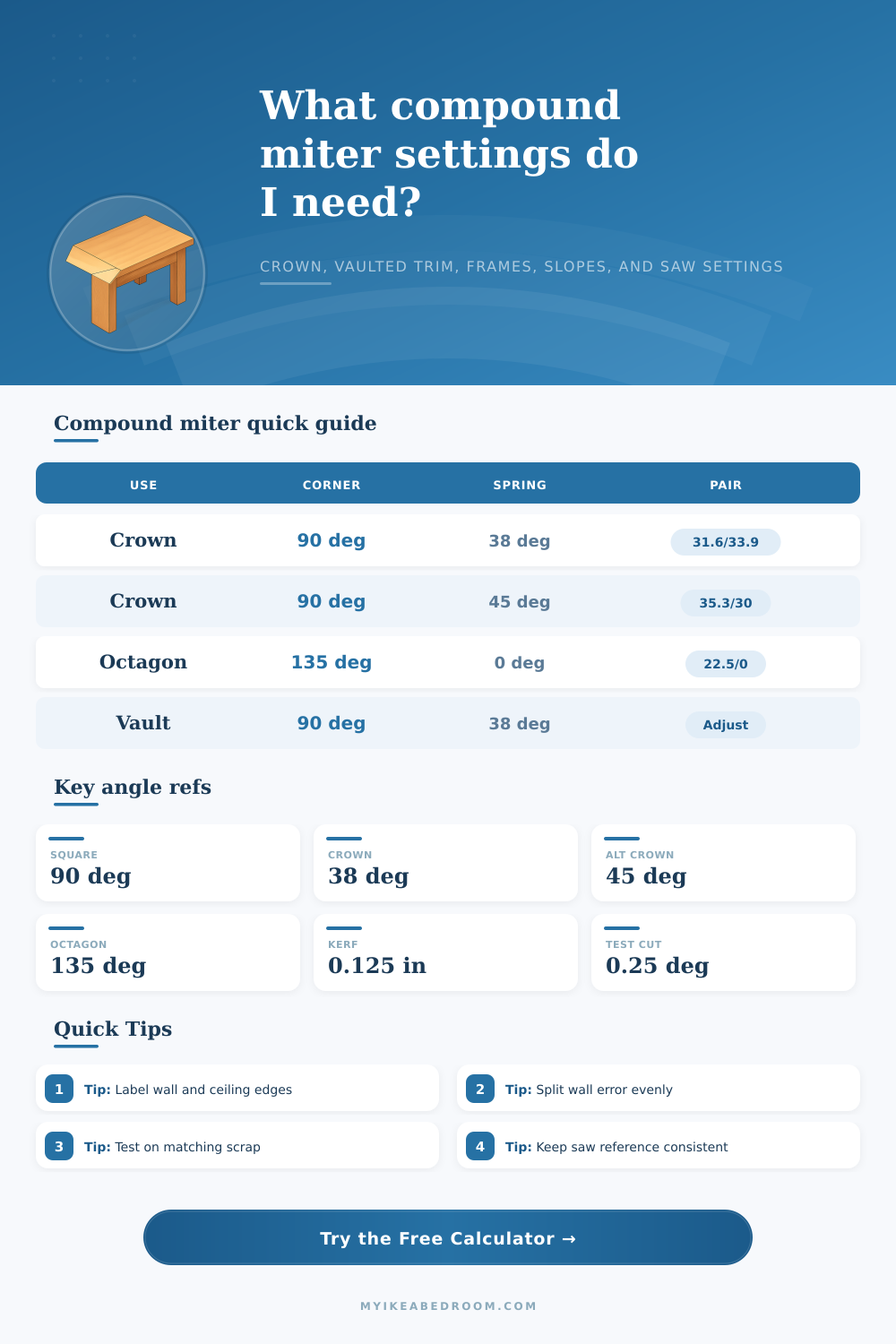
| Crown spring | 90° inside miter | 90° inside bevel | Best saw reference |
|---|---|---|---|
| 38° spring crown | 31.62° | 33.86° | Flat on table, wall edge marked |
| 45° spring crown | 35.26° | 30.00° | Flat on table, equal spring profile |
| 52° spring crown | 38.38° | 25.68° | Flat on table, steep wall projection |
| 0° flat trim | 45.00° | 0.00° | Miter only, no crown bevel |
| Regular shape | Number of sides | Included corner | Flat miter before bevel |
|---|---|---|---|
| Triangle tray trim | 3 | 60° | 60° |
| Square frame or room corner | 4 | 90° | 45° |
| Hexagon ceiling medallion | 6 | 120° | 30° |
| Octagon frame bevel | 8 | 135° | 22.5° |
| 12-sided molding ring | 12 | 150° | 15° |
| Reference mode | What the bevel means | Common use | Check before cutting |
|---|---|---|---|
| Blade tilt from vertical | Most miter saw bevel scales | Crown cut flat | Confirm saw zero is square to table |
| Blade angle from table | 90° minus the tilt result | Table saw layout notes | Use a digital gauge on blade plate |
| Bevel across trim face | Face-side bevel relationship | Octagon frames and sloped rails | Keep the show face orientation fixed |
| Back-bevel relief | Small relief behind a coped edge | Inside crown and baseboard tweaking | Stay clear of the visible edge |
| Correction input | Typical value | Effect on result | Use when |
|---|---|---|---|
| Wall out of square | -2° to +2° | Splits error across the miter and bevel | Actual wall angle differs from nominal |
| Ceiling slope or rake | 5° to 35° | Adds a compound slope component | Vaulted ceilings and stair skirts |
| Kerf allowance | 0.094 to 0.125 in | Reports half-kerf per saved edge | Cutting to a finished long or short point |
| Test cut allowance | 0.10° to 0.50° | Shows a trial range around the setting | Dialing in visible trim joints |
Crown cut flat
Best for: repeatable crown runs when the molding is too tall to nest safely.
The calculator gives a miter rotation and bevel tilt pair based on spring angle and corner angle.
Nested crown
Best for: small crown profiles held at their installed spring angle.
Use the miter result as the main rotation and keep the crown upside down against the fence.
Sloped trim
Best for: vaulted ceilings, stair skirts, raked base returns, and angled rails.
Slope changes both settings, so test cuts matter more than nominal corner charts.
Polygon bevel
Best for: octagon frames, tray ceilings, medallions, and beam caps.
The side count supplies the plan angle, while the bevel reference controls how the face meets.
Compound miter angles fails when the saw does not match the corner angles; trim work fails because people assumes that the corner has a perfect right angle. Using a compound miter angle calculator will help a person to avoids these errors. A compound miter angle calculator will transform the physical measurement of a project into the setting for a saw.
The first measurement that a person need to take is the angle of the corner. Many corner in a room are not perfect right angles. Instead, the person should take the measurement of the corner instead of making the assumption that it is a ninety-degree angle.
How to Use a Compound Miter Saw Calculator
The compound miter angle calculator will use this angle measurement of the corner to determine the tilt of the bevel and the rotation of the miter saw. For projects that use crown molding, an additional measurement is required: the spring angle of the molding. The spring angle is the angle between the molding and the wall.
Different type of crown molding have different spring angles: thirty-eight degree, forty-five degree, for instance. Because crown molding changes the angle of the cut of the molding, a compound miter saw calculator requires a person to enter the spring angle of the molding for the saw blade settings to be properly calculate. For trim jobs that include a slope, such as vaulted ceilings or stair skirts, the compound miter saw calculator allow a person to enter the angle of the slope.
Because the slope changes the miter saw settings, you should make an allowance for the slope when the saw settings are programmed into the saw. If the slope is not account for in the calculation of the saw settings, the joint may result in a gap between the trim piece. For projects that include polygon frame or tray ceilings, the compound miter saw calculator takes a different approach to calculating settings.
A polygon frame have a specific number of side. The saw settings calculation takes the number of sides of the polygon and calculates the angle of the corner between each joint. For instance, an eight-sided polygon has a corner angle of one hundred thirty-five degree for each joint.
The calculations for crown molding are separate from the calculations for polygon frame. The saw orientation for the mitre saw is another decision a person must make when cutting trim with a compound miter saw calculator. Some people prefers to place the crown molding flat on the saw table.
Others may place the molding against the saw fence. Others may use a table saw. Each saw orientation has different setting for the miter and bevel saw blades.
The calculator will calculate the saw settings based on the saw orientation the saw user will use. Out-of-square walls is common. When a corner angle measurement does not match the ninety-degree measurement of a right angle, the wall is out of square.
In this case, a compound miter saw calculator allows a person to enter a correction value for the saw to account for the out-of-square wall. The saw will distribute this correction between the miter and bevel saw angle to ensure that the joint allow for proper fitting of the trim. Lastly, two very small measurement must be accounted for when cutting trim.
The first is the kerf of the saw blade. The kerf is the width of the material that the saw blade remove from the piece of wood. This measurement is important if the saw must make a cut to a specific length.
The second of these two measurement is the allowance for a test cut. This allowance is used in the first cut of the trim. Making a test cut on scrap wood with this allowance allows a saw user to exercise caution with the first cut.
The kerf and test-cut allowance both protect the saw user from cutting too much wood when making the final trim piece. One of the main benefit of using a compound miter saw calculator is that it allows a person to measure the actual dimension of a project. The calculator will calculate the saw settings based on the actual measurement of the project instead of the persons assumption of its dimension.
After cutting the trim, it is important to mark which side of the trim goes to the wall and which goes to the ceiling. Furthermore, it is important to make a pair of matching test cut out of scrap wood to test the joint between the trim pieces. If the joint does not appear even when viewing the two piece of trim, the person should split the difference between the two trim pieces.
Using a compound miter saw calculator requires a person patience to make each cut with the saw. However, patience is also required to ensure that each saw cut is correctly calculate. A compound miter saw calculator cannot replace test cut of the joint with scrap molding pieces.
It is easier to adjust the saw if the saw is still making cut into scrap wood. Thus, a saw user must follow a specific process in order to succeed in cutting trim with a compound miter saw calculator. The process include measuring the corner angle, the spring angle of crown molding, checking for slope, noting the number of side of a polygon frame, saw orientation, correcting for out-of-square wall, and making test cut on scrap wood.