🖼 Canvas Size Calculator
Find the ideal canvas for your wall, calculate wrap cut dimensions, or scale artwork to any canvas size
Quick Presets
Wall Dimensions
Wrap Depth Options
Visible Canvas Dimensions
Original Artwork Dimensions
📏 Canvas Size Reference Tables
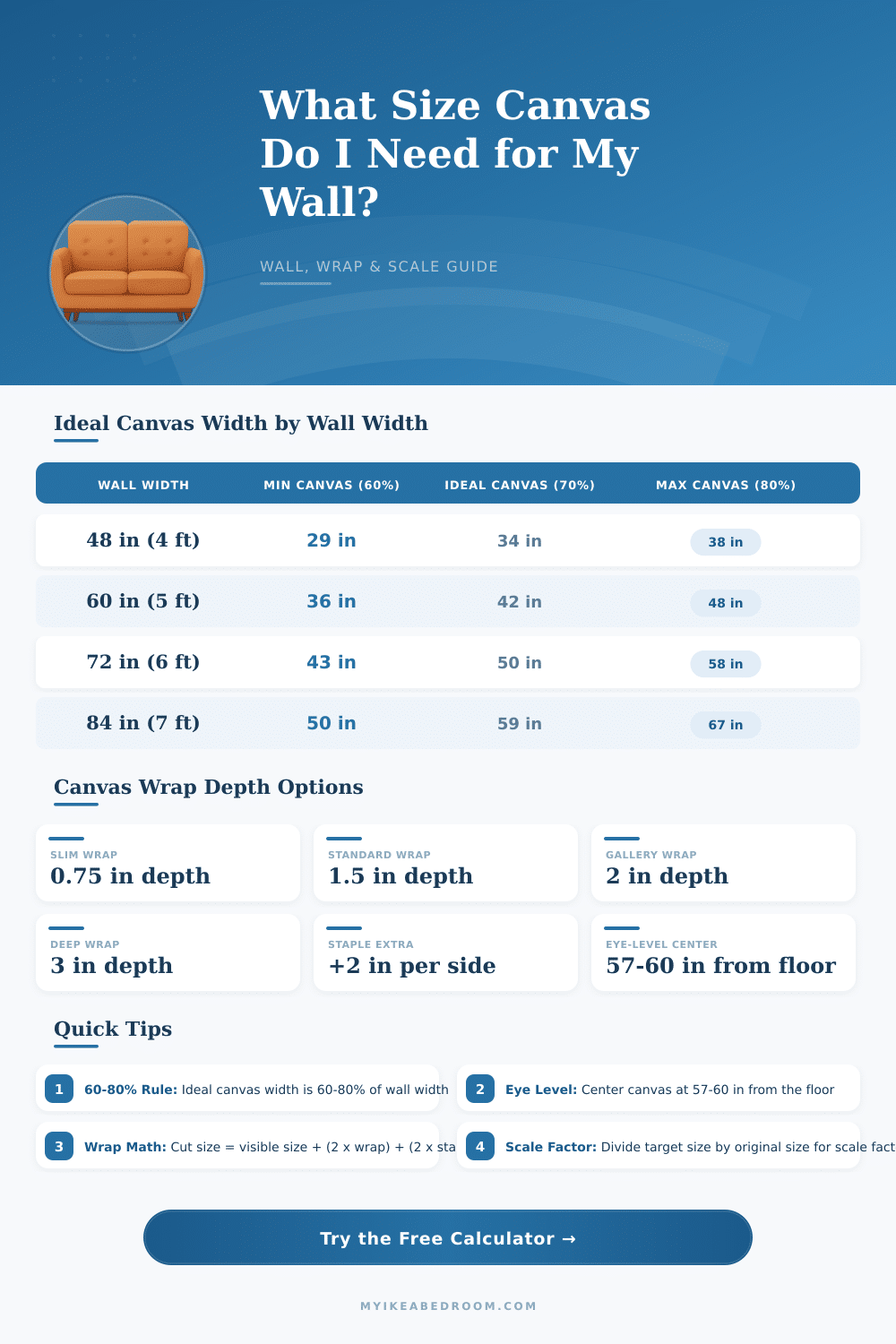
Canvas Size by Wall Width (Imperial)
| Wall Width | Min Canvas (60%) | Ideal Canvas (70%) | Max Canvas (80%) | Suggested Canvas Size |
|---|---|---|---|---|
| 48 in (4 ft) | 29 in | 34 in | 38 in | 24 x 36 in |
| 60 in (5 ft) | 36 in | 42 in | 48 in | 30 x 40 in |
| 72 in (6 ft) | 43 in | 50 in | 58 in | 40 x 50 in |
| 84 in (7 ft) | 50 in | 59 in | 67 in | 48 x 60 in |
| 96 in (8 ft) | 58 in | 67 in | 77 in | 60 x 48 in |
| 108 in (9 ft) | 65 in | 76 in | 86 in | 72 x 54 in |
| 120 in (10 ft) | 72 in | 84 in | 96 in | 80 x 60 in |
| 144 in (12 ft) | 86 in | 101 in | 115 in | 96 x 72 in |
Canvas Wrap Cut Size by Depth (18 x 24 in visible example)
| Wrap Depth | Type | Width Cut Size | Height Cut Size | Total Extra |
|---|---|---|---|---|
| 0.75 in | Slim | 23.5 in (18 + 2x0.75 + 2x2) | 29.5 in (24 + 2x0.75 + 2x2) | +5.5 in each side |
| 1.5 in | Standard | 25 in (18 + 2x1.5 + 2x2) | 31 in (24 + 2x1.5 + 2x2) | +7 in each side |
| 2 in | Gallery | 26 in (18 + 2x2 + 2x2) | 32 in (24 + 2x2 + 2x2) | +8 in each side |
| 3 in | Deep | 28 in (18 + 2x3 + 2x2) | 34 in (24 + 2x3 + 2x2) | +10 in each side |
Common Standard Canvas Sizes
| Size (in) | Size (cm) | Category | Best For | Aspect Ratio |
|---|---|---|---|---|
| 8 x 10 | 20 x 25 | Small Accent | Nightstand, shelf vignette | 4:5 |
| 11 x 14 | 28 x 36 | Small | Bathroom, small wall | 11:14 |
| 12 x 16 | 30 x 41 | Small-Medium | Hallway, accent wall | 3:4 |
| 12 x 24 | 30 x 61 | Triptych Panel | Part of multi-panel set | 1:2 |
| 12 x 36 | 30 x 91 | Panoramic | Over console table | 1:3 |
| 16 x 20 | 41 x 51 | Medium | Bedroom wall, dining room | 4:5 |
| 18 x 24 | 46 x 61 | Medium-Bedroom | Bedroom focal point | 3:4 |
| 20 x 20 | 51 x 51 | Square | Any wall, versatile | 1:1 |
| 20 x 24 | 51 x 61 | Medium-Large | Living room, office | 5:6 |
| 24 x 36 | 61 x 91 | Living Room Focal | Sofa wall, main feature | 2:3 |
| 30 x 40 | 76 x 102 | Large | Above sofa, master bedroom | 3:4 |
| 36 x 48 | 91 x 122 | Statement | Open plan living, loft | 3:4 |
| 40 x 60 | 102 x 152 | Large Statement | Gallery, large feature wall | 2:3 |
Finding the right canvas size does not have to be hard. First measure the space on the wall where you want to hang it and later multiply those values by something between 0.60 and 0.75 That sweet spot; called the 60-75% Rule, helps that your art will not seem too little and lost or too big and dominant on the wall.
You have choices of little 8×10 inch pieces until impressive 36×48 canvases and even bigger. The choice depends on how you want the room to feel. Sizes affect the mood of the whole space and its flow.
How to Choose the Right Canvas Size
Popular formats like 16×20 or 24×36 are common in framing shops because they simply work well. Those sizes work for most rooms.
8×10 inch canvas? That is like a standard page of paper. It works ideally for tight corners; for example on desks or in bokshelfs.
Moreover are mid-range options: 9×12, 11×14, 12×16 and more, until 18×24. They fit well in bathrooms, vanities or above desks, where there is enough space for breathing, but not a whole wall for big things.
Here comes the part where it becomes interesting for digital work. Pixel measures matter more than you think. For letter-size quality you require at least 3300 by 2550 pixels.
For an 18×24 poster aim close to 3300 by 4200 pixels. Character designers usually use a master canvas with 3000 until 4000 pixels on the longest side, at 300 DPI for print. Even so flexibility depends on your final use.
Printing requires 300 PPI for good photo sharpness, but large-format posters can suffice with 150 until 200 PPI without big problems. For something only for the screen, 72 until 150 PPI suffices. A decisive role plays your actual pixel width and height, not the DPI value.
More pixels give naturally more detail in the art. But ultimately you will reach a limit, or your computer struggles with the load, RAM is full or files get too big. Want to work in 4K by 4K?
Better stick to under 10 layers and use simple brushes to avoid constant lag.
For social media square canvases rule on most platforms, so starting at 1200 by 1200 pixels you have a firm base. For more choices about cropping, go to 2048 pixels on the longest side, keeping detail without damage. Beginners occasionally benefit from smaller sizes, for instance 100 by 100 pixels make projects faster, you learn more quickly and finish more pieces.
Truly, there is no one size for everything. Most seriously is hitting 300 DPI for anything that will be printed.